SECTION 2 - CONTROLS, INSTRUMENTS AND OPERATION
2ï93
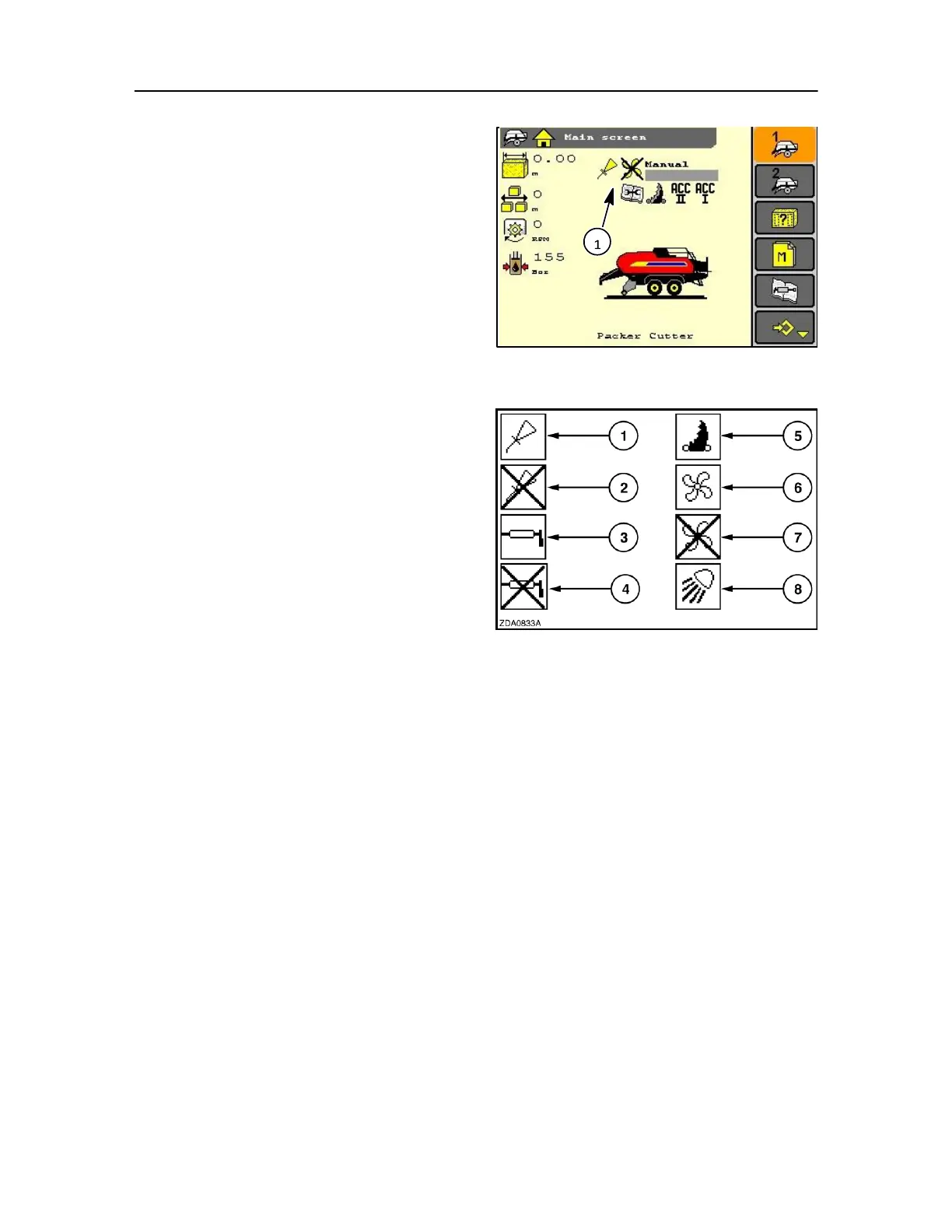
SCREEN STATUS AREA
When requiring to activate a device, a corresponding
indicator will appear in the status area (1).
When a function is not selected the indicator will not
appear on the screen.
If an item is selected but the baler PTO is below < 600
rpm the indicator will display a cross
NOTE: The following indicators can not be displayed
simultaneously:
- Automatic greasing system and Accessory. - Manual bale
density setting and automatic bale density setting
The different indicators that can appear are:
1. Integrated oiling system
2. Integrated oiling system - crossed through
This indicator shows that the integrated oiling system
is stand‐ by but not activated because the conditions
for activation are not fulfilled (i.e. PTO speed lower
than < 600 rpm). The cross will disappear as soon as
all conditions are fulfilled.
NOTE: In addition, the symbol for the integrated oiling
system will blink in case of a diagnostic fault.
204
3. Automatic greasing system and ACC1
4. Automatic greasing system - crossed through
This indicator shows that the automatic greasing
system is stand‐ by but not activated because the
conditions for activation are not fulfilled (i.e. PTO
speed lower than < 600 rpm). The cross will
disappear as soon as all conditions are fulfilled.



 To Next Page