SECTION 2
2-46
PARKING BRAKE
The gearbox contains two packs of plates, that are
pressed by preloaded springs, when the parking
brake is applied.
PARKING BRAKE ACTIVATION
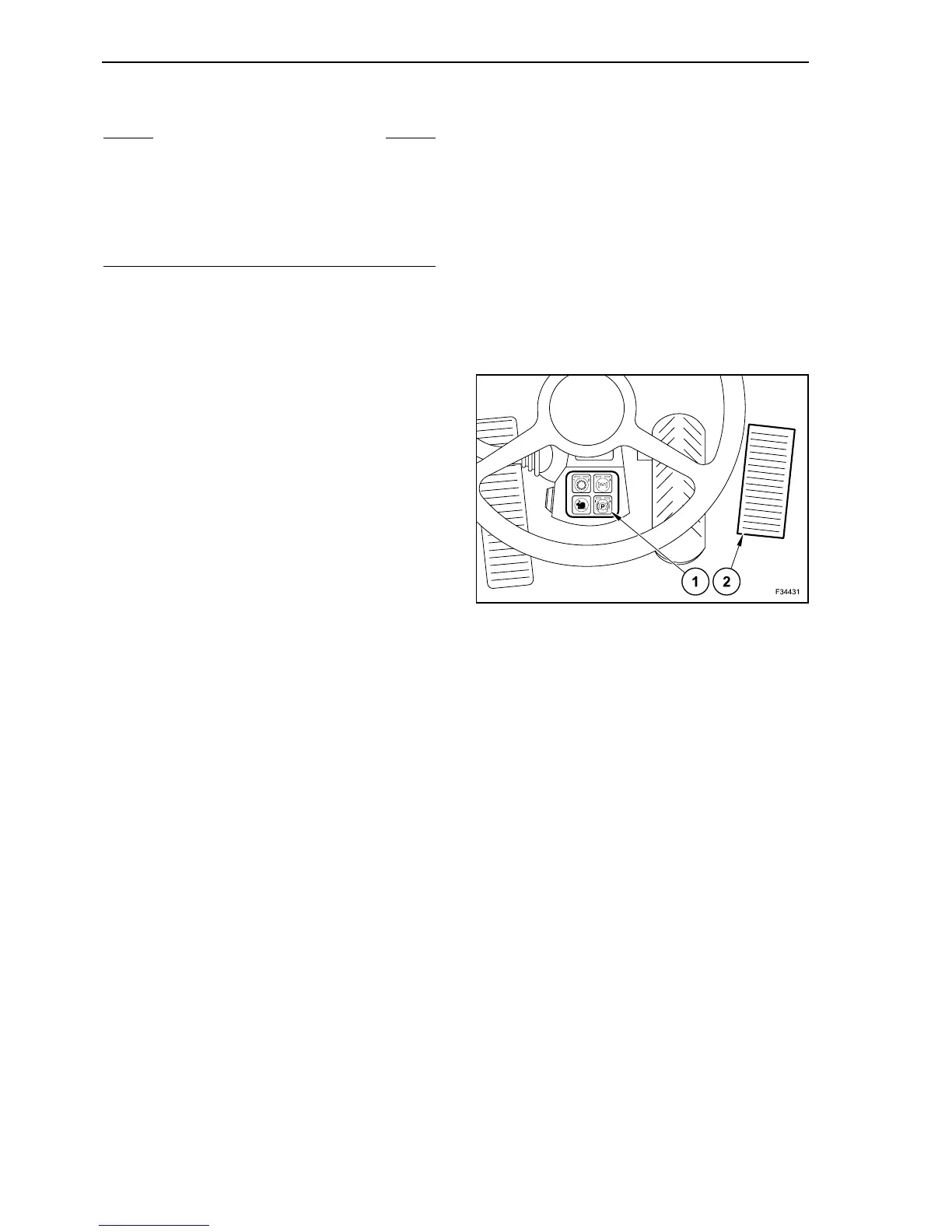
The parking brake is engaged by keeping the button
(1) pressed until the left lamp lights up. This button
has two lights and three engagement positions:
- left lamp on: brake engaged;
- left light off: brake released;
- right light on: automatic mode is active (in 1st gear
only).
When the engine is stopped, the current engage-
ment condition is saved.
By using the buttons for travel direction, you can
select the travel direction, but you cannot start the
machine as the parking brake is engaged.
AUTOMATIC MODE
To select the automatic mode, press and hold button
(1) for more than two seconds.
To exit automatic mode, press the button (1) again.
Switching always occurs with no delay.
In the automatic mode, when the machine is
stopped, the parking brake is automatically
engaged.
If the travel direction has already been set, the
machine moves when the travel pedal (2) is acti-
vated.
If the travel pedal (2) remains unused for more than
0,5 seconds, the parking brake is engaged.
S WARNING S
Apply the parking brake only with machine station-
ary! Only in emergency case, for instance if the
service brake fails, you can activate the parking
brake while the machine is still moving.
In this case the braking effect is immediate, and the
wheels lock!
55



 To Next Page