●
Testing the alarm
In the Alarm Mode, hold down (D) to sound the
alarm.
●
To stop the alarm
Pressing any button while the beeper is
sounding stops it.
Snooze causes the alarm to sound up to seven
times, at five-minute intervals. To cancel a
snooze alarm, turn [SNZ] off.
l
Turning Off an Alarm or the Hourly Time
Signal
Note
●
A beeper sounds for 10 seconds when
an alarm time is reached.
●
The watch will automatically return
from the Alarm Mode to the
Timekeeping Mode if you do not
perform any operation for about two or
three minutes.
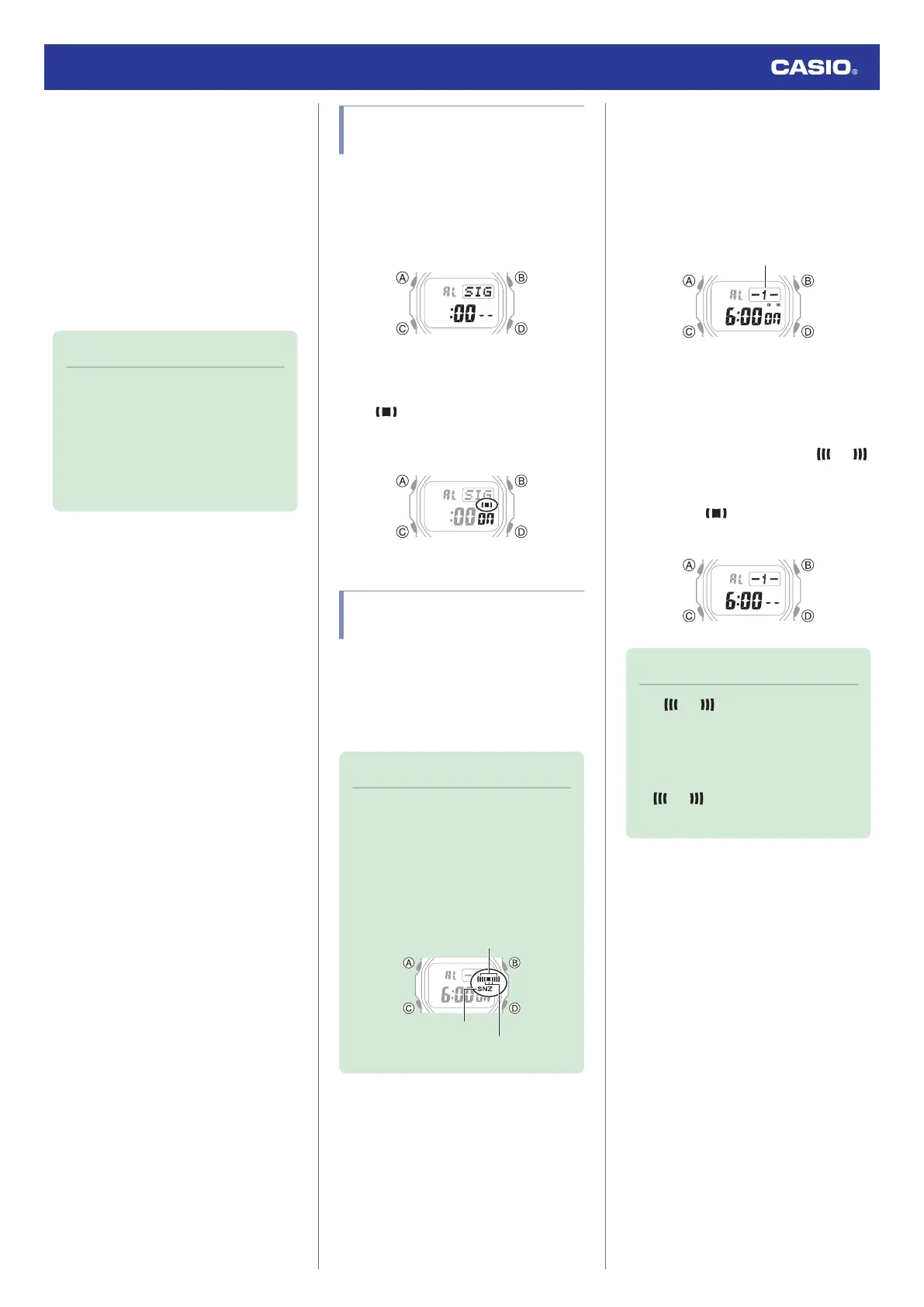
Enabling the Hourly Time
Signal
1. Enter the Alarm Mode.
l
Navigating Between Modes
2. Use (D) to display the hourly time signal
screen ([SIG]).
3. Press (A) to toggle the hourly time signal
between enabled and disabled.
●
(hourly time signal) is shown on
the display while the hourly time signal
is turned on.
Turning Off an Alarm or the
Hourly Time Signal
To stop an alarm or the hourly time signal from
sounding, perform the steps below to turn it
off.
●
To have an alarm or hourly time signal
sound again, turn it back on.
Note
●
Indicators are displayed while any of
the alarms or the hourly time signal is
turned on.
●
The applicable indicators are not
displayed while all of the alarms are
turned off and/or the hourly time signal
is turned off.
Snooze
Hourly time signal
Alarm
1. Enter the Alarm Mode.
l
Navigating Between Modes
2. Use (D) to scroll through the alarm ([1] to
[4], [SNZ]) and hourly time signal ([SIG])
screens until the one you want to turn off
is displayed.
Alarm number or hourly time signal
3. Press (A) to turn off the displayed alarm or
the hourly time signal.
●
Each press of (A) toggles between on
and off.
●
Turning off an alarm causes
(alarm) to disappear from the display.
Turning off the hourly time signal
causes (hourly time signal) to
disappear.
Note
●
If (alarm) is still displayed
after you turn off an alarm, it means that
at least one of the other alarms is still
turned on. To turn off all of the alarms,
repeat steps 2 and 3 until the
(alarm) indicator is no
longer displayed.
Watch Operation Guide 3539
19


 To Next Page