Need help?
Do you have a question about the Casio 5663 and is the answer not in the manual?
Information on water resistance, band care, and general usage for watches.
Covers temperature, magnetism, chemicals, storage effects, and material care for the watch.
Guidelines for watch cleaning, operation, and risks associated with poor maintenance.
Procedures for battery replacement and indicators of low battery power.
Overview of watch features like World Time, Stopwatch, Timer, and Alarm.
Explains the analog and digital display elements and indicators.
How to switch modes, cycle displays, shift hands, and view the face in the dark.
Procedures for setting the current time, date, and summer time.
How to select a Home City and configure summer time settings.
How to switch between 12-hour and 24-hour timekeeping formats.
Steps to set up and configure alarm times and the hourly time signal.
How to stop an alarm or hourly time signal from sounding.
How to set the start time for the countdown timer.
Instructions for starting, pausing, and stopping the timer.
How to measure elapsed time using the stopwatch.
How to measure and display split times during stopwatch operation.
How to record times for the first and second place finishers.
Procedure to align analog hands with the digital display time.
How to enable or disable the audible tone for button presses.
A table listing cities, their UTC offsets, and time zone information.
Details on accuracy, timekeeping, World Time, Stopwatch, Timer, Alarm, and LED light.
Answers to frequently asked questions about watch operation and indicators.
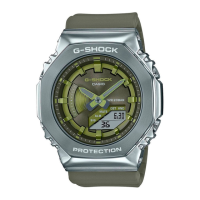
This document is an operation guide for the Casio Watch Model 5663, outlining its functions, usage, and maintenance.
The watch features a Timekeeping Mode, which displays the current time, including the hour, minute, second, month, day, and day of the week. It supports both 12-hour and 24-hour timekeeping formats and includes a full auto-calendar from 2000 to 2099. Summer time settings can be configured for the Home City. The digital display content can be cycled to show different information such as month/day, seconds, day of week, and hours/minutes. To adjust the current time and date, the user enters the Timekeeping Mode, holds down button (A) to access the setting screen, and then uses buttons (B) and (D) to change the settings. Button (C) is used to cycle through the different settings (Home City, Summer time, 12/24-hour timekeeping, seconds, hours, minutes, year, month, day, operation tone enable/disable, and illumination duration). The watch also features a hand alignment adjustment function to correct discrepancies between the analog hands and the digital display, which can occur due to strong magnetism or impact. This adjustment is performed by holding down button (A) in Timekeeping Mode until "H.SET" flashes, and then using buttons (B) and (D) to align the hands to 12 o'clock.
The World Time Mode allows the user to view the current time in 48 cities across 31 time zones, as well as Coordinated Universal Time (UTC). To check World Time, the user navigates to the World Time Mode using button (C), and the watch displays the current time in the selected World Time City. Button (A) can be pressed to display the World Time City name. To set a World Time city, the user enters World Time Mode, uses button (D) to scroll through cities, and can adjust summer time settings by holding down button (A). The summer time setting is applied only to the currently selected city and does not affect other cities.
The Stopwatch Mode measures elapsed time up to 24 hours. For the first hour, it measures in 1/100-second units, and thereafter in one-second units. It supports measuring elapsed time, split times, and timing first and second place finishers. To use the stopwatch, the user navigates to Stopwatch Mode. Button (A) is used to start, stop, and reset the stopwatch, as well as to record split times and display finisher times.
The Timer Mode allows for a countdown from a user-specified start time, up to 24 hours, in 1-second units. An alarm sounds when the countdown reaches zero. To set the countdown start time, the user enters Timer Mode, holds down button (A) until the hour setting flashes, and then uses buttons (B) and (D) to adjust the hours, minutes, and seconds. Button (C) cycles through the hour, minute, and second settings. Button (A) is used to start, pause, resume, and reset the countdown. A 10-second beeper sounds at the end of the countdown, which can be stopped by pressing any button.
The Alarm Mode provides up to five independent daily alarms and an hourly time signal. An alarm sounds for 10 seconds when the set time is reached, and the hourly time signal causes the watch to beep every hour on the hour. To configure alarm settings, the user navigates to Alarm Mode, uses button (D) to select the desired alarm ([AL1] to [AL5]) or the hourly time signal ([SIG]). Holding down button (A) allows adjustment of the alarm hour and minute using buttons (B) and (D). Button (C) cycles between hour and minute settings. Button (A) is also used to toggle alarms and the hourly time signal on or off. The [ALM] indicator is displayed when any alarm is active, and [SIG] is displayed when the hourly time signal is active.
Other settings include enabling or disabling the button operation tone. This is done by holding down button (A) in Timekeeping Mode until the Home City name appears, then pressing button (C) nine times to display [KEY] or [MUTE]. Buttons (B) and (D) are used to select [KEY] (tone enabled) or [MUTE] (tone muted). Alarm and timer tones will still sound even when the operation tone is muted.
For viewing the face in the dark, the watch is equipped with an LED light, referred to as Super Illuminator. Pressing button (B) turns on the illumination. The illumination duration can be set to either 1.5 seconds or 3 seconds. This setting is accessed through the Timekeeping Mode settings, by cycling to [LIGHT] using button (C) and then using buttons (B) and (D) to select the duration. The light automatically turns off if an alarm sounds or if the hands are moving at high speed.
The watch also features a hand shift function, which moves the analog hands out of the way to allow for easier viewing of the digital display. This is activated by pressing buttons (B) and (C) simultaneously. The hands will automatically return to normal timekeeping positions after about one hour of no operation.
Maintenance features are extensively covered. The guide emphasizes the importance of water resistance and provides a table detailing water resistance levels for various daily uses (No BAR mark, 5BAR, 10BAR, 20BAR). It advises against operating buttons underwater, wearing the watch in baths, heated pools, saunas, or high-temperature/humidity environments, and using soaps or detergents. After submersion in seawater, rinsing with plain water is recommended. Periodic replacement of gaskets (every two to three years) and inspection by a trained technician during battery replacement are crucial for maintaining water resistance.
General care instructions include keeping the watch clean by wiping it with a soft cloth to remove dirt, sweat, and moisture. For metal or resin bands with metal parts, a soft toothbrush with a weak solution of water and mild neutral detergent or soapy water is recommended, followed by rinsing and drying. For resin bands, washing with water and wiping dry is sufficient. Leather bands should be cleaned by wiping with a soft cloth to remove water and sweat. Regular operation of the crown, buttons, and rotary bezel is advised to maintain proper function.
The guide warns against dangers of poor watch care, such as rust formation on metal components due to dirt and lack of oxygen, which can lead to sharp edges or band pin failure. Premature wear of resin bands and bezels can occur from prolonged exposure to sweat or water. Skin irritation is also a concern for individuals with sensitive skin, who should keep their bands clean and seek professional advice if irritation occurs.
Environmental precautions include avoiding extreme temperatures (very high or very low) as they can affect timekeeping accuracy and LCD readability. Strong impacts should be avoided, though the watch is designed for normal daily use and light activity. Strong magnetism from devices like audio speakers or cell phones can affect analog hand movement, causing inaccurate time display. Very strong magnetism from medical equipment can damage electronic components. Exposure to very strong electrostatic charge can cause incorrect time display or damage to components.
Chemicals like thinner, gasoline, solvents, oils, fats, cleaners, adhesives, paints, medicines, or cosmetics should not come into contact with the watch, as they can cause discoloration or damage to resin, leather, and other parts. For storage, the watch should be thoroughly cleaned and stored in a cool, dry place if not used for a long time. Resin components can discolor due to prolonged exposure to direct sunlight, dirt, friction, or if left wet. Semi-transparent resin parts can also discolor due to sweat, dirt, high temperatures, and humidity.
Battery replacement should be performed by the original retailer or an authorized CASIO service center, using only the specified battery type. A check for proper water resistance is also recommended during battery replacement. The guide notes that initial batteries are for factory testing and may have a shorter life, with replacement costs potentially incurred even within the warranty period. Low battery power is indicated by large timekeeping error, dim display, or a blank display, and prompt battery replacement is advised to prevent malfunction.
 General
| Model Number | 5663 |
|---|---|
| Brand | Casio |
| Category | Watch |
| Display Type | Digital |
| Alarm | Yes |
| Stopwatch | Yes |
| Calendar | Yes |
| Backlight | Yes |

 To Next Page