EasyManua.ls Logo

Casio CE-4700 - Manual Tax and Tax Shift; Rate Tax

Casio CE-4700
141 pages
Print Icon
To Next Page IconTo Next Page
To Previous Page IconTo Previous Page
Loading...
CE47(n
Orrrcrlon Manual
Manual
Tax
and
The
following
procedure
applies in the
United
States and Canada
only.
Tax
Shift
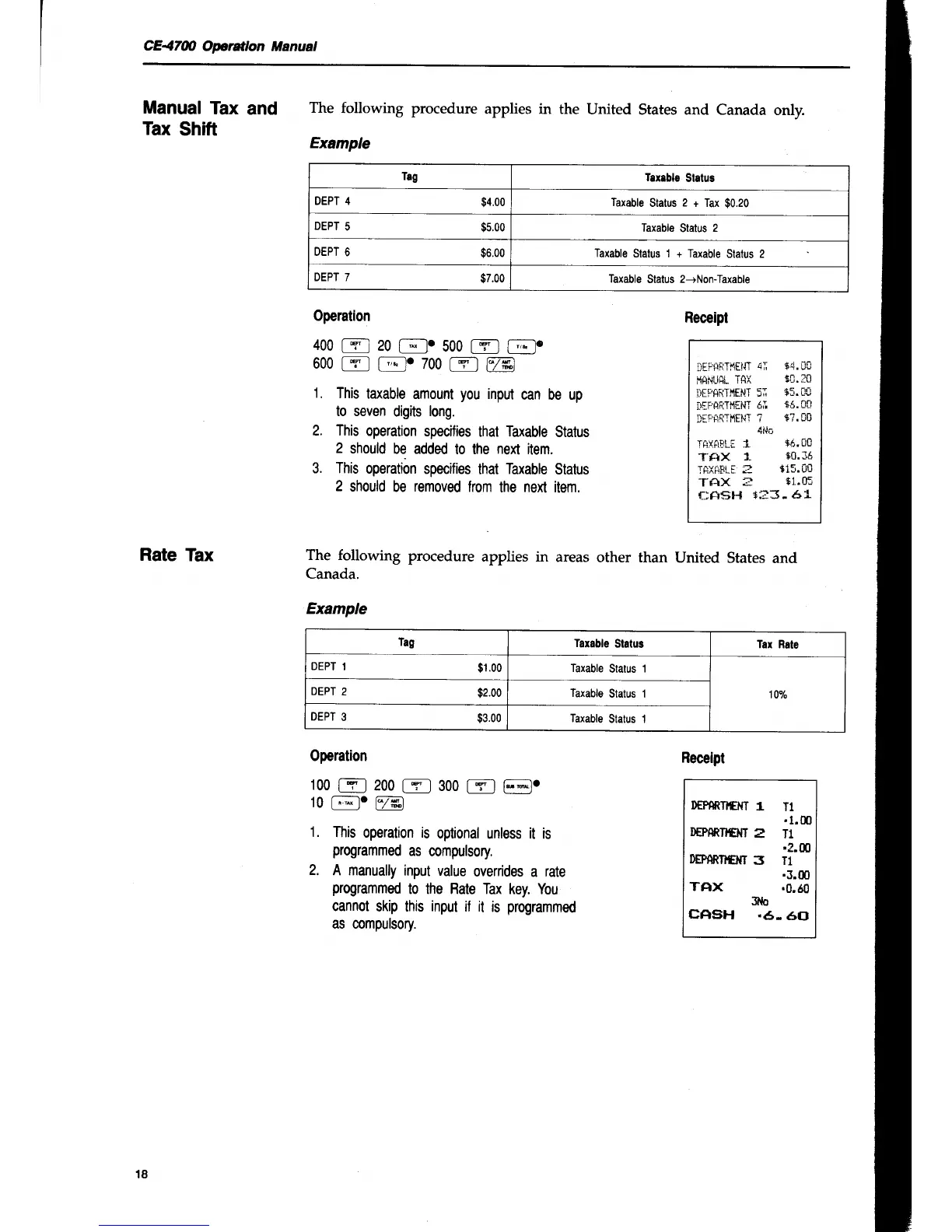
Example
Tag
Tax.blg
Slatug
DEPT 4
94.00
Taxable
Status
2
+ Tax
$0.20
DEPT
5
$5.00
Taxable
Status
2
DEPT
6
96.00
Taxable
Status 1 + Taxable
Status 2
DEPT 7
$7.00
Taxable
Status
2-+Non-Taxable
Rate
Tax
The following
procedure
applies in
areas
other than
United
States
and
Canada.
Example
Tag
Tarable
Status
Tar Rale
DEPT
1
$i.oo Taxable
Status
1
10o/o
DEPT
2
$2.00
Taxable
Status 1
DEPT
e
$3.00
Taxable
Status 1
Operation
400
[T
I
20
{-';-lc
500
[-g'
I
[;-lo
600
t-Yl
[-';]
7ss
tfl
@
1.
This
taxable
amount
you
input
can be up
to seven
digits
long.
2. This
operation
specifies
that Taxable
Status
2
should
be added
to the
next
item.
3. This
operation
specifies
that
Taxable
Status
2
should
be
removed
from
the next item.
Operation
100
[Y-l
200
fY_l
300
[-rr] F;1.
tO
[*
l'
[7*]
1.
This
operation is
optional
unless
it
is
programmed
as
compulsory.
2.
A manually
input
value
overrides
a
rate
programmed
to the Rate Tax
key. You
cannot
skip this
input
il it
is
programmed
as compulsory.
Receipt
lEtAi.iTrtli]T
4I
$4. UU
i'lilNlirit.
TRX
i$.10
IiEF.AF:TMENT
5I
T5.OU
iliFAttTl,liNT
6I
+6.Ctl
liF'irR'l'i'{EliT
?
S?.00
4t.|t
TfiXfiiLr
1
$6,0c
TFIX
1"
S0.16
TftXiiFLT
3
9i5.8[
Tr{X
=
s1..0:
fiftsH
't:3-
61
Receipt
DEPAfilI€M
1
T1
't.m
D€PAftT}C}{T
E
T1
.?.00
EPARTI€I{T
3 T1
.3.m
TAX
.0.60
${o
cAsH
.6-
60
18

Table of Contents

Other manuals for Casio CE-4700

Related product manuals