EasyManua.ls Logo

Casio fx-6200G - Page 17

Casio fx-6200G
60 pages
Print Icon
To Next Page IconTo Next Page
To Previous Page IconTo Previous Page
Loading...
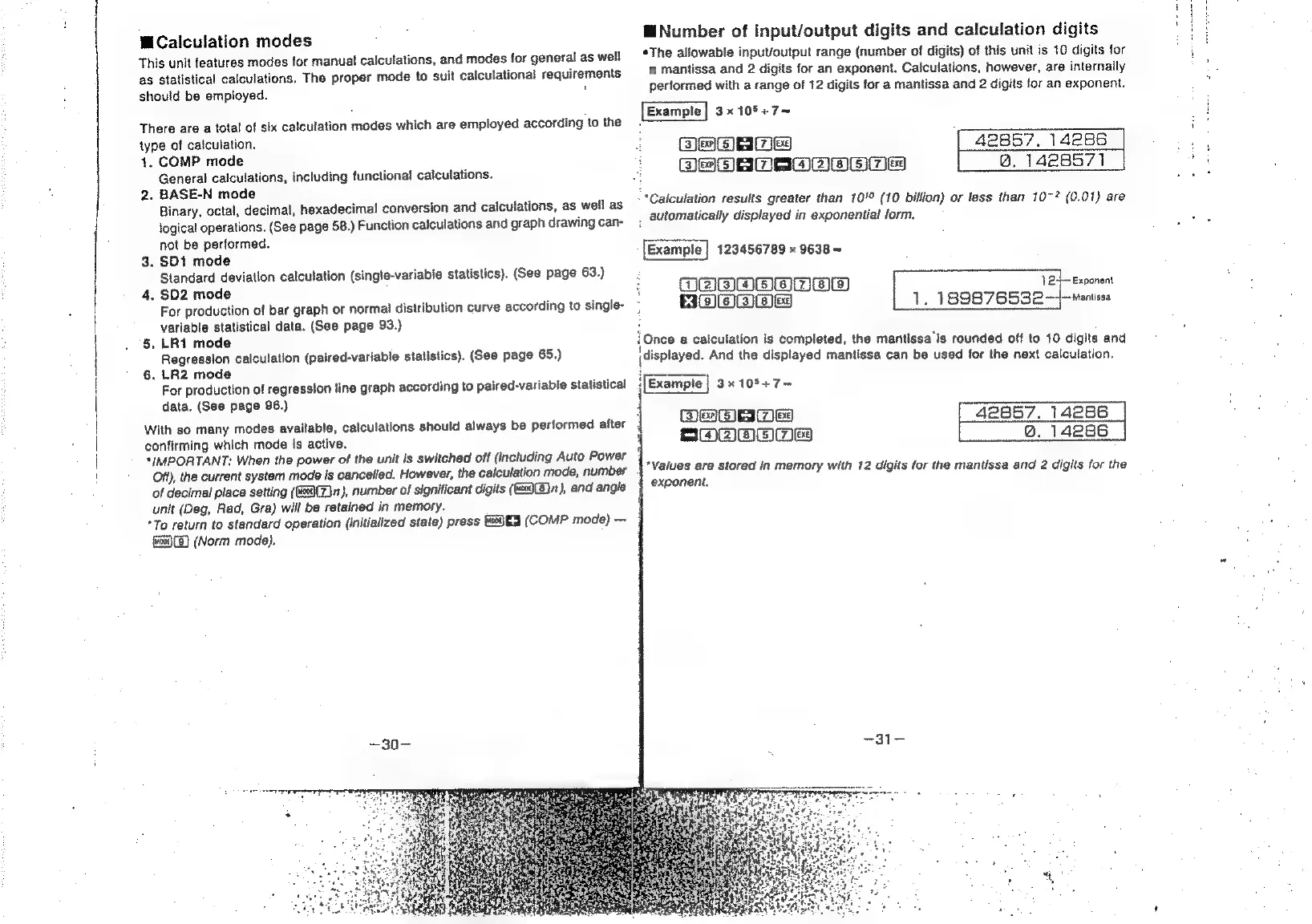
MCaiculation
modes
‘This
unit
features
modes
for
manual
calculations,
and
modes
for
general
as
well
ag
statistical
calculations.
The
proper
mode
to
suit
calculational
requirements
should
be
employed.
i
There
are
a
total
of
six
calculation
modes
which
are
employed
according
to
the
type
of
caiculation,
4.
COMP
mode
General
calculations,
including
functional
calculations.
2.
BASE-N
mode
Binary,
octal,
decimal,
hexadecimal
conversion
and
calculations,
as
well
as
logical
operations.
(See
page
58.)
Function
calculations
and
graph
drawing
can-
not
be
performed.
3.
SD1
mode
Standard
deviation
calculation
(single-variable
statistics).
(See
page
63.)
4,
$D2
mode
For
production
of
bar
graph
or
normal
distribution
curve
according
to
single-
variable
statistical
data.
(See
page
93.)
5,
LR1
mode
Regression
calculation
(paired-variable
statistics).
(See
page
65.)
6.
LR2
mode
For
production
of
regression
line
graph
according
to
paired-variable
statistical
data.
(See
page
96.)
With
so
many
modes
available,
calculations
should
always
be
performed
after
confirming
which
mode
is
active.
*{MPORTANT:
When
the
power
of
the
unit
is
switched
off
(including
Auto
Power
Oft),
the
currant
system
mode
is
cancelled.
However,
the
calculation
mode,
number
of
decimal
place
setting
(Zn),
number
of
significant
digits
((c69(B)
1),
and
angle
unit
(Deg,
Rad,
Gra)
will
be
retained
in
memory.
*To
return
to
standard
operation
(initialized
state)
press
(COMP
mode)
(ucai}(3}
(Norm
mode).
4
SOOO
HNumber
of
input/output
digits
and
calculation
digits
*The
allowable
input/output
range
(number
of
digits)
of
this
unit
is
10
digits
for
a
mantissa
and
2
digits
for
an
exponent.
Calculations,
however,
are
internally
performed
with
a
range
of
12
digits
for
a
mantissa
and
2
digits
for
an
exponent.
3x10⁵+7—
(ES
COjED)
=
[a
(3
i)
9)
~
[a]
BEE
ea)
42857,
14286
@.
1428571
“Calculation
results
greater
than
10!
(10
billion)
or
less
than
10~?
(0.01)
are
:
automatically
displayed
in
exponential
form.
123456789
x
9638
=
1
24—
Exponent
1.
189876532
—~Mantissa
OOS
OOmwaa
Bow)
{Once
a
calculation
is
completed,
the
mantissa'is
rounded
off
to
10
digits
and
(displayed.
And
the
displayed
mantissa
can
be
used
for
the
next
calculation,
‘[Example
|
3x
10%+7~
42857.
14286
Q@.
14286
3
aa]
<=
[Walo)
*Values
are
stored
in
memory
with
12
digits
for
the
mantissa
and
2
digits
for
the
exponent.