EasyManua.ls Logo

Casio fx-6200G - Page 25

Casio fx-6200G
60 pages
Print Icon
To Next Page IconTo Next Page
To Previous Page IconTo Previous Page
Loading...
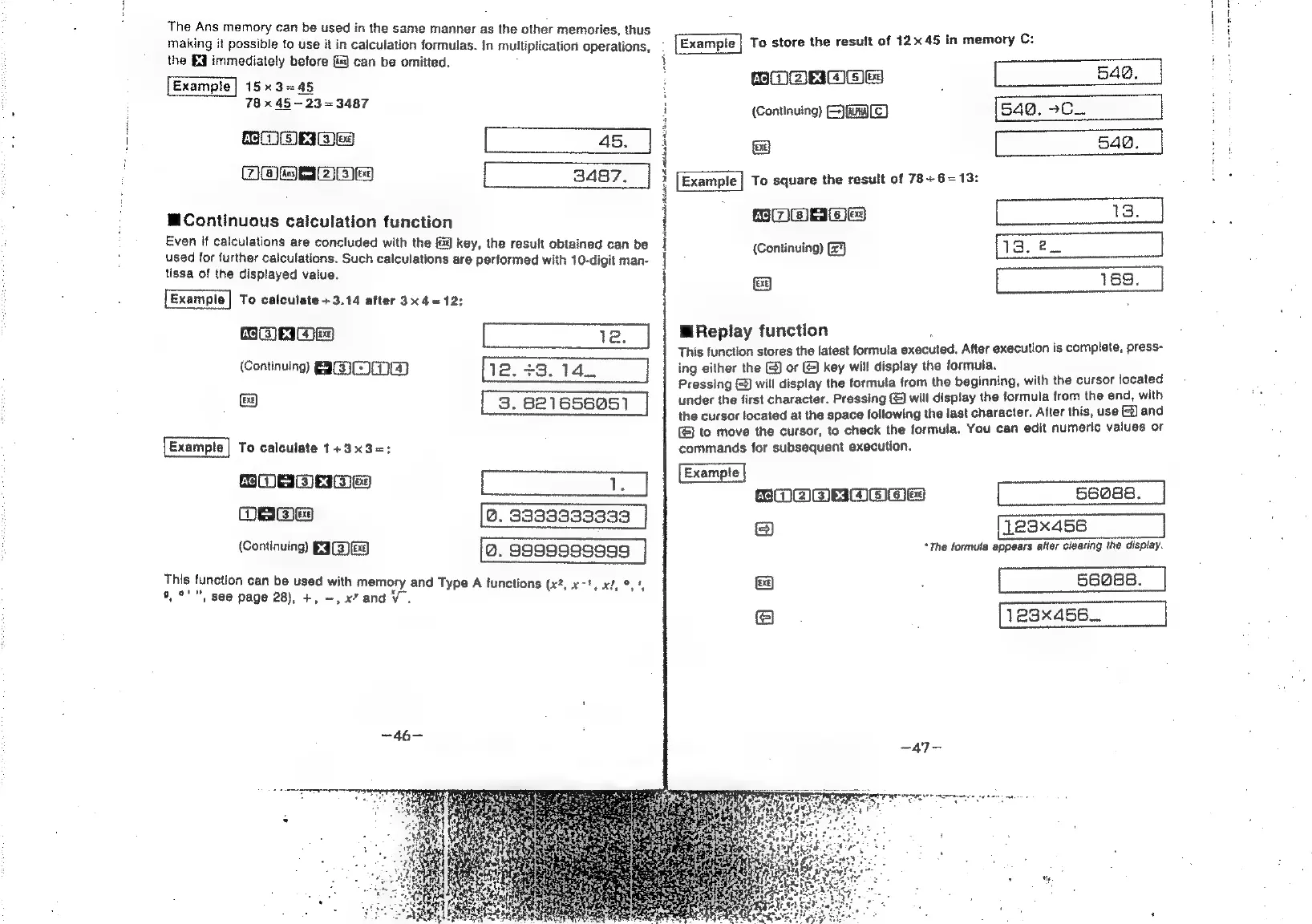
The
Ans
memory
can
be
used
in
the
same
manner
as
the
other
memories,
thus
making
it
possible
to
use
it
in
calculation
formulas.
In
multiplication
operations,
the
Eq
immediately
before
f}
can
be
omitted.
15x3=45
78
x
45~23
=
3487
SOE
45.
TOWRA
BIED
3487.
@Continuous
calculation
function
Even
if
caiculations
are
concluded
with
the
&@
key,
the
result
obtained
can
be
used
for
further
calculations.
Such
calculations
are
performed
with
10-digit
man-
tissa
of
the
displayed
value.
Example
|
To
calculate
+3.14
after
3x4
=12:
PACER
JES)
12.
(Continuing
EID
223.14.
|
To
calculate
1+3x3=;
BOEMeEmes
be
eee
Ve
Ome
@.
33933333333
(Continuing)
E3(3)&3)
@.
sggg9gg9ssg
This
function
can
be
used
with
memory
and
Type
A
functions
(x2,
x78,
el,
9,
4
9,°'",
see
page
28),
+,
-,
x”
andV.
i
Late
a
en
ASD
re
porn
snc
otra
To
store
the
result
of
12x45
in
memory
C:
ACIem
eS)
x
EMEC
54@.
(Continuing)
=)
(E)
540.
-C_.
&
542.
[Example
|
To
square
the
result
of
78+
6=13:
13.
(Continuing)
13.
2
(sa)
169.
M
Replay
function
:
This
function
stores
the
latest
formula
executed.
After
execution
is
complete,
press-
ing
either
the
&)
or
@
key
will
display
the
formula.
Pressing
(©)
will
display
the
formula
from
the
beginning,
with
the
cursor
located
under
the
first
character.
Pressing
©)
will
display
the
formula
from
the
end,
with
the
cursor
located
at
the
space
following
the
last
character.
After
this,
use
@&)
and
to
move
the
cursor,
to
check
the
formula.
You
can
edit
numeric
values
or
commands
for
subsequent
execution.
ROOORBOAwE
“The
formula
appears
atter
clearing
the
display.
a]
;
56088.
@
;
1e3x456_.