EasyManua.ls Logo

Casio fx-6200G - Page 26

Casio fx-6200G
60 pages
Print Icon
To Next Page IconTo Next Page
To Previous Page IconTo Previous Page
Loading...
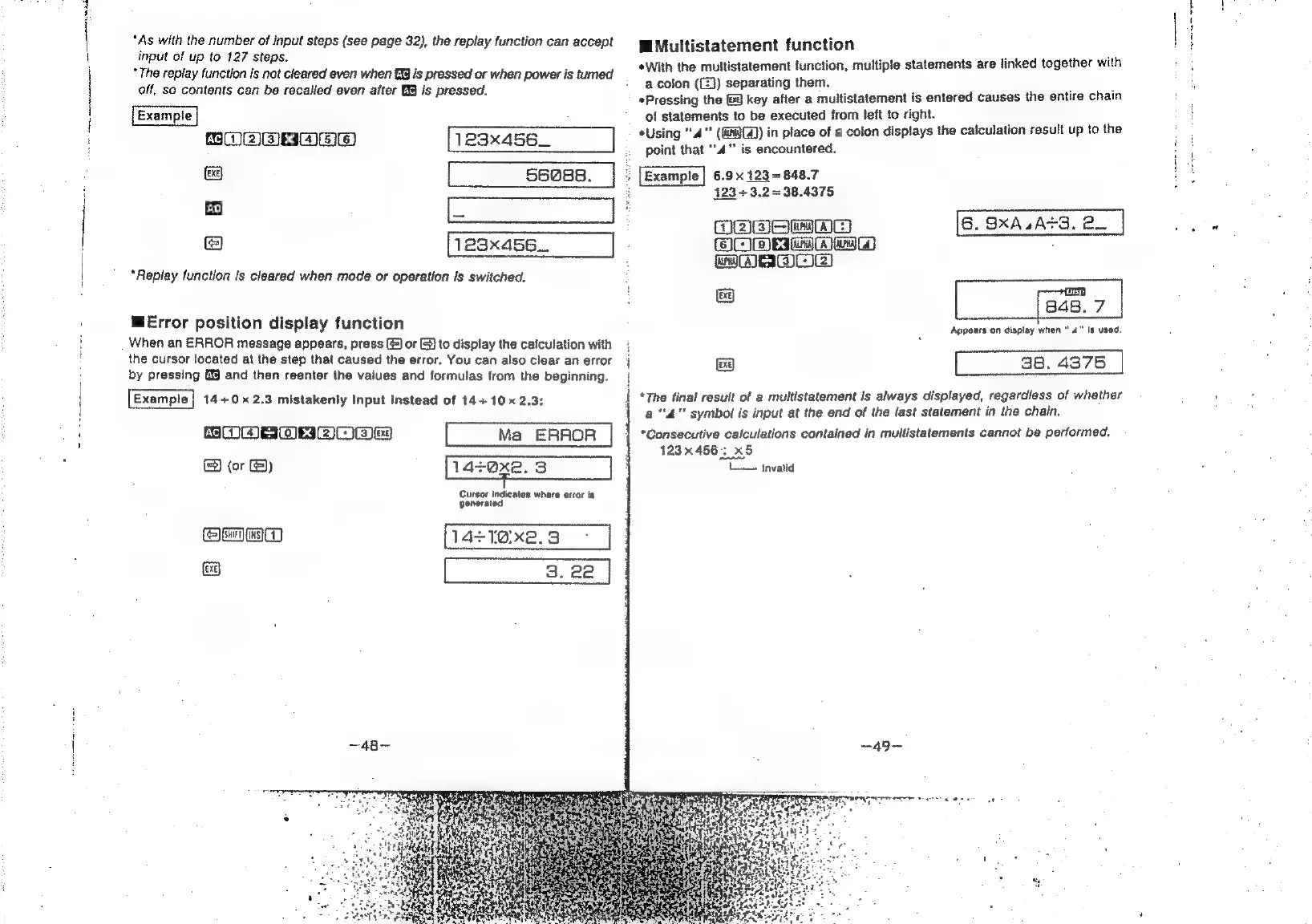
*As
with
the
number
of
input
steps
(see
page
32),
the
replay
function
can
accept
input
of
up
to
127
steps.
*
The
replay
function
is
not
cleared
even
when
E33
is
pressed
or
when
power
is
tumed
off,
so
contents
can
be
recalled
even
after
is
pressed.
WMultistatement
function
:
*With
the
multistatement
function,
multiple
statements
are
linked
together
with
ye
a
colon
((£})
separating
them.
.
Pressing
the
&@
key
after
a
multistatement
is
entered
causes
the
entire
chain
of
statements
to
be
executed
from
left
to
right.
*Using
"4"
(GBC)
in
place
of
a
colon
displays
the
calculation
result
up
to
the
AC/RM
ER
ES)
X
(SEFC)
123x456_
point
that
‘4
is
encountered.
ie
ea
56088.
;
[Example
|
6.9x
123
=
848.7
ae
;
123
+3.2=38.4375
.
B
ea
3
ODE
mmMm
6.
SxXA4At3.
BW.
:
123x456...
OOD
Rm
maw
:
WABI)
“Replay
function
is
cleared
when
mode
or
operation
is
switched.
rt
=
848.
7
MError
position
display
function
Appears
on
display
when
"4"
is
used.
When
an
ERROR
message
appears,
press
(@]
or
©)
to
display
the
calculation
with
the
cursor
located
at
the
step
that
caused
the
error.
You
can
also
clear
an
error
(ea)
38.
4375
by
pressing
and
then
reenter
the
values
and
formulas
from
the
beginning.
Example}
14+0x
2.3
mistakenly
Input
Instead
of
14+
10x
2.3:
SOME
OwAOwes
Ma
ERROR
Bee)
Cursor
indicates
where
error
is
generated
Qe
wa
14+1O:xe.3
—48—-
*The
final
result
of
a
multistatement
is
always
displayed,
regardless
of
whether
a
4"
symbol
is
input
at
the
end
of
the
last
statement
in
the
chain.
*Consecutive
calculations
contained
in
multistatements
cannot
be
performed,
123x456:
x5
i
Invalid
—~49-~
raeayerrmnere
eee
te
ae