EasyManua.ls Logo

Casio fx-6200G - Page 41

Casio fx-6200G
60 pages
Print Icon
To Next Page IconTo Next Page
To Previous Page IconTo Previous Page
Loading...
oberon
«Checking
range
parameters
¢
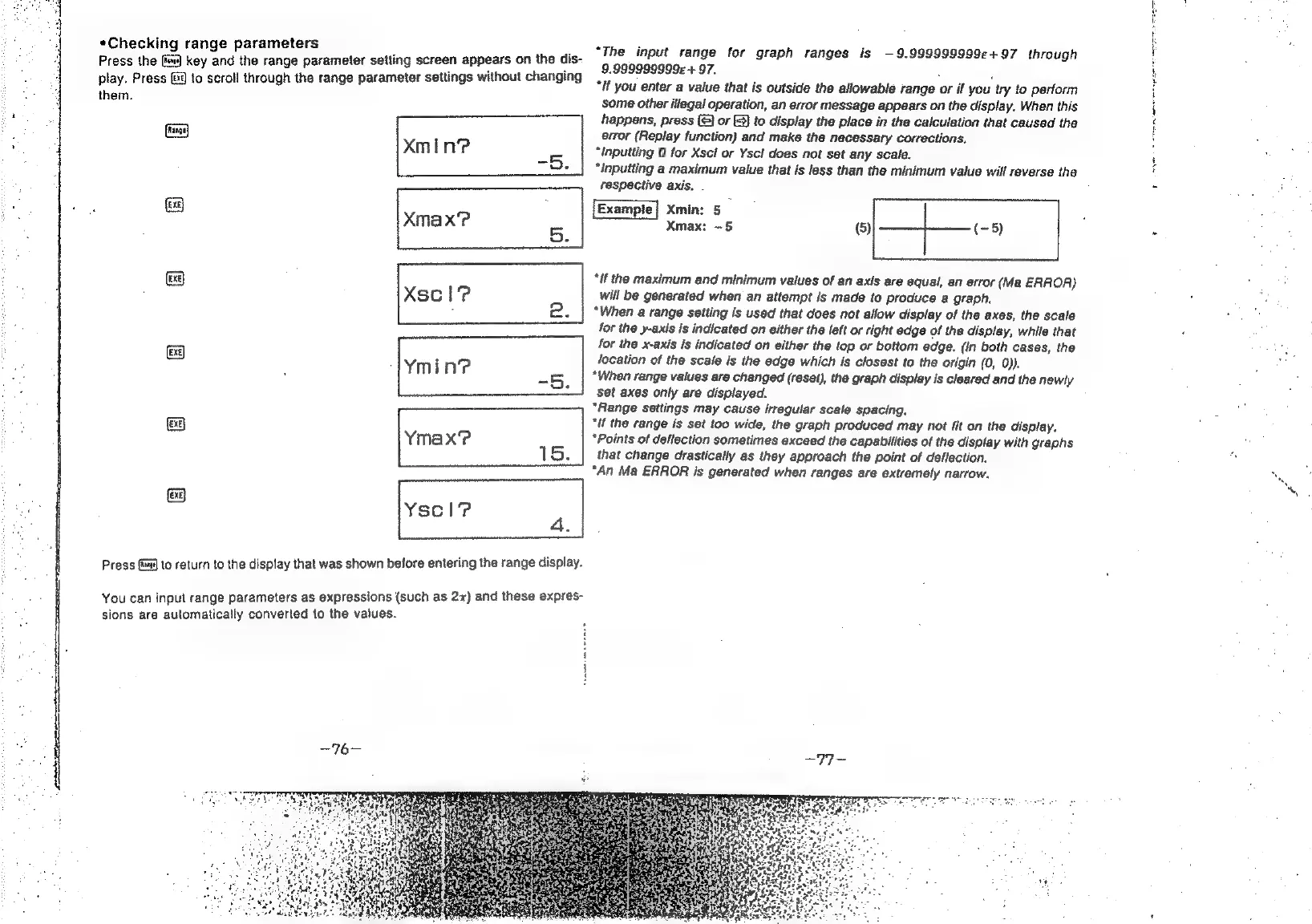
Press
the
fee)
key
and
the
range
parameter
setting
screen
appears
on
the
dis-
play.
Press
@%)
to
scroll
through
the
range
parameter
settings
without
changing
them.
a
xXmin?
-5.
=
Xmax’?
5.
=
Xscl?
2.
=
Ymin?
-5.
=
Ymax?
1S.
e
Yscl?
“a
Press
fm)
to
return
to
the
display
that
was
shown
before
entering
the
range
display.
You
can
input
range
parameters
as
expressions
(such
as
2x)
and
these
expres-
sions
are
automatically
converted
to
the
values.
“The
input
range
for
graph
ranges
is
—9.999999999e+97
through
9.999999999«
+
97.
:
“if
you
enter
a
value
that
is
outside
the
allowable
range
or
if
you
try
to
perform
some
other
illegal
operation,
an
error
message
appears
on
the
display.
When
this
happens,
press
(©)
or
(3)
to
display
the
place
in
the
calculation
that
caused
the
error
(Replay
function)
and
make
the
necessary
corrections.
“inputting
0
for
Xscl
or
Yscl
does
not
set
any
scale.
“inputting
a
maximum
value
that
is
less
than
the
minimum
value
will
reverse
the
respective
axis,
Xmin:
5
;
Xmax:
—5
(5):
(-5)
“if
the
maximum
and
minimum
values
of
an
axis
are
equal,
an
error
(Ma
ERROR)
will
be
generated
when
an
attempt
is
made
to
produce
a
graph.
“When
a
range
setting
is
used
that
does
not
allow
display
of
the
axes,
the
scale
for
the
y-axis
is
indicated
on
either
the
felt
or
right
edge
of
the
display,
while
that
for
the
x-axis
is
indicated
on
either
the
top
or
bottom
edge.
(In
both
cases,
the
location
of
the
scale
is
the
edge
which
is
closest
to
the
origin
(0,
0)).
“When
range
values
are
changed
(reset),
the
graph
display
is
cleared
and
the
newly
set
axes
only
are
displayed.
“Range
setlings
may
cause
irregular
scale
spacing.
“if
the
range
is
set
too
wide,
the
graph
produced
may
not
fit
on
the
display.
“Points
of
deflection
sometimes
exceed
the
capabilities
of
the
display
with
graphs
that
change
drastically
as
they
approach
the
point
of
deflection.
“An
Ma
ERROR
is
generated
when
ranges
are
extremely
narrow.