EasyManua.ls Logo

Casio fx-6200G - Page 49

Casio fx-6200G
60 pages
Print Icon
To Next Page IconTo Next Page
To Previous Page IconTo Previous Page
Loading...
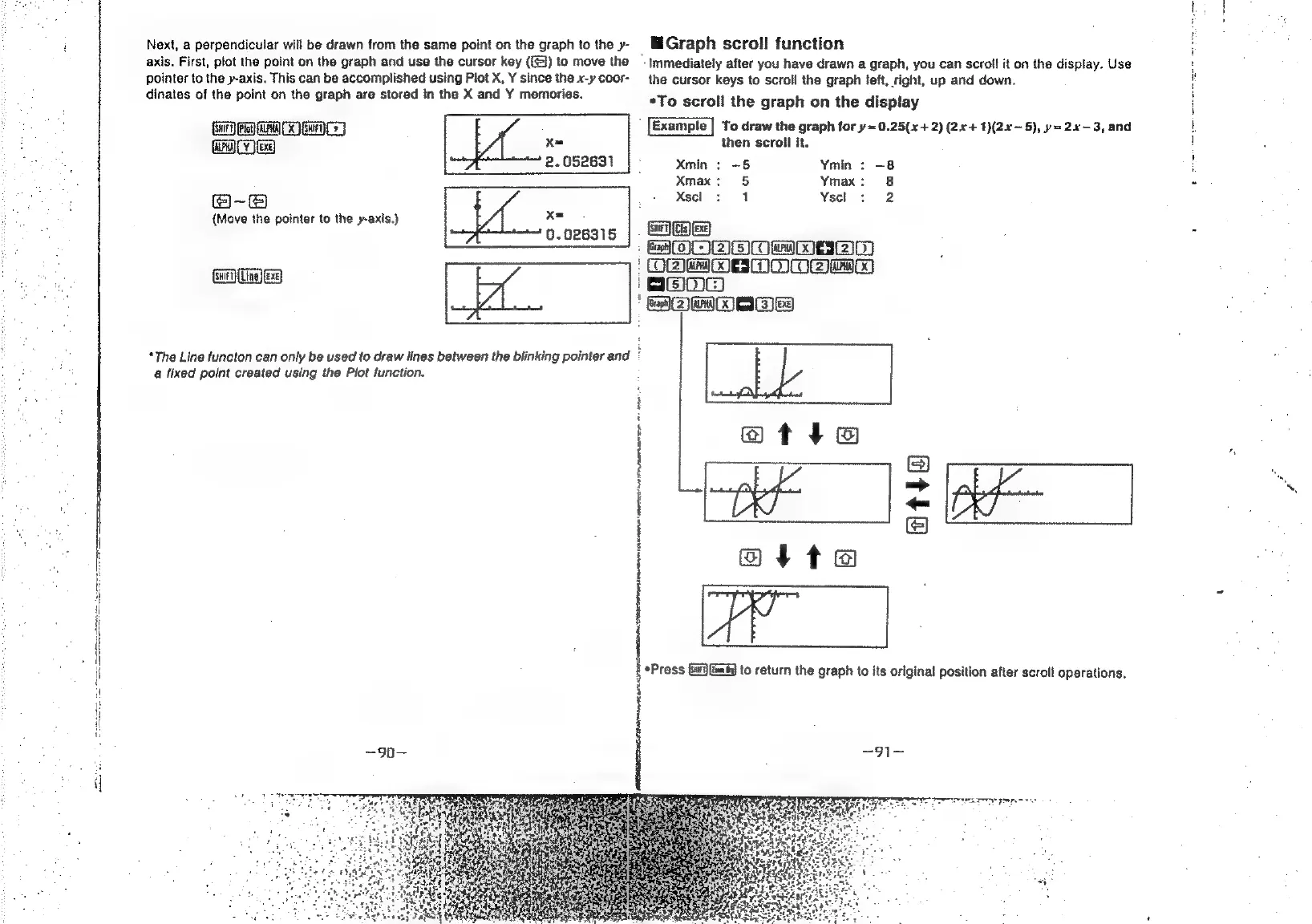
Next,
a
perpendicular
will
be
drawn
from
the
same
point
on
the
graph
to
the
y-
lliGraph
scroll
function
axis.
First,
plot
the
point
on
the
graph
and
use
the
cursor
key
({))
to
move
the
—_
Immediately
after
you
have
drawn
a
graph,
you
can
scroll
it
on
the
display.
Use
pointer
to
the
y-axis.
This
can
be
accomplished
using
Plot
X,
Y
since
the
x-y
coor-
the
cursor
keys
to
scroll
the
graph
left,
right,
up
and
down.
dinates
of
the
point
on
the
graph
are
stored
in
the
X
and
Y
memories.
*To
scroll
the
graph
on
the
display
MTCC
To
draw
the
graph
for
y=
0.25(x+
2)
(2x+
1)(2x~-5),
p=
2x-3,
and
GAM
eg
x=
then
scroll
it.
2.052631
|
-
Xmin
:
-5
Ymin
:
-8
Xmax:
5
Ymax:
8
@-e@
.
+
Xsel
so
4
Yscl
:
2
(Move
the
pointer
to
the
y-axis.)
x=.
o.o26315
|
SNGed
BOOB
OMWDBZ)
OB
MOE
MOM@awt0
Stes
[los]
IDOE
*The
Line
functon
can
only
be
used
to
draw
lines
between
the
blinking
pointer
and
:
a
fixed
point
created
using
the
Plot
function.
atria
atte
@tta
*Press
Gi)
fim)
to
return
the
graph
to
its
original
position
after
scroll
operations.
=90= ~91—
|
|
|
|

Related product manuals