EasyManua.ls Logo

Casio fx-6200G - Page 50

Casio fx-6200G
60 pages
Print Icon
To Next Page IconTo Next Page
To Previous Page IconTo Previous Page
Loading...
Ed
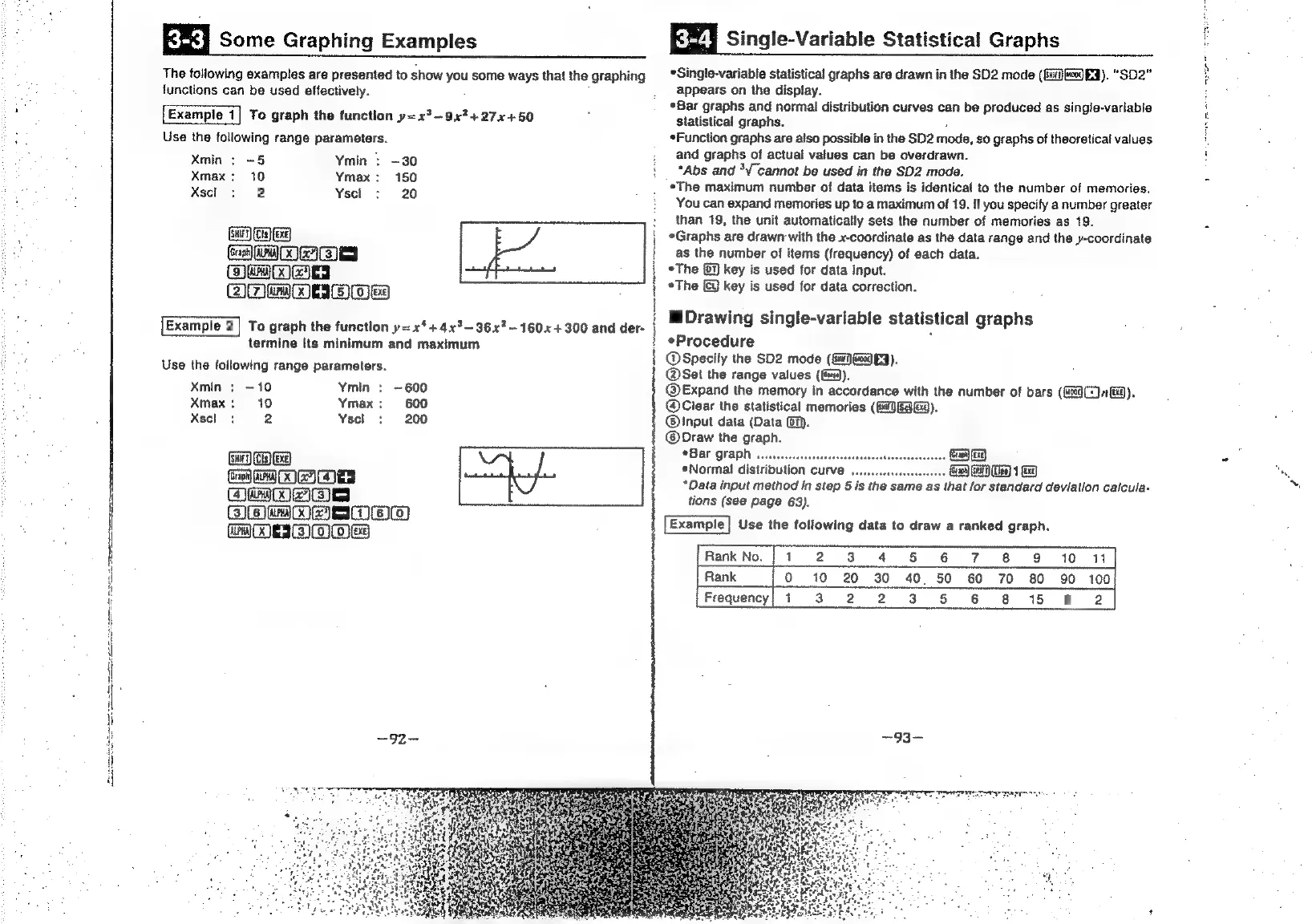
Some
Graphing
Examples
EZ]
Single-Variable
Statistical
Graphs
The
following
examples
are
presented
to
show
you
some
ways
that
the
graphing
functions
can
be
used
effectively.
Example
1|
To
graph
the
function
y=x°~—9x7427x4+50
Use
the
foliowing
range
parameters.
Xmin
:
-5
Ymin
>
-30
Xmax:
10
Ymax:
150
Xsel
+
2
Ysel
:
20
GH
is)
xg
[cE
Ca
ad]
EN]
Ra
aa]
+}
Wala)
68)
+
SC
Example
2|
To
graph
the
function
y=
x‘
+
4x°—36x?—160«+300
and
der-
[
|
.
termine
its
minimum
and
maximum
Use
the
following
range
parameters.
Xmin
;
~10
Ymin
:
~600
Xmax:
10
Ymax:
600
Xscl:
2
Yscl
:
200
Ge)
ay
Oa
wa)
|
QmweSes
AP
mMOAMIGe)
MM
MEI
Mes
*Single-variable
statistical
graphs
are
drawn
in
the
SD2
mode
(G0
EQ).
“SD2"
appears
on
the
display.
*Bar
graphs
and
normal
distribution
curves
can
be
produced
as
single-variabie
statistical
graphs.
*Function
graphs
are
also
possible
in
the
SD2
mode,
s0
graphs
of
theoretical
values
and
graphs
of
actual
values
can
be
overdrawn.
*Abs
and
*V
cannot
be
used
in
the
SD2
mode.
¢The
maximum
number
of
data
items
is
identical
to
the
number
of
memories.
You
can
expand
memories
up
to
a
maximum
of
19.
If
you
specify
a
number
greater
than
19,
the
unit
automatically
sets
the
number
of
memories
as
19.
*Graphs
are
drawn
with
the
x-coordinate
as
the
data
range
and
the
y-coordinate
as
the
number
of
items
(frequency)
of
each
data.
*The
(7)
key
is
used
for
data
input.
*The
key
is
used
for
data
correction.
M
Drawing
single-variable
Statistical
graphs
Procedure
|
@Specity
the
SD2
mode
(fi
eg
FY).
@Set
the
range
values
((e).
@Expand
the
memory
in
accordance
with
the
number
of
bars
(og)
1
BQ).
@Clear
the
statistical
memories
(GJ
GAG).
@®Input
data
(Data
(6).
@Draw
the
graph.
OBar
QFAPN
wcsessessesseeee
.
Gea
*Normal
distribution
curve
.
Ga
GH)
1
*Data
input
method
in
step
5
is
the
same
as
that
for
standard
deviation
caicula-
tions
(see
page
63).
Use
the
following
data
to
draw
a
ranked
graph.
Rank
No.
|
1
2 3
4
5
6
7 8
9
10
11
Rank
Oo
10
20
30
40
50
60
70
80
90
100
Frequency!
1
3.2
2
3
5
6
8
15
9 2
~93~

Related product manuals