
 Need help?
Do you have a question about the Casio G-SHOCK FROGMAN GW-8230 and is the answer not in the manual?
General guidelines for watch operation, including water resistance and pre-dive checks.
Warnings and advice for using the watch during diving, covering band, temperature, magnetism, etc.
Instructions and advice for charging the watch using its solar panel.
Explanation of the display indicators for different battery charge levels.
Guide to selecting a Home City and configuring summer time settings.
Step-by-step instructions for adjusting the current time and date settings.
How to measure and record dive time using the watch.
How to measure and record the time spent on the surface between dives.
How to use the stopwatch to measure elapsed time.
How to set and use the countdown timer.
Addresses common problems with watch charging and provides solutions.
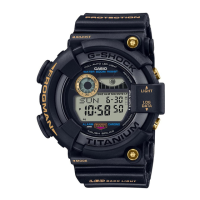
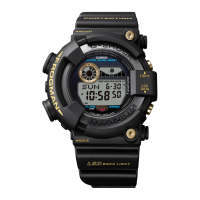
This document describes the operation and maintenance of a CASIO Watch, model 3521, which is a diver's watch with solar charging capabilities and various digital functions.
The CASIO Watch 3521 is a multi-functional digital timepiece designed for daily use and diving activities. Its core features include:
Timekeeping: The watch displays the current hour, minute, second, month, day, and day of the week. It supports both 12-hour and 24-hour timekeeping formats and includes a full auto calendar from 2000 to 2099. The year display is available only on the setting screen. Summer Time (Daylight Saving Time) can be configured for the Home City.
Solar Charging: The watch is powered by a rechargeable (secondary) battery that is charged by a solar panel integrated into the watch face. This allows the watch to generate power whenever its face is exposed to light, eliminating the need for regular battery replacement. The charge level is indicated on the display, with different levels affecting function availability.
Dive Function: This is a key feature for divers, allowing measurement of dive times and surface intervals. It records dive log data automatically, storing up to 10 records. Each log includes the dive start date and time, dive time, and surface interval. The dive time is measured in units of one second, up to 23 hours, 59 minutes, 59 seconds. The surface interval is measured in one-minute increments, up to 48 hours. The watch will automatically return to Timekeeping Mode if 11 or 12 hours elapse after entering Dive Mode.
Tide Level and Moon Age: The watch can display the current tide graph and Moon phase (Moon Graph) for the current date in the selected Home City. Users can also look up tide levels and Moon ages for a specific date and time. The tide graph provides information on high and low tides, and the Moon graph shows the approximate shape of the Moon at noon of the displayed date. High tide times can be adjusted for improved accuracy based on external information.
World Time: This function allows users to view the current time in any of 48 cities (31 time zones) around the globe. It supports the configuration of Summer Time for World Time cities.
Alarm: The watch features five daily alarms, including one with a snooze function. Alarms sound for 10 seconds when the set time is reached. The snooze alarm sounds up to seven times at five-minute intervals.
Hourly Time Signal: This function causes the watch to beep every hour on the hour.
Stopwatch: The stopwatch measures elapsed time in units of 1/100 second, up to 23 hours, 59 minutes, 59.99 seconds. It also supports split times and can record the times for first and second place finishers.
Timer: A countdown timer can be set from a start time specified by the user, in 1-minute units up to 24 hours. A beeper sounds when the countdown reaches zero.
Illumination: The watch includes a high-brightness LED light to illuminate the face for viewing in the dark. Illumination can be activated manually or automatically when the Auto Light function is enabled and the watch is angled 40 degrees or more towards the face. The illumination duration can be set to 1.5 or 3 seconds.
Power Saving Function: To conserve battery power, the watch can enter a power saving mode when left in a dark location. In Level 1 power saving, the digital display goes blank. In Level 2, all functions are disabled. The watch can recover from power saving by pressing any button, moving it to a bright location, or triggering auto light.
Navigating Modes: The watch features a "C" button that cycles through different modes (Timekeeping, Timer, Stopwatch, Log Data Recall, Tide Graph/Moon Graph, Alarm, World Time). Holding down the "C" button for at least one second in any mode (except Dive Mode) enters the Dive Mode.
Setting Screens: Many settings, such as time, date, alarms, and illumination duration, are configured by holding down the "A" button for at least two seconds to enter a setting screen. The "D" button is typically used to change settings, and the "B" button can be used for high-speed scrolling.
Dive Mode Operation: To start dive time measurement, enter Dive Mode and press "D". To stop, hold down "D" for one second. To reset the measurement time to zero and record log data, press "A". Surface interval measurement begins automatically after dive time measurement stops.
Log Data Recall: Recorded dive log data can be viewed in the Log Data Recall Mode. The "D" button scrolls through the log records.
Tide Graph/Moon Graph Operation: In this mode, the "A" button toggles between Tide Search and Moon Search. The "D" button is used to select the day for Moon age viewing or the time for Tide Graph viewing.
Alarm and Hourly Time Signal Configuration: In Alarm Mode, the "D" button scrolls through the five alarms and the hourly time signal. The "A" button is used to toggle alarms/hourly time signal on/off or to enter the setting screen for an alarm. The "B" and "D" buttons adjust hour and minute settings.
Timer Operation: In Timer Mode, the "A" button starts, pauses, and resumes the countdown. Pressing "A" again while paused resets the timer to its start time.
Button Operation Tone: The button operation tone can be enabled or disabled through the Timekeeping Mode settings.
Water Resistance: The watch is designed for skin diving and scuba diving, with pressure resistance up to 200 meters. It is crucial not to operate the crown while submerged. After seawater exposure, it should be rinsed with plain water.
General Cleaning: Regular cleaning is essential. The watch and band should be wiped frequently with a soft cloth to remove dirt, sweat, water, and other foreign matter. After exposure to seawater or mud, rinse with clean fresh water.
Metal and Resin Bands: For metal bands or resin bands with metal parts, use a soft toothbrush with a weak solution of water and a mild neutral detergent or soapy water. Rinse thoroughly with water and wipe dry with a soft absorbent cloth. When washing metal components, the watch case should be wrapped in kitchen plastic wrap to prevent contact with detergent or soap. Resin bands can be washed with water and wiped dry.
Leather Bands: Clean leather bands by wiping with a soft cloth to remove water and sweat.
Crown, Buttons, and Rotary Bezel: Periodically rotate the crown and rotary bezel, and press buttons to maintain proper operation and prevent future issues.
Gasket Replacement: To maintain water resistance, the watch's gaskets should be replaced regularly (every two years). Battery replacement should be performed by a trained technician at an original retailer or authorized CASIO service center, as it requires special tools and includes a water resistance inspection.
Battery Charging: The watch should be exposed to bright light when not being worn to ensure sufficient charging. Avoid charging in extremely hot environments (above 60 °C / 140 °F) to prevent burn injury or damage to internal components. Ensure the solar panel is not blocked by clothing when wearing the watch.
Band Inspection: Regularly check the band for signs of deterioration, rust, cracks, discoloration, looseness, or any abnormality. If any issues are noticed, stop using the band immediately and take the watch to a retailer or CASIO service center for inspection, repair, or replacement to prevent personal injury or loss.
Storage: If the watch will not be used for a long time, thoroughly wipe it free of dirt, sweat, and moisture, and store it in a cool, dry place.
Temperature Precautions: Avoid leaving the watch in locations subject to very high or very low temperatures, as this can cause time inaccuracies, malfunction, or LCD problems.
Impact Precautions: While designed to withstand normal daily use and light activity, strong impacts should be avoided to prevent malfunction.
Magnetism and Electrostatic Charge: Avoid very strong magnetism and electrostatic charges, as they can cause malfunction, damage electronic components, or lead to incorrect time display.
Chemical Exposure: Do not allow the watch to come into contact with thinners, gasoline, solvents, oils, fats, cleaners, adhesives, paints, medicines, or cosmetics containing such ingredients, as this can cause discoloration or damage to resin, leather, and other parts.
Data Memory: Be aware that battery depletion, replacement, or watch repair can lead to the loss of data stored in the watch's memory. It is recommended to keep separate written copies of all important data.
 General
| Model | GW-8230 |
|---|---|
| Series | G-SHOCK FROGMAN |
| Water Resistance | 200 meters |
| Shock Resistance | Yes |
| Solar Powered | Yes |
| Radio Controlled | Yes |
| Case Material | Resin |
| Band Material | Resin |
| Crystal | Mineral Glass |
| Tide Graph | Yes |
| Dive Time and Surface Interval Measurement Function | Yes |
| Timer | Yes |
| Battery Level Indicator | Yes |
| Power Saving | Yes |
| Full Auto-Calendar | Yes |
| Accuracy | ±15 seconds per month |
| World Time | 31 time zones |
| Moon Data | Moon data (moon age of the specific date, moon phase) |
| Stopwatch | 1/100 second |
| Alarm | 5 daily alarms |
| Backlight | LED |
| Battery Life | Approx. 10 months on full charge |

 To Next Page