82
Advanced Operations and Setups
E
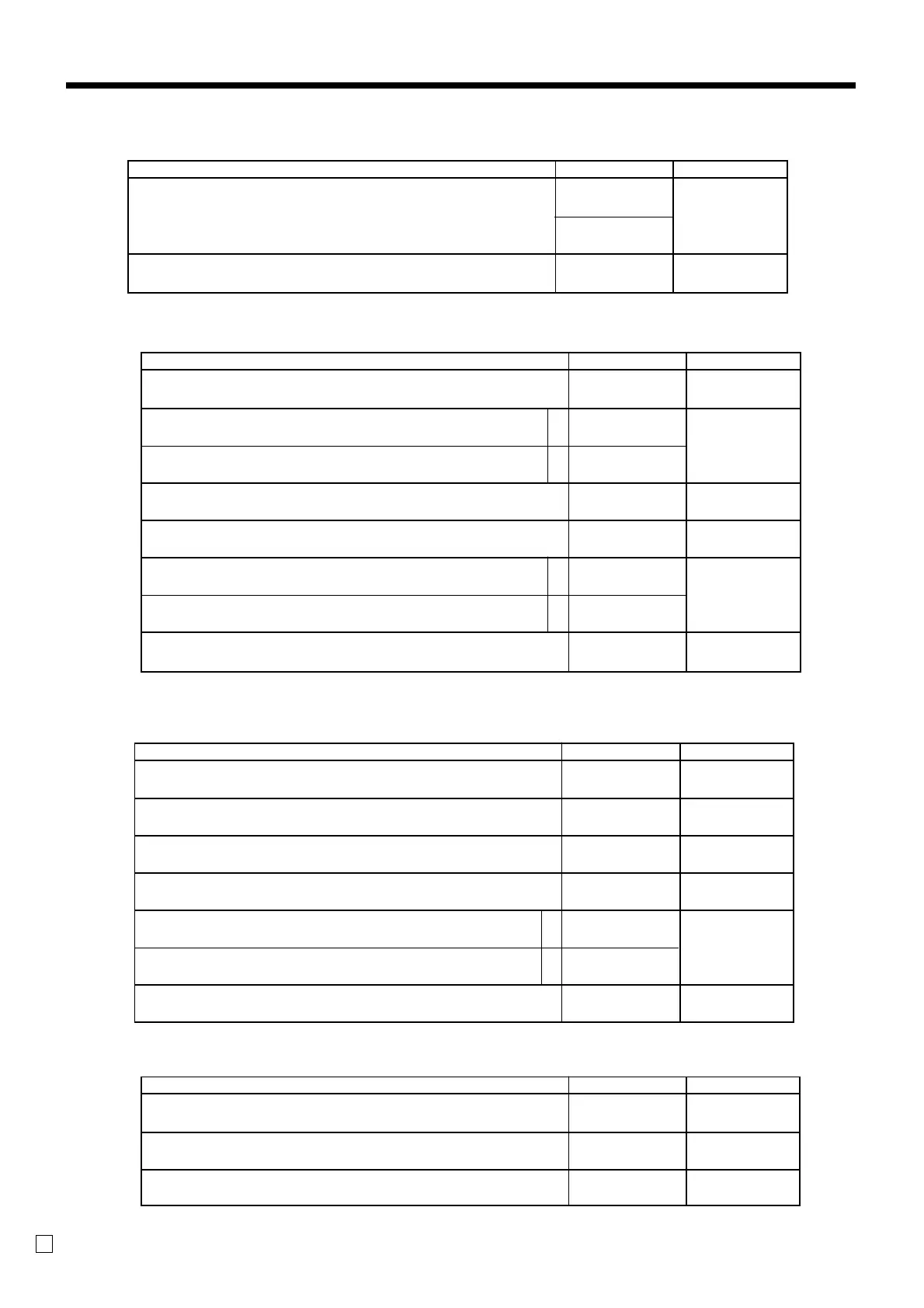
<ADDITION (PLUS)>, <REDUCTION (MINUS)>, <COUPON>
<RECEIVED ON ACCOUNT>, <PAID OUT>
Description Choice Program code
High amount limit specification for entering amounts
Always “00”
::
D
4
D
3
;;
D
2
D
1
Maximum value
(0 ~ 9)
Number of zeros
(0 ~ 9)
<PREMIUM (%+)>, <DISCOUNT (%-)>
Description Choice Program code
Taxable status:
See page 81.
Prohibit manual rate override.
Rounding:
Round off = 0, cut off = 1, round up = 2
Always “00”
Commission 1
Commission 2
Always “0”
a
b
::
D
8
D
7
:
D
6
:
D
5
;;
D
4
D
3
:
(a+b)
D
2
;
D
1
No = 0
Yes = 2
Significant
number
No = 0
Yes = 1
No = 0
Yes = 2
Description Choice Program code
Allow mode change or clerk change after non-add registration as first transaction.
(only for non-add function)
Always “0000”
Always “00”
:
D
7
;;;;
D
6
D
5
D
4
D
3
;;
D
2
D
1
Yes = 0
No = 1
<NON-ADD (#)>, <NON-ADD (#)/NO SALE>
Description Choice Program code
Taxable status:
See page 81.
Allow credit balance. (–, CPN only)
Allow out of sales (+ only)
Always “00”
High digit limitation (HDL) for manually entered unit price
(“9” means NOT allow manual entry.)
Commission 1
Commission 2
Always “0”
a
b
a
b
::
D
8
D
7
:
(a+b)
D
6
;;
D
5
D
4
:
D
3
:
(a+b)
D
2
;
D
1
No = 0
Yes = 1
No = 0
Yes = 2
Significant
number
No = 0
Yes = 1
No = 0
Yes = 2



 To Next Page