EasyManua.ls Logo

Casio VZ-10M - Page 20

Casio VZ-10M
113 pages
Print Icon
To Next Page IconTo Next Page
To Previous Page IconTo Previous Page
Loading...
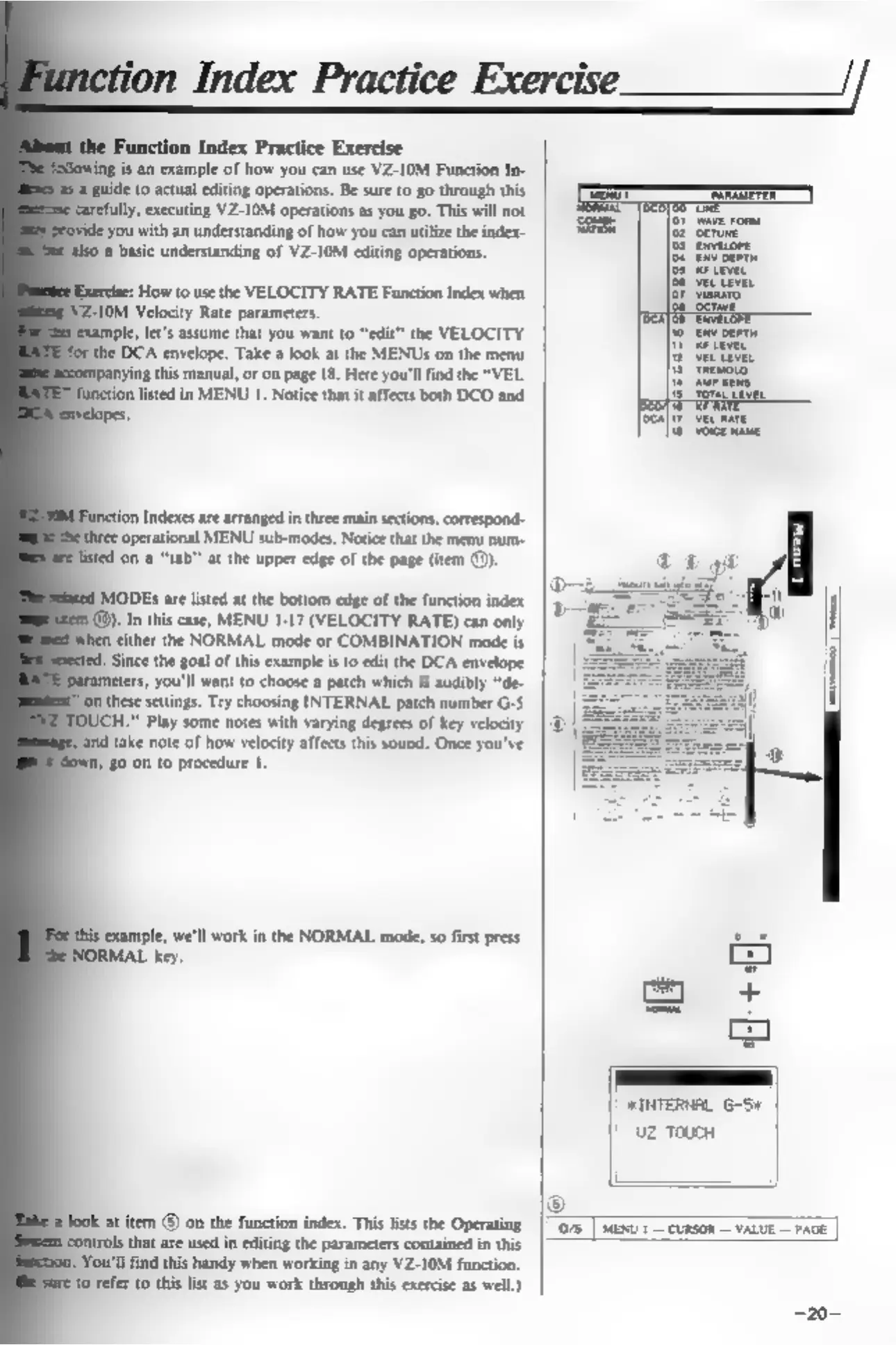
Function
Index
Practice
Exercise
is
an
example
of
how
you
can use
VZ-10M
Function
In-
guide
to
actual
editing
operations.
Be
sure
to
go
through
this
ly,
executing
VZ-10M
operations
as
you go.
This
will
not
de
you
with
an
understanding
of
how
you
can
utilize
the
index-
0
a
basic
understanding
of
VZ-10M
editing
operations.
Exercise:
How
to
use
the
VELOCITY
RATE
Function
Index
when
FZ-10M
Velocity
Rate
parameters.
ple,
let's
assume
that
you
want
to
“edit”
the
VELOCITY
the
DCA
envelope.
Take
a
look
at
the
MENUs
on
the
menu
ing
this
manual,
or
on
page
18.
Here
you'll
find
the
“VEL
ton
Indexes
are
arranged
in
three
main
sections,
correspond-
‘operational
MENU
sub-modes.
Notice
that
the
menu
num-
don
a
“tab”
at
the
upper
edge
of
the
page
(item
(®).
MODES
are
listed
at
the
bottom
edge
of
the
function
index
.@).
In
this
case,
MENU
1-17
(VELOCITY
RATE)
can
only
m
either
the
NORMAL
mode
or
COMBINATION
mode
is
Since
the
goa!
of
this
example
isto
edit
the
DCA
envelope
meters,
you'll
want
to
choose
a
patch
which
is
audibly
“de-
"on
these
settings.
Try
choosing
INTERNAL
patch
number
G-S
Play
some
notes
with
varying
degrees
of
key
velocity
nd
take
note
of
how
velocity
affects
this
sound.
Once
you've
0
on
to
procedure
1.
‘example,
we'll
work
in
the
NORMAL
mode,
so
first
press
RMAL
key.
at
item
@
on
the
function
index.
This
lists
the
Operating
that
are
used
in
editing
the
parameters
contained
in
this
You'll
find
this
handy
when
working
in
any
VZ-10M
function.
Ere
to
refer
to
this
lst
as
you
work
through
this
exercise
as
well.)
|
FINTERNAL
6-54
|
uz
ToucH
©
(O78
|
MENU
1
CURSOR
VALUE
PAGE
|

Other manuals for Casio VZ-10M

Related product manuals