EasyManua.ls Logo

Casio VZ-10M - Page 35

Casio VZ-10M
113 pages
Print Icon
To Next Page IconTo Next Page
To Previous Page IconTo Previous Page
Loading...
DETUNE
Parameters
|
O/S
|
MENU
1
—
VALUE
—
MENU
1
—
¥,
|
Pages
1
Graphic
Editing
NO
OFF
ocT=0-$
;
1763-63
NOTE=00~11
j
Donaiat
SORT
AY
~
FINE=00~63
TES
RANGE
=
x1/
x
1/16
hecgpare
Soa
PLICH
Fy
|
feted
Pou
ae
=a
ZA
re)
z
9
z
COMBINATION
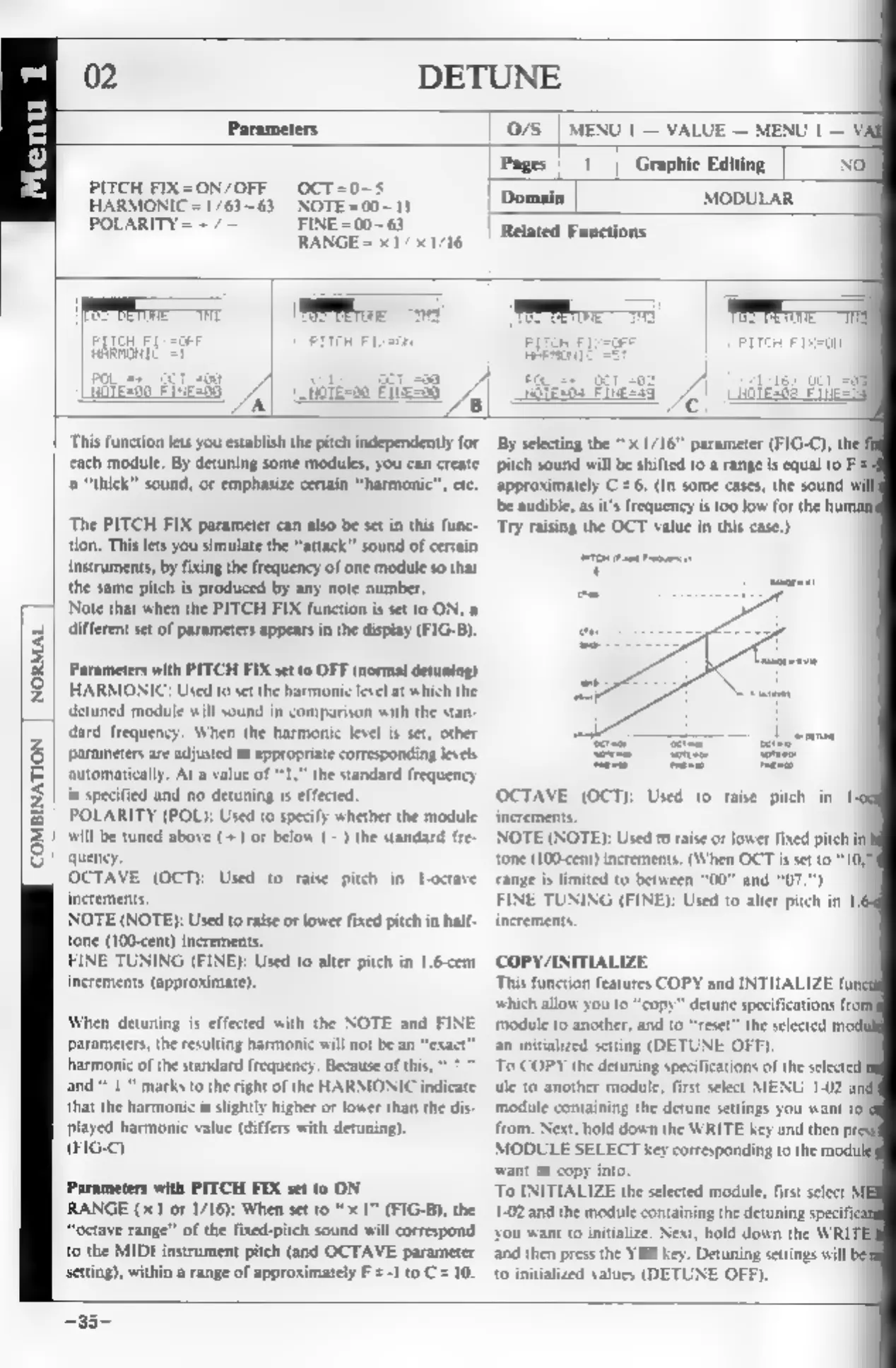
This
function
lets
you
establish
the
pitch
independently
for
cach
module,
By
detuning
some
modules,
you
can
create
“thick”
sound,
or
emphasize
certain
“harmonic”,
etc.
‘The
PITCH
FIX
parameter
can
also
be
set
in
this
func-
tion.
This
lets
you
simulate
the
“attack”
sound
of
certain
instruments,
by
fixing
the
frequency
of
one
module
so
that
the
same
pitch
is
produced
by
any
note
number.
‘Note
that
when
the
PITCH
FIX
function
is
set
10
ON,
different
set
of
parameters
appears
in
the
display
(FIG-B).
Parameters
with
PITCH
FIX
set
to
OFF
(normal
detuning)
HARMONIC:
Used
to
set
the
harmonic
level
at
which
the
detuned
module
will
sound
in
comparison
with
the
stan-
dard
frequency.
When
the
harmonic
level
is
set,
other
parameters
are
adjusted
to
appropriate
corresponding
levels
automatically,
At
a
value
of
“1,”
the
standard
frequency
is
specified
and
no
detuning
is
effected.
POLARITY
(POL):
Used
to
specify
whether
the
module
will
be
tuned
above
(+)
or
below
(—)
the
standard
fre-
quency
OCTAVE
(OCT):
Used
to
raise
pitch
in
I-octave
increments.
NOTE
(NOTE):
Used
to
raise
or
lower
fixed
pitch
in
half-
tone
(100-cent)
increments.
FINE
TUNING
(FINE):
Used
to
alter
pitch
in
1.6-cent
increments
(approximate),
When
detuning
is
effected
with
the
NOTE
and
FINE
parameters,
the
resulting
harmonic
will
not
be
an
“e
of
the
standard
frequency.
Because
oft
marks
to
the
right
of
the
HARMONI
te
that
the
harmonic
is
slightly
higher
or
lower
than
the
dis
played
harmonic
value
(differs
with
detuning)
(FIG-C)
Parameters
with
PITCH
FIX
set
to
ON
RANGE
(x1
or
1/16):
When
set
to
"1"
(FIG-B),
the
“octave
range”
ofthe
fixed-pitch
sound
will
correspond
to
the
MIDI
instrument
pitch
(and
OCTAVE
parameter
sting),
within
a
range
of
approximately
F
=
-1
to
C=
10.
By
selecting
the
“x
1/16”
parameter
(FIG-C),
the
pitch
sound
will
be
shifted
to
a
range
is
equal
to
F
=
approximately
C
+
6,
(In
some
cases,
the
sound
bbe
audible,
as
it’s
frequency
is
too
low
for
the
hut
‘Try
raising
the
OCT
value
in
this
case,)
OCTAVE
(OCT):
Used
to
raise
pitch
in
I
increments
NOTE
(NOTE):
Used
to raise
or
lower
fixed
pitch
i
tone
(100-cent)
increments.
(When
OCT
is
set
to
“10
range
is
limited
to
between
"00"
and
“07."")
FINE
TUNING
(FINE):
Used
to
alter
piteh
in
1
an
initialized
setting
(DETUNE
OFF),
To
COPY
the
detuning
specifications
of
the
selected
tle
to
another
module,
first
select
MENU
1-02
a
‘module
containing
the
detune
settings
you
want
to)
from.
Next,
hold
down
the
WRITE
key
and
then
pr
MODULE
SELECT
key
corresponding
to
the
modi
‘want
to
copy
into.
To
INITIALIZE
the
selected
module,
first
select
1-02
and
the
module
containing
the
detuning
specifi
‘you
want
to
initialize.
Next,
hold
down
the
WRI
and
then
press
the
YES
key.
Detuning
settings
will
be
to
initialized
values
(DETUNE
OFF).
—33-