EasyManua.ls Logo

Casio VZ-10M - Page 55

Casio VZ-10M
113 pages
Print Icon
To Next Page IconTo Next Page
To Previous Page IconTo Previous Page
Loading...
Parameters
O/S_|
MENU
2
—
VALUE
—
MENU
2
—
VALUE
SENSITIVITY
PITCH=~+ON/-ON/OFF|
Pages
|
2
|
Graphic
Editing
|
NO
(NORMAL,
MULTI-
PORTM
TIME-ON/
OFF
CHANNEL)
=00-99
__TREM
DEPTH-ON/OFF
|
Domain
GLOBAL
(COMBINATION)
=
~99~"+99
TREM
RATE
=ON/
OFF
z
Vip
DEPTH=ON/OFF
AENVBIAS=ON/OFF
|
Related
Functions
¢\teNU
1.14)
VIB
RATE=ON/OFF
NORMAL,
COMBINATION
MULTI
CHANNEL
I
is
function
is
used
to
specify
the
sensitivity
of
an
exter-
nal
MIDI
keyboard
“after
touch’,
and
the
effects
that
af-
ter
touch
is
used
to
control,
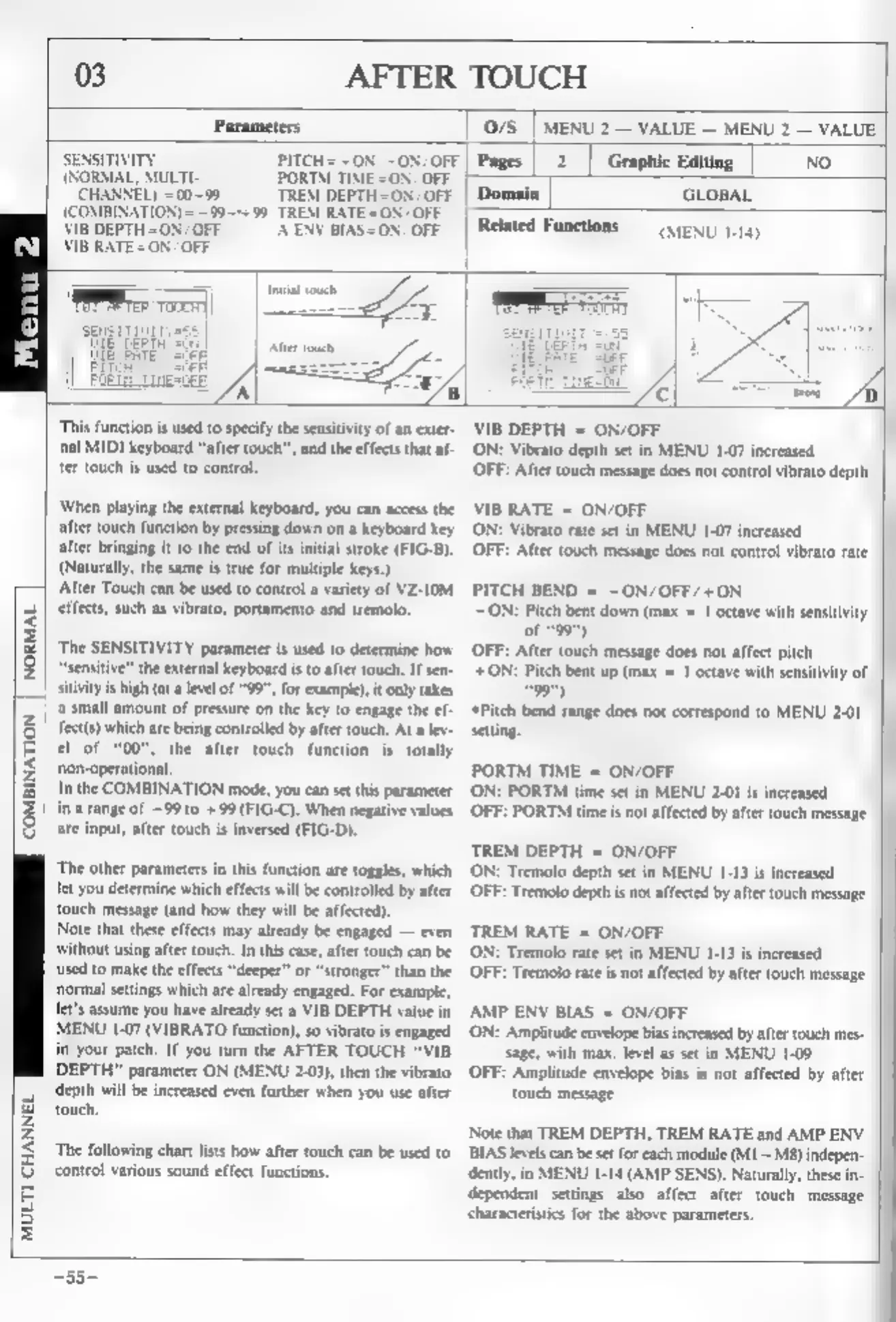
‘When
playing
the
external
keyboard,
you
can
access
the
after
touch
function
by
pressing
down
on
a
keyboard
key
after
bringing
it
to
the
end
of
its
initial
stroke
(FIG-B).
(Naturally,
the
same
is
true
for
multiple
keys.)
After
Touch
can
be
used
to
control
a
variety
of
VZ-10M
effects,
such
as
vibrato,
portamento
and
tremolo,
‘The
SENSITIVITY
parameter
is
used
to
determine
how
“sensitive”
the
external
keyboard
is
to
after
touch.
If
sen-
sitivity
is
high
(at
a
level
of
"99",
for
example),
it
only
takes
‘a
small
amount
of
pressure
on
the
key
to
engage
the
ef
fect(s)
which
are
being
controlled
by
after
touch.
At
a
lev-
el
of
"00",
the
after
touch
function
is
totally
‘non-operational
In
the
COMBINATION
mode,
you
can
set
this
parameter
in
a
range
of
~99
10
+99
(FIG-C).
When
negative
values
are
input,
after
touch
is
inversed
(FIG-D).
‘The
other
parameters
in
this
function
are
toggles,
which
let
you
determine
which
effects
will
be
controlled
by
after
touch
message
(and
how
they
will
be
affected).
Note
that
these
effects
may
already
be
engaged
—
even
without
using
after
touch.
In
this
case,
after
touch
can
be
used
to
make
the
effects
“deeper”
or
“stronger”
than
the
normal
settings
which
are
already
engaged.
For
example,
Jet's
assume
you
have
already
set
a
VIB
DEPTH
value
in
MENU
1-07
(VIBRATO
function),
so
vibrato
is
engaged
in
your
patch.
If
you
turn
the
AFTER
TOUCH
“VIB
DEPTH”
parameter
ON
(MENU
2.03),
then
the
vibrato
depth
will
be
increased
even
further
when
you
use
after
touch,
‘The
following
chart
lists
how
after
touch
can
be
used
to
control
various
sound
effect
functions.
VIB
DEPTH
=
ON/OFF
‘ON:
Vibrato
depth
set
in
MENU
1-07
increased
OFF:
After
touch
message
does
not
control vibrato
depth
B
RATE
=
ON/OFF
‘ON:
Vibrato
rate
set
in
MENU
1-07
increased
OFF:
After
touch
message
does
not
control
vibrato
rate
PITCH
BEND
=
~ON/OFF/+ON
ON:
Pitch
bent
down
(max
=
1
octave
with
sensitivity
of
*99")
OFF:
After
touch
message
does
not
affect
pitch
+ON:
Pitch
bent
up
(max
=
1
octave
with
sensitivity
of
99")
‘Pitch
bend
range
does
not
correspond
to
MENU
2-01
setin
PORTM
TIME
=
ON/OFF
ON:
PORTM
time
set
in
MENU
2-01
is
increased
(OFF:
PORTM
time
is
not
affected
by
afier
touch
message
TREM
DEPTH
=
ON/OFF
‘ON:
Tremolo
depth
set
in
MENU
1-13
is
increased
(OFF:
Tremolo
depth
is
not
affected
by
after
touch
message
TREM
RATE
=
ON/OFF
ON:
Tremolo
rate
set
in
MENU
1-13
is
increased
OFF:
Tremolo
rate
is
not
affected
by
after
touch
message
AMP
ENV
BIAS
=
ON/OFF
‘ON:
Amplitude
envelope
bias
increased
by
after
touch
mes-
sage,
with
max.
level
as
set
in
MENU
1-09
OFF:
Amplitude
envelope
bias
is
not
affected
by
after
touch
message
Note
that
TREM
DEPTH,
TREM
RATE
and
AMP
ENV
BIAS
levels
can
be
set
for
each
module
(M1
~
MB)
indepen-
dently,
in
MENU
1-14
(AMP
SENS).
Naturally,
these
in-
dependent
settings
also
affect
after
touch
message
‘characteristics
for the
above
parameters.
—33-