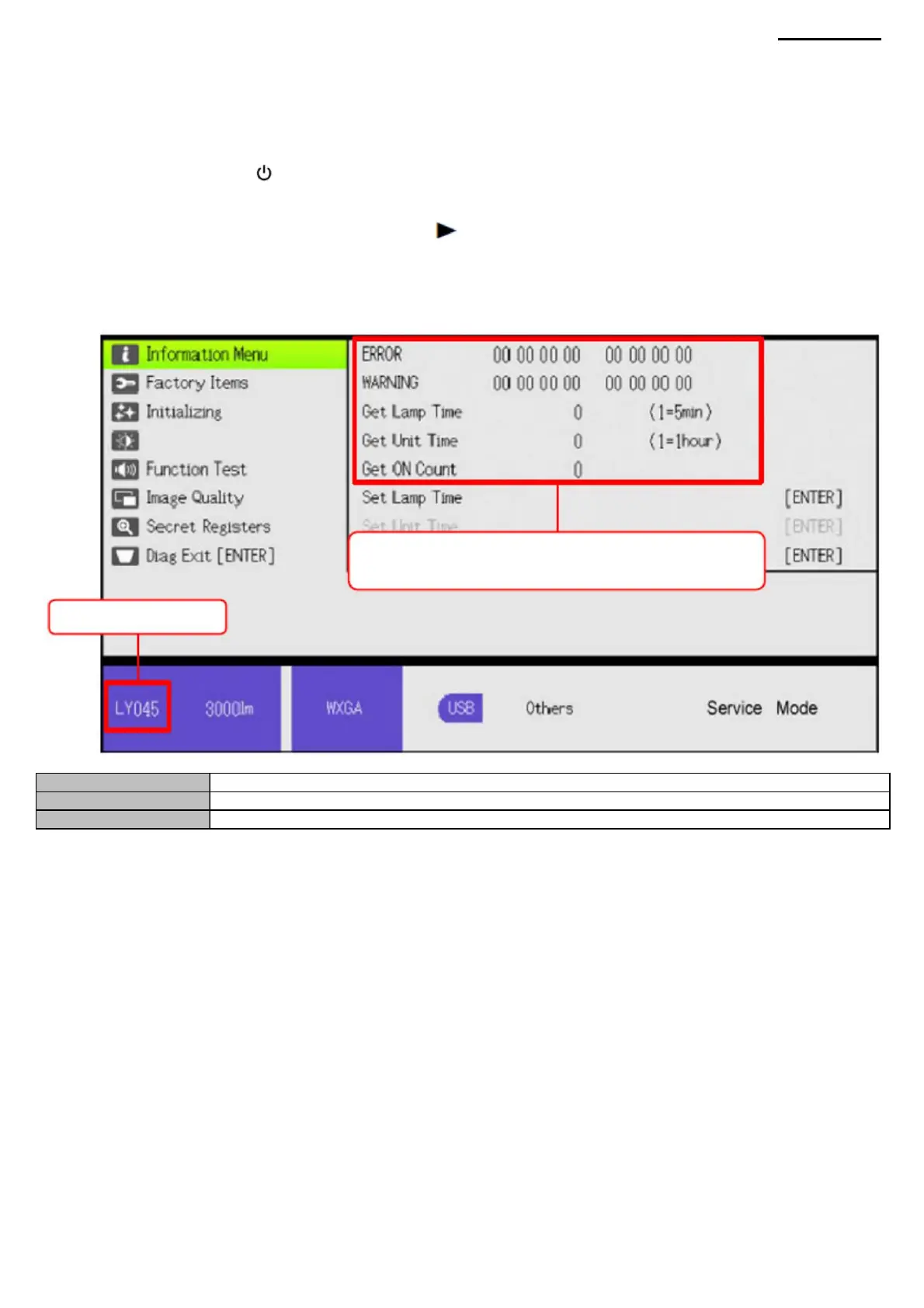
ERROR
Always save this data. (WARNING
and Get ON data not included)
XJ-A240/A245
Development code
(2) Press the [ (POWER] button on the remote control or on the projector to turn it on.
Get Unit Time
(1) Connect the power cable to the projector and wait for the [POWER] LED to turn yellow.
Get Lamp Time
Step 1. Press the [ENTER] and [ ] buttons simultaneously.
Step 2 After pressing the buttons as described in step 1, press and hold the [INPUT] button for 2 seconds. (a total of 3 buttons
must be held down).
The model is specified with the development code.
(3) Follow the steps below to run the diagnostic program.
Error code number.
Lamp duration. The duration of
the device.
(4) The diagnostic program menu will appear.
(5) To view the ROM version information, select "Function Test" ÿ "ROM CHECK". (6) To exit the diagnostic
program, move the cursor to "Diag Exit [ENTER]" and press the [ENTER] button.
Step 3 Release all buttons except the [INPUT] button.
LY042: XJ-A240
LY043: XJ-A245
4-7. Using Diagnostic Software to View Lamp/Device Hours and Error Codes
-9-
Machine Translated by Google



 To Next Page