-13-
KEQS08
Technical Manual
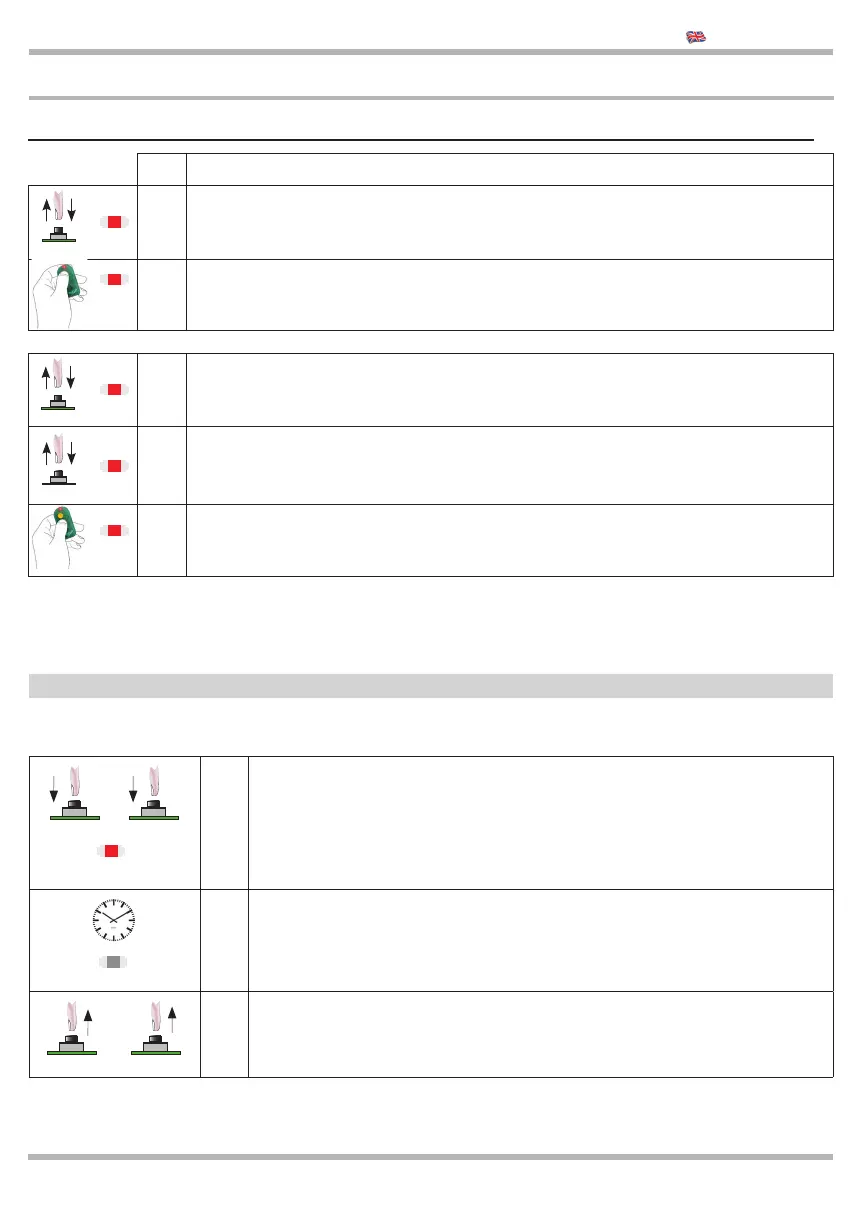
4.3 Learning of the remote controls
The remote controls can be learnt ONLY when the gate is CLOSED.
CONNECT THE ANTENNA CABLE AFTER MEMORIZATION OF THE REMOTE CONTROLS (terminals 8-9)
- If you need to learn a new remote control repeat the same operation.
- When you push the remote control’s button and the L.E.D. codes is switched ON, it means that the remote control is not compatible
- When you push the remote control’s button and the L.E.D. codes fl ashes slowly, it means that the memory is FULL.
- It is not possible to cancel a single code
1 Make sure that the gate is CLOSED
>
2 Press and release the CODICI button, the LED L1 will stay lit ON.
3
Press the button of the remote control, ex: button no.1:
if it is memorized LED L1 will fl ash
>
1 Press and release the CODICI button, the LED L1 will lit ON.
>
2 Press again the CODICI button, the LED L1 will fl ash and lit ON
3
Press the button of the remote control, ex:
button no.2: if it is memorized LED L1 will fl ash
CODICI
CODICI
CODICI
START
PEDESTRIAN
The reset of the control unti set all parameters at factory settings. It doesn’t cancel the remote controls codes, there
are two diff erent memories available:
1
Press the buttons CODICI and TEMPI
LED L1 lit ON
2 Wait 10 seconds until LED L1 will switch OFF
3 Release the buttons CODICI and TEMPI
TEMPI CODICI
TEMPI CODICI
5 Reset of the memory at factory settings
L1
L1
L1
L1
L1
L1
L1



 To Next Page