-9-
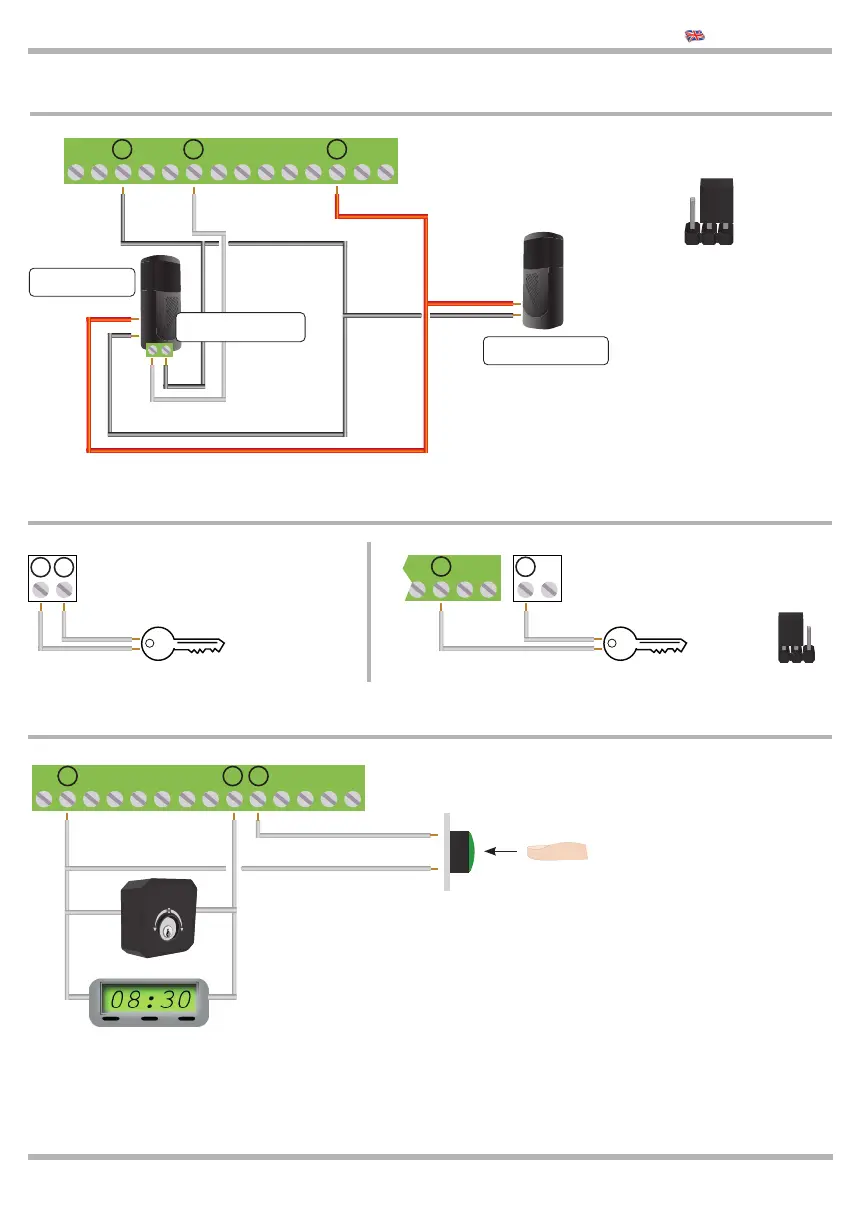
2.14 Connection of the “START” and “PEDESTRIAN” commands
The PEDESTRIAN opening command can be connected to any push
button or N.O. (normally open) contact. If several devices are used,
they must be connected in parallel.
Using terminals 9 and 16 it is possible connect a TIMER to program
gate opening. The timer contact must be an NO (normally open) con-
tact and must remain closed while the gate remains open.
If an opening command is connected to terminal 16, it must be con-
nected in parallel.
The START opening command can be connected to
any push-button or N.O. (normally open) contact.
2.12 Connect the 3 WIRES PHOTO 1 24 Vdc
POWER SUPPLY
TX PHOTOCELL
POWER SUPPLY
RX PHOTOCELL
+
-
+
-
Photocell receiver.
N.C. contact terminals
-
+
Bring JUMPER AC/DC
as shown in the picture
Voltage: 24 Vdc
Maximum current: 300 mA
8 9 10 11 12 13 14 15 16 17 18 19
8 9 10 11 12 13 14 15 16 17 18 19
KEQS08
Technical Manual
20 21
20 21
Here you can see the connections
of the electrical lock: 12 Vac
2.13 Electrical lock connection: 12 or 24 Vac
22 23
Here you can see the connections
of the electrical lock: 24 Vac
Put JAC/DC as shown in the picture:
22 23
17 18 19 20 21
AC DC
START
PEDESTRIAN



 To Next Page