-8-
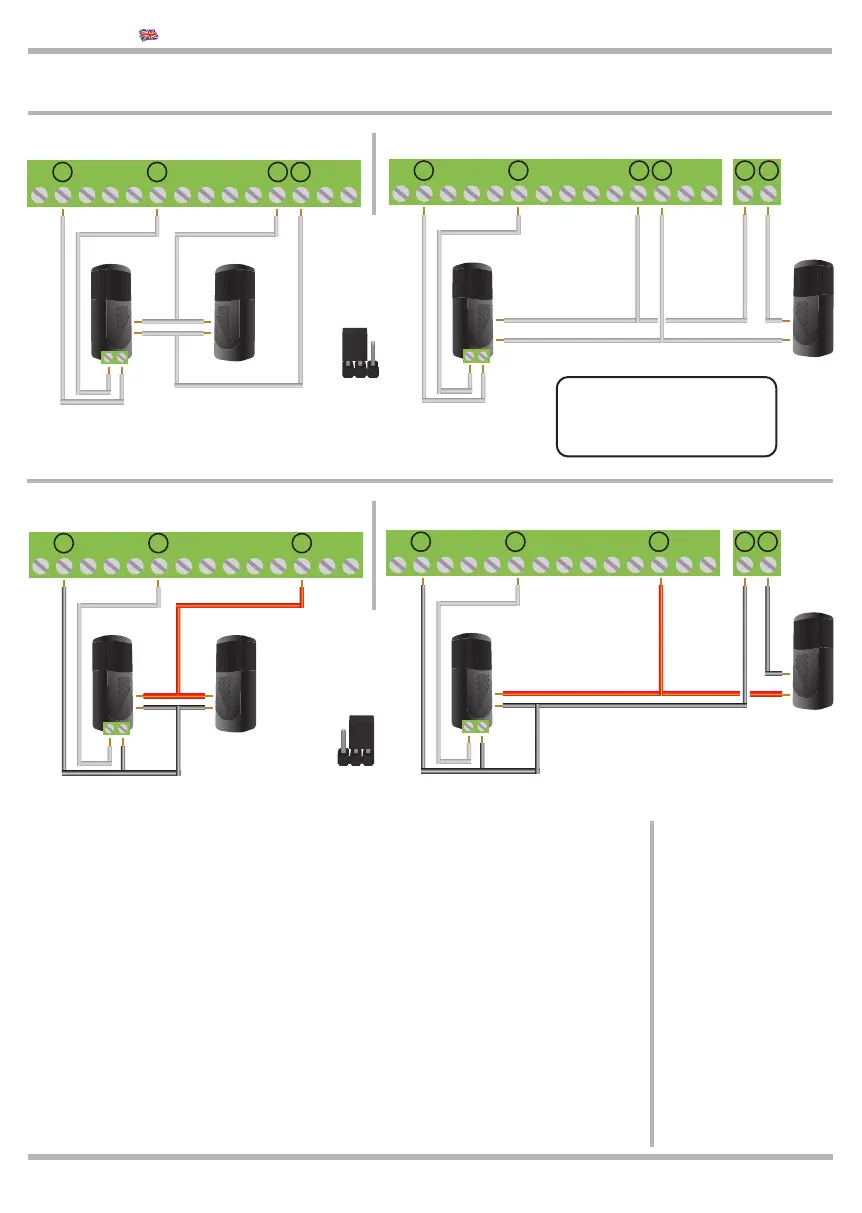
The photocell receiver
contact must be:
- dry (isolated from
power supply voltages)
- type N.C.
(Normally closed)
If more photocells are
available, connect them
in parallel, they must be
connected in series.
The photocell TEST ensures the gate is working when the photocells are functioning
properly. In fact, the control unit performs the test before each opening. if the photocells
are not working properly, the signal light will be lit on for 5 seconds and the gate stops.
The control unit automatically activates the test only after the START command
times have been learnt. If you wish to return to the LIGHT function on terminals
24 and 25, the photocells must be connected without the test and then you must
repeat the times learning operation with the START command.
The TEST function is compatible with slow response devices (for example TRANSCEI-
VER) so the gate be slowly while opening. The TEST can be done also from some
devices in the INPUT COSTA (safety edge) and STOP. After the TEST connections,
memorize the working time for the START control during this time the control unit check
the devices which are under TEST.
KEQS08
Technical Manual
2.10 Connection of the 24 Vac photocell 1 only closing
2.11 Connection of the 24 Vdc photocell 1
If the STOP input is
NOT used put the
DIP 2B in ON.
!
RX TX
NC Contact
TX
24 25
Without TEST
With TEST
8 9 10 11 12 13 14 15 16 17 18 19
24 Vac
RX
NC Contact
8 9 10 11 12 13 14 15 16 17 18 19
24 Vac
AC DC
Put
JUMPER
JAC/DC
as shown in
the picture
RX TX
NC Contact
TX
24 25
Without TEST With TEST
8 9 10 11 12 13 14 15 16 17 18 19
24 Vdc
8 9 10 11 12 13 14 15 16 17 18 19
+
-
RX
NC Contact
24 Vdc
+
-
Put
JUMPER
JAC/DC
as shown in
the picture
AC DC
20 21
20 21
20 21
20 21



 To Next Page