5 Functions
5.1 Opening / closing door
+
Open door
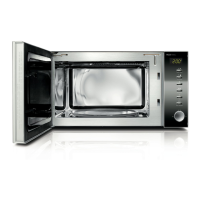
Push the door release to open the door of the device. If the
appliance is switched on, the current cooking program will be
interrupted.
Please note
► Leave the door open for a moment before reaching into the
cooking chamber, to allow any accumulated heat to escape.
+
Close doors
Close the door until the door latch audibly locks in place. If a
current cooking program was interrupted as a result of opening
the door, it can be continued by pressing the Start button.
5.2 Start cooking after selecting a cooking program
After selecting a cooking program, press the Start button to
start that cooking program.
5.3 Quick start
Use this function to quickly program the oven for cooking at the
maximum Power Level.
Press the Quick Start button in quick sequence to increase the
cooking time. The maximum cooking time is 10 minutes. If you
press the button Quick Start once, the oven will work for 30
sec., if you press it twice, it works for 1 min, etc.
The oven starts automatically after 2 seconds if no other
buttons are pressed.
Once the cooking time is finished, four signal tones will sound
and END will appear in the display.


 To Next Page