ADVANCEMODESET
TARGET
PULSE
ON/OFF
LOADING
LEVEL
MODE
PULSE
CADENCE
TIME
WORK RATE
SPEED
CALORIE
PULSE
DISTANCE
ADVANCEMODESET
TARGET
PULSE
ON/OFF
mile/h
mile
kcal
LOADING
LEVEL
MODE
PULSE
CADENCE
TIME
WORK RATE
SPEED
CALORIE
PULSE
DISTANCE
ADVANCEMODESET
TARGET
PULSE
ON/OFF
rpm
min
sec
watt
LOADING
LEVEL
MODE
PULSE
CADENCE
TIME
WORK RATE
SPEED
CALORIE
PULSE
DISTANCE
ADVANCEMODESET
TARGET
PULSE
ON/OFF
TPL
PLL
min
sec
AGE
LOADING
LEVEL
MODE
PULSE
CADENCE
TIME
WORK RATE
SPEED
CALORIE
PULSE
DISTANCE
ADVANCEMODESET
TARGET
PULSE
ON/OFF
8
LET'S HAVE A RIDE
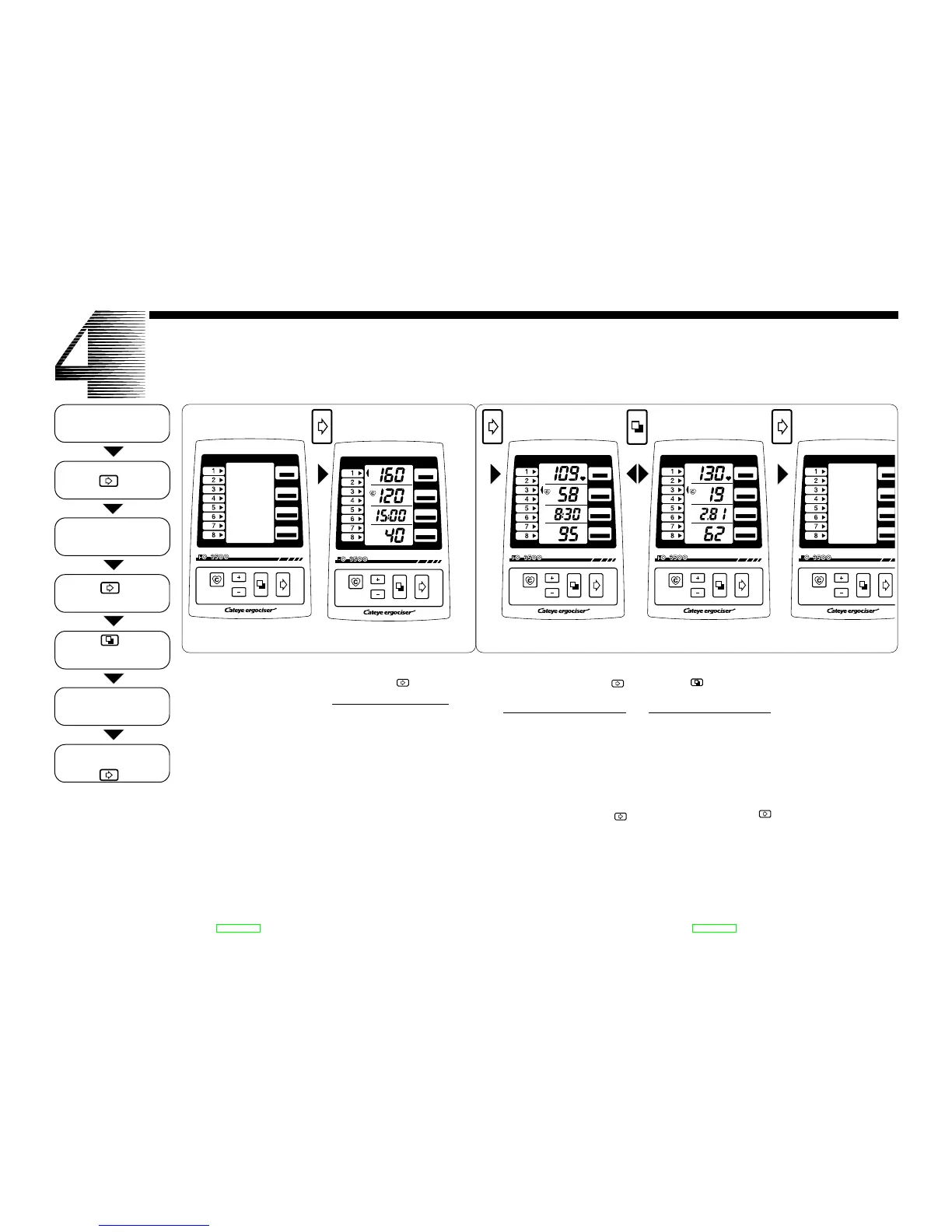
In the "No-Display" state, this "Ini-
tial Display" appears with a press of
the Advance button .
• Preset Initial Display (from top)
• Upper-Limit Pulse Rate
160 bpm (beats per minute)
• Target Pulse Rate
120 bpm (beats per minute)
• Target Exercise Time
15 minutes
• Age
40 years old
Before starting exercise, input your
age, target exercise time and target
pulse rate, in accordance with your
purpose.
When power is off, no display ap-
pears on the screen. In this state, the
battery consumes minimal power.
When the unit is not in use, turn off
to "No-Display" state.
• If input signal is not entered into
the control unit in 10 minutes, the
unit is automatically turned off to
"No-Display" state.
No-Display Screen Initial Display Screen
Press Adv Button
Begin Exercise
Attach Pulse Sensor
Make sure Initial Display
appears
Press Md Button
Make sure In-Exercise
Display(A) and (B) appear
Operate Workload Shift
Lever/ Make sure Pedal
Resistance changes
Finish Exercise when Buzzer
beeps to signal the end.
Press Adv Button
Try a ride so that you can familiarize yourself with the unit.
Press Adv Button
9
After the "Initial Display" state, this
"In-Exercise Display (A)" appears
with a press of the advance button .
• Exercise Display (A) Screen
(from top)
• Current Pulse Rate
(bpm)
• Pedal Cadence
(rpm-revolutions per minute)
• Countdown Timer
(minute:second)
• Work Rate
(watt)
If you press the advance button av
when the screen is in this state, it turns
to the "No-Display" state.
The In-Exercise Display (A) and (B)
are alternative. With a press of the
mode button , they alternate.
• In-Exercise Display (B) Screen
(from top)
• Current pulse Rate
(bpm)
• Simulated Current Speed
(mile/h or km/h)
• Simulated Trip Distance
(mile or km)
• Calorie Consumption
(kcal)
If you press the Advance button av
when the screen is in this state, it turns
to the "No-Display" state.
In-Exercise Display (A)
Screen
In-Exercise Display (B)
Screen
No-Display Screen


 To Next Page