Tire size icon
Auto mode icon
CC-MC200W ENG 4
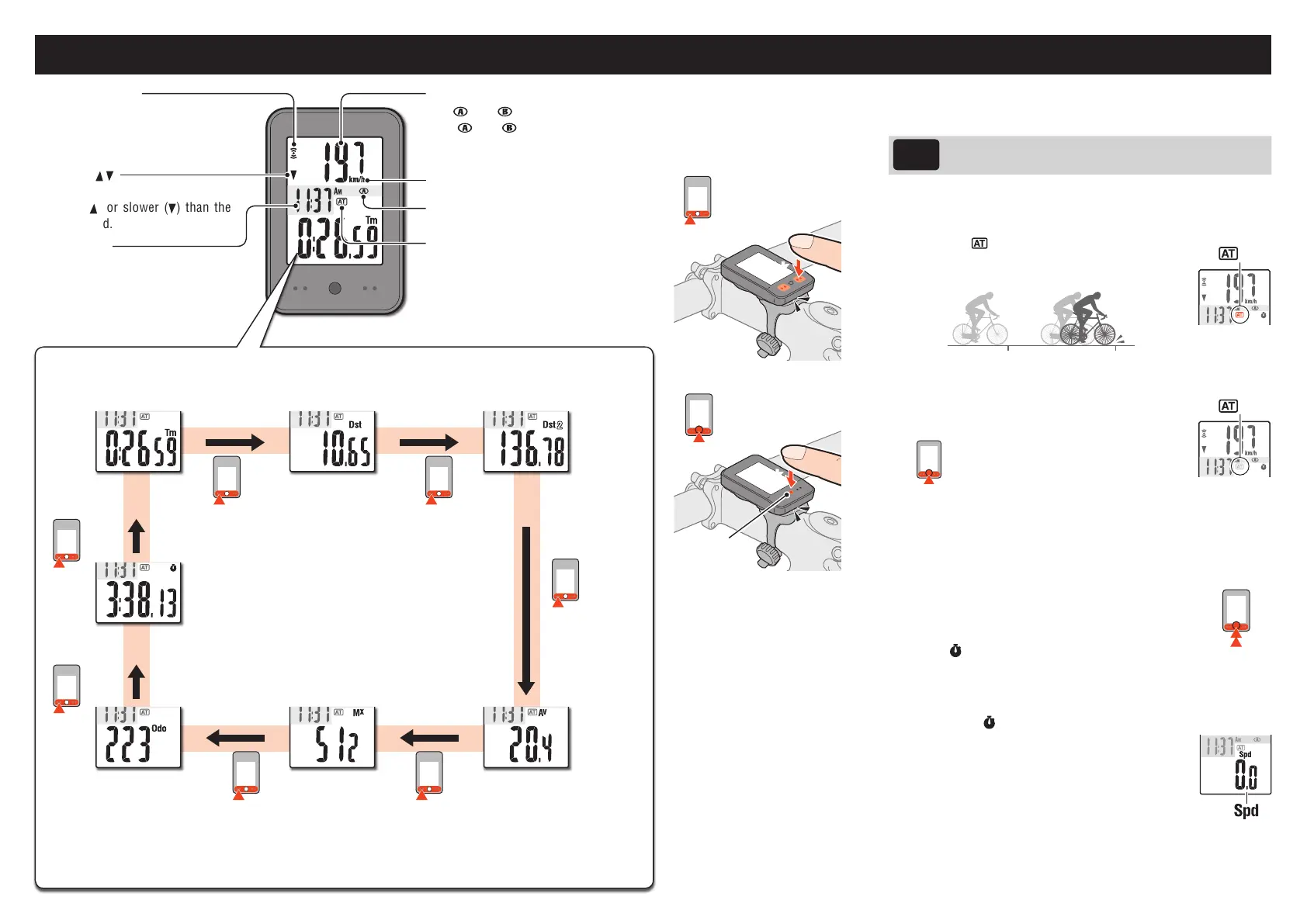
Operating the computer [Measuring screen]
Clock display
Elapsed Time
0:00’00”–9:59’59”
Stop watch (*2)
0:00’00-9:59’59”
Total Distance
0–99999km[mile]
Trip Distance
0.00–999.99km[mile]
Maximum Speed
0.0–105.9km/h
[0.0–65.0mph]
Trip Distance-2
0.00–999.99km[mile]
Average Speed (*1)
0.0–105.9km/h
[0.0–65.0mph]
Starting / Stopping measurement
Therearetwomeasurementmethods;manualmodeandautomode.
Setting
method
See“Changingthecomputersettings:Selectingtheauto
mode”(Page7).
Thespeedunit(km/hormph)ashesduringmeasurement.
*Themaximumspeedandtotaldistanceareupdatedregardlessofstart/
stopofthemeasurement.
• Auto mode (
illuminated)
Measurementsstartautomaticallywhenthebicycleis
inmotion.
• Manual mode
PresstheSSEbuttontogetherwiththeunittostart/
stopthemeasurement.
SSE
+
MODE
Starting/Stoppingmeasurement
*Whenthecomputerisremovedfromthebracket,presstheSSE
buttononthefrontandtheMODEbuttononthebacksimultane-
ously.
Resetting data
PressingandholdingSSEtogetherwiththeunitonthe
measurementscreenresetsanymeasurementdata,ex-
ceptthetotaldistance(Odo),tripdistance-2(Dst2),and
stopwatch(
).
*Thetotaldistance(ODO)isnotreset.
• Resetting separately the trip distance-2 and stop watch
Toresetthecurrentlydisplayeddata,displaytripdistance2(Dst2)or
thestopwatch(
),andholddownthemainunitalongwiththeSSE.
*How to reset the trip distance 2 (Dst2) and the
stopwatch displayed in top row of screen
Displaythecurrentspeed(Spd)inbottomrowof
screenandperformtheresetoperation.
Switching computer function
PressingtheMODEbuttonswitchesthemeasurementdataatthebottomintheordershowninthefollowinggure.
Current speed
0.0(
:4.0/ :3.0)–105.9km/h
[0.0(
:3.0/ :2.0)–65.0mph]
*“Spd”iconisdisplayedwhendisplay-
ingcurrentspeedatthebottom.
Sensor signal icon
Flashesinsynchwithasensorsignal.
Pace arrow
Indicateswhetherthecurrentspeed
isfaster(
)orslower( )thanthe
averagespeed.
Speed unit
*1 WhenTmabout10hours,orDstexceeds999.99km,.Ewillappear.
Resetthedata.
*2 Itappearsonlyintheautomode.
MODE
MODE
MODE
MODE
MODE
MODE
MODE
MODE
Click
Click
MODE operation when
the computer is mount-
ed on the bracket
SSE
+
MODE
SSE
ON
OFF
SSE
+
MODE
(Press&hold)













 To Next Page