SENSOR ZONE
5 mm
Mounting the computer
5
Attach/detach computer
6
Test operation
vÌiÀÊ>ÌÌ>V}ÊÌiÊV«ÕÌiÀ]ÊÀÌ>ÌiÊÌiÊvÀÌÊÜiiÊ}iÌÞÊÌÊViVÊÌ>ÌÊVÕÀÀiÌ
ëii`ÊÃÊ`ë>Þi`ÊÊÌiÊV«ÕÌiÀ°
vÊÌiÊëii`ÊÃÊÌÊ`ë>Þi`]ÊÀiviÀÊÌÊÌiÊ>ÌÌ>ViÌÊV`ÌÃÊÊÃÌi«ÃÊ£]ÊÓ]Ê>`Ê{Ê
Ê>}>°
4
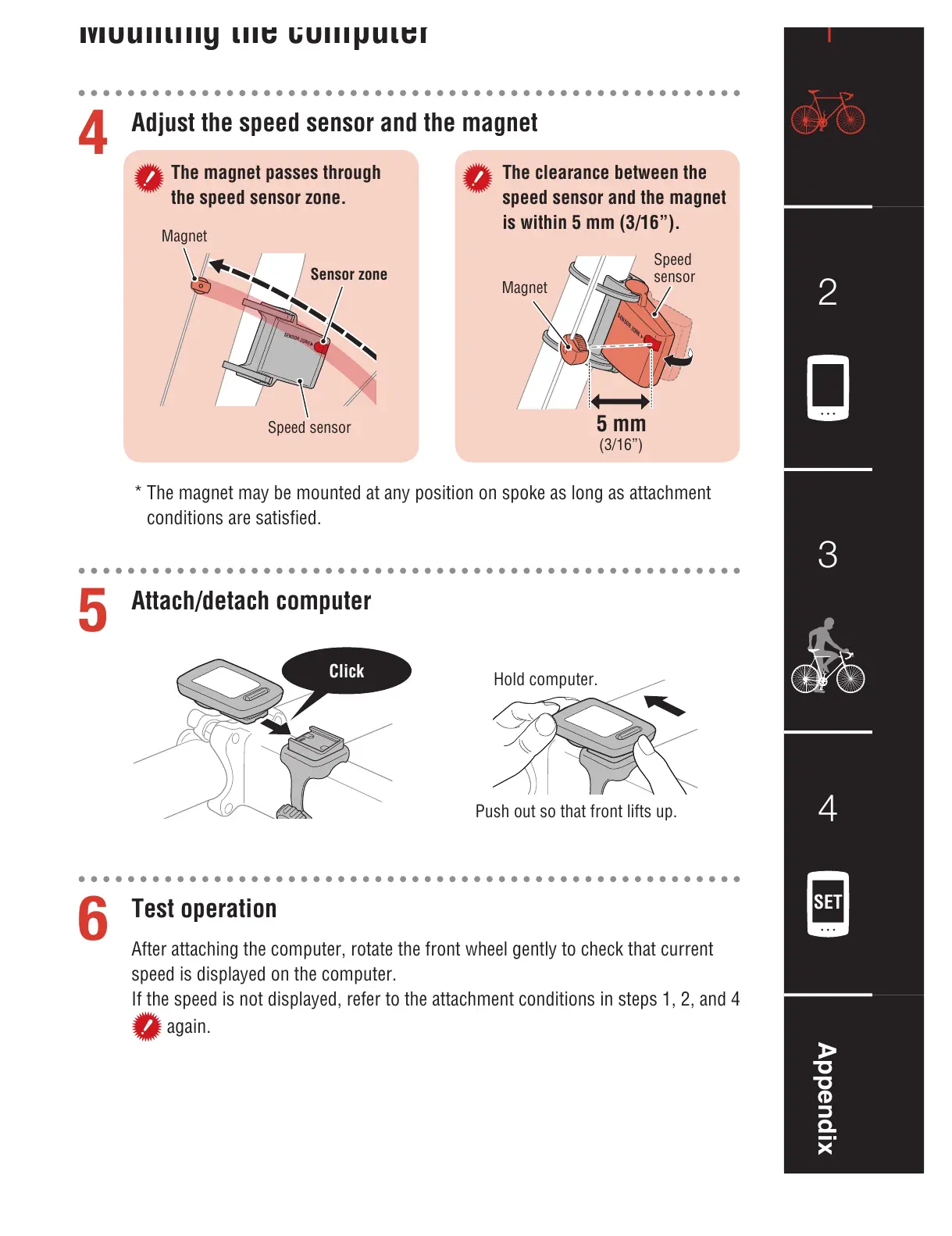
Adjust the speed sensor and the magnet
The magnet passes through
the speed sensor zone.
The clearance between the
speed sensor and the magnet
is within 5 mm (3/16”).
IÊ/iÊ>}iÌÊ>ÞÊLiÊÕÌi`Ê>ÌÊ>ÞÊ«ÃÌÊÊëiÊ>ÃÊ}Ê>ÃÊ>ÌÌ>ViÌÊ
V`ÌÃÊ>ÀiÊÃ>ÌÃwi`°
`ÊV«ÕÌiÀ°
*ÕÃÊÕÌÊÃÊÌ>ÌÊvÀÌÊvÌÃÊÕ«°
Click
>}iÌ
Sensor zone
-«ii`ÊÃiÃÀ
ÎɣȻ®
-«ii`Ê
ÃiÃÀ
>}iÌ














 To Next Page