Need help?
Do you have a question about the Cayin N8 and is the answer not in the manual?
Offers choice between vacuum tube and solid state amplification for single-ended headphone output.
Supports both 4.4mm balanced and 3.5mm single-ended headphone outputs.
Provides 4.4mm balanced and 3.5mm single-ended line outputs.
Supports USB Audio, S/PDIF, and I2S digital outputs.
Supports multiple Bluetooth audio profiles for wireless connectivity.
Allows firmware updates over-the-air via dual-band Wi-Fi.
Supports various formats up to 32Bit/384kHz PCM and DSD256, SACD-ISO.
Features 128GB internal storage and TF card support up to 512GB, plus OTG.
Utilizes USB 3.0 for high-speed data transfer.
Runs a proprietary OS with touchscreen and supports QC2.0/Pump Express fast charging.
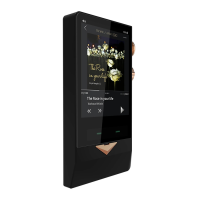
Features physical dials and a Home/Return button for user-friendly control.
Includes a variety of essential cables and accessories.
Details the 4.4mm balanced and 3.5mm single-ended line/headphone outputs.
Covers the multi-function volume knob, playback control dial, and HOME/Return button.
Identifies the multi-purpose USB Port (Type-C), TF card slot, and I2S output.
Explains the Status LED, Vacuum Tube indicator, and RESET function.
Refers to the Touch Screen functionality for user interaction.
Explains how to use the volume knob for power, screen lock, and volume control.
Details using the dial for playback control like play/pause, skip, fast forward/rewind.
Describes how to use the HOME/Return button to navigate to the home screen or playback.
Explains how to organize and play music files by folder, album, artist, etc.
Covers single-ended (3.5mm) and balanced (4.4mm) headphone outputs, including adapters.
Details connecting the single-ended and balanced line outputs to amplifiers.
Explains S/PDIF and I2S digital outputs via Type-C and Mini HDMI connectors.
Describes how the N8 can be used as a USB DAC for external players.
Explains how to connect to a computer for file management using USB Storage mode.
Details how to charge the DAP using a Type-C USB cable and charging indicators.
Explains the multi-color LED's function for sampling rates and charging status.
Instructions for using a TF card to expand storage capacity.
How to use USB OTG feature with flash drives or card readers for storage.
Steps to reset the device if it behaves abnormally.
 General
| DAC | Dual AK4497EQ |
|---|---|
| Wi-Fi | No |
| Storage | expandable via microSD |
| Outputs | 3.5mm single-ended, 4.4mm balanced |
| Bluetooth | Bluetooth 4.2 |
| Supported Formats | DSD, FLAC, ALAC, WAV, AIFF, APE, MP3, AAC, WMA |
| Dimensions | 128mm x 75mm x 25mm |
| Weight | 380g |
| Frequency Response | 20Hz - 20kHz |
| Amplifier | Dual amplification system (Solid State & Tube) |

 To Next Page