3) USB Audio output
The USB Audio output is available for the Type-C USB connector. Please use high
quality USB OTG cable to connect N8 to outboard DAC with USB Audio input.
NOTE:
t When N8 connected to outboard DAC with USB Audio out, the 3.5mm and 4.4mm
analogue output and I2S digital output via HDMI Type C connector will be disabled.
t Most desktop DAC use USB Type-B as their USB Audio input, you’ll need a Type-C to
Type-B USB cable for this connection. The cable is readily available in the market and
is not supplied in N8 package.
8. USB DAC:
N8 can be used as a USB DAC when connect to a outboard player with USB output. The
bundled USB Type-C to Type A cable might be applicable for this purpose.
NOTE:
t To use USB DAC function, you have to toggle USB mode from the Pull Down menu
until then “USB DAC” icon is displayed.
t When connected to an outboard player through USB cable, N8 will display DAC user
interface screen and stop all local playback function.
t Support Windows(drivers required), Mac OS and Android(partial) system.
t Computer, Tablet, Smart phone and even Cayin Digital Audio Player can be used as
outboard player for N8 USB DAC function. You need to acquire an appropriate USB
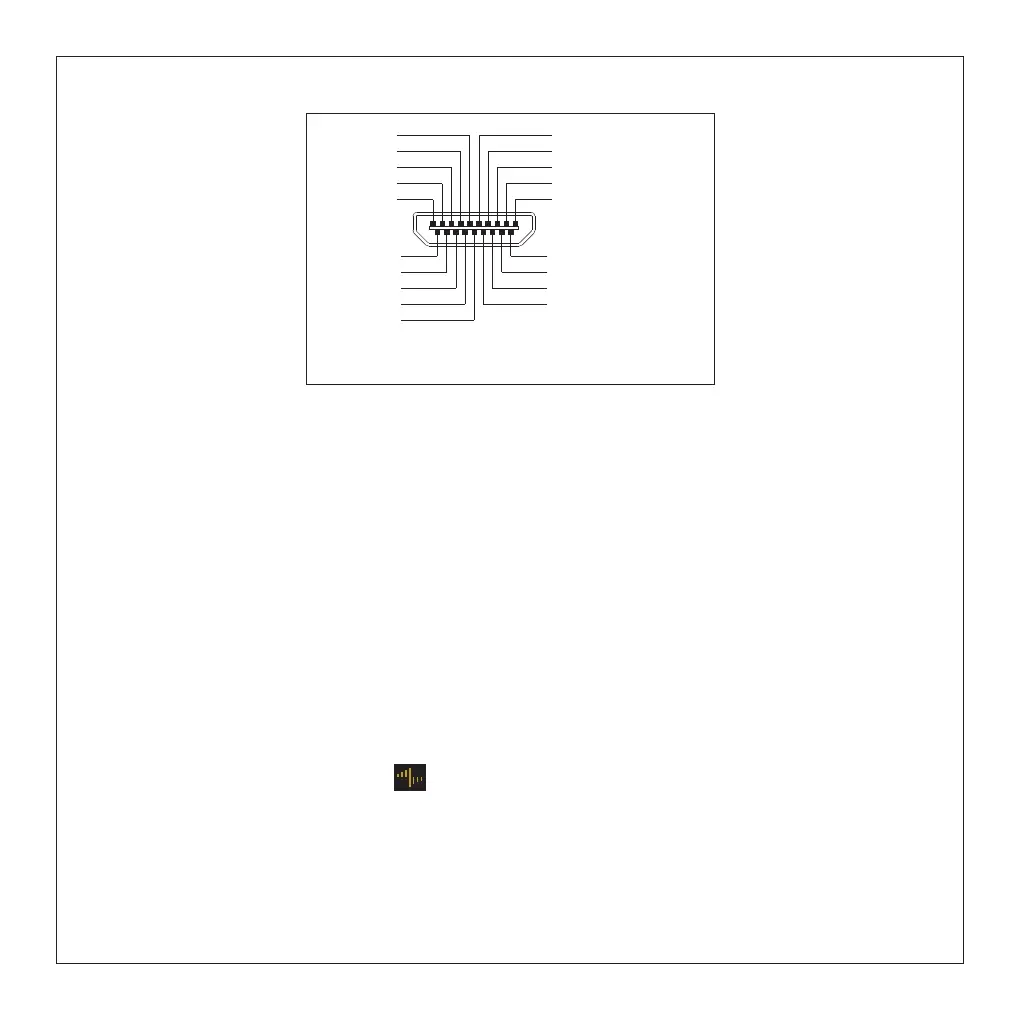
Type-C HDMI Pin Definition Diagram
NC
DSD/PCM
NC
GND
MCLK+
LRCK+/DSD DATA L+
GND
SCLK+/DSD CLK+
DATA+/DSD DATA R+
GND
+5V
NC
MUTE
MCLK-
GND
LRCK-/DSD DATA L-
SCLK-/DSD CLK-
GND
DATA-/DSD DATA R-
1
19
9


 To Next Page