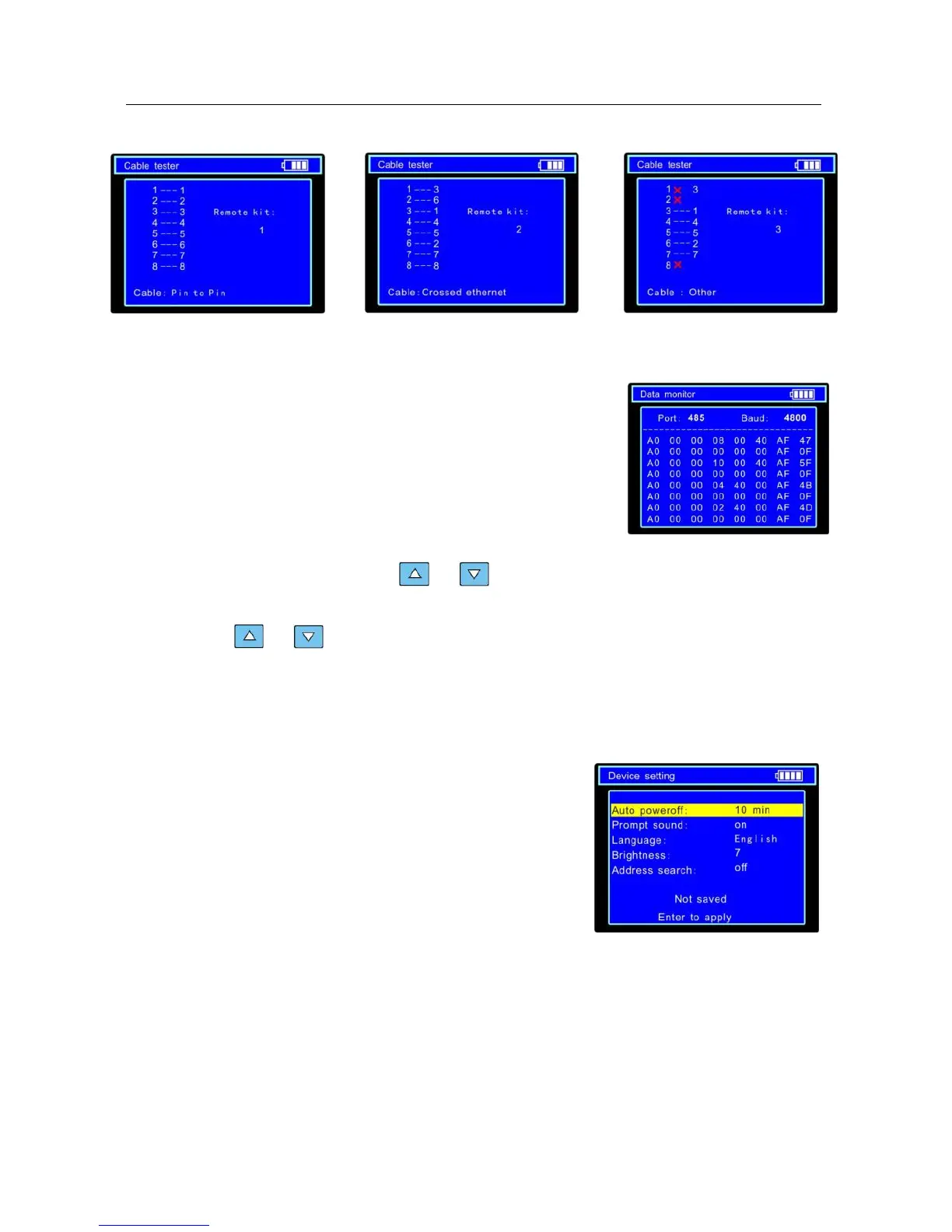
The right picture shows line1-7 are closed, line8 is open and the number of the cable tester box is
255
Straight-through Line Cross Line Open Line or Short Line
3.7. Data monitor
Capture the command data from RS485 controlling system.
a. Connect the RS485 or RS232 interface of controlling system
with the RS485 or RS232 interface of the CCTV testerPRO
(In case of RS485, A to A, B to B)
b. Press SET key and then press or key to select communication port according to
the system connection. Press SET key to save the change.
d. Press or key to select the baud rate according to the baud rate of controlling
system and then press SET key to save the change and capture command data from
controlling system.
e. Press RETURN key to clear the screen.
3.8 Device setting
Set the parameters of the CCTV testerPRO
Auto poweroff: Setting the time of auto shut-down.(Disable,5,10,…,60)
Disable: Disable the “Auto poweroff” function. 5 means the CCTV will power off
after 5 minutes when there is no any operation.
Keypad tone: Open or close the beep of pressing keypad.
Language: Select language of OSD menu


 To Next Page