EasyManua.ls Logo

CCTV Tester Pro - Installing the Battery

CCTV Tester Pro
31 pages
Print Icon
To Next Page IconTo Next Page
To Previous Page IconTo Previous Page
Loading...
CCTV tester PRO User’s Manual
Page.8.
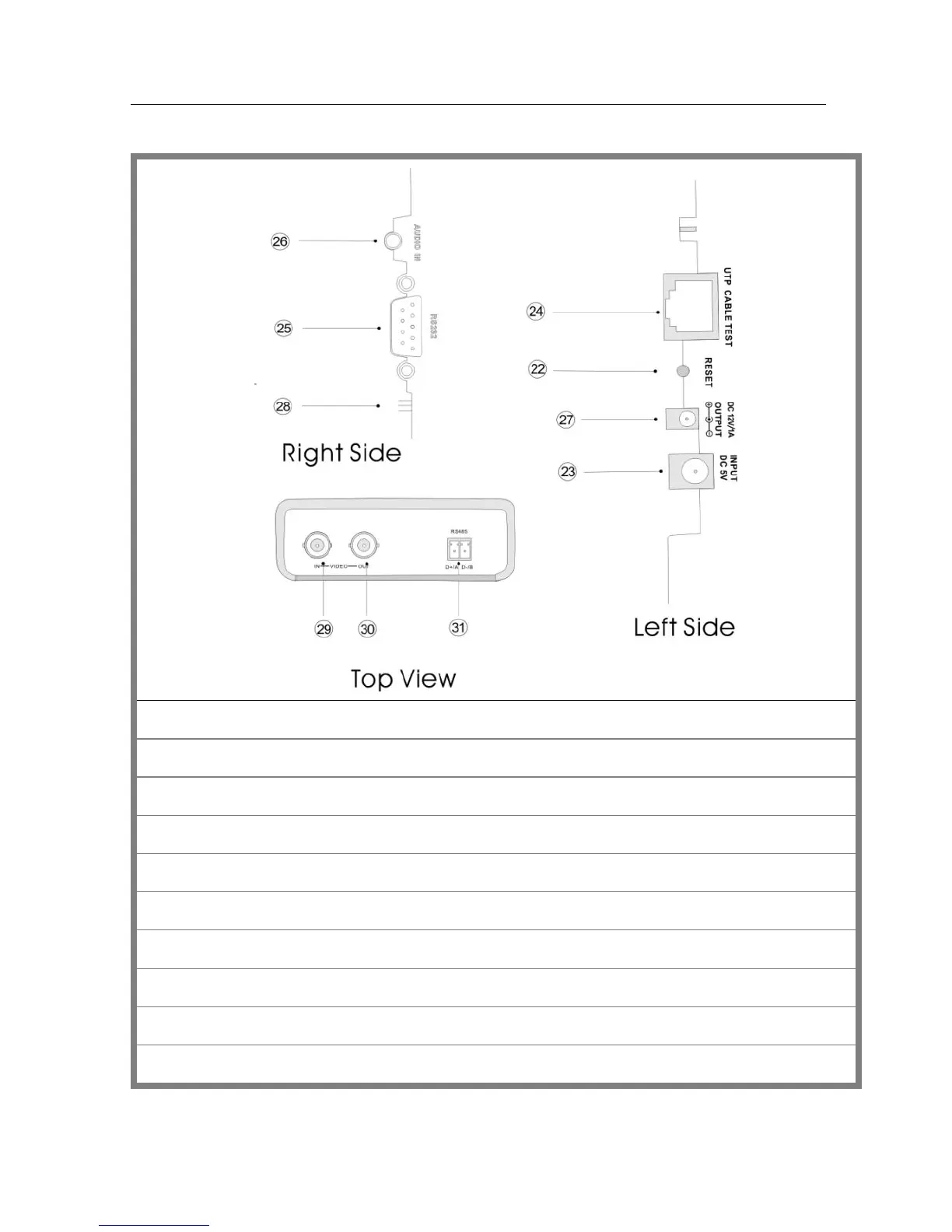
2.4 Side view
22
Reset the default settings of parameters.
23
External power supply (DC, 5V): It is highly recommended to use the equipped power adapter.
24
UTP cable port: Please use together with UTP LAN cable tester.
25
RS232 interface: RS232 communication for the PTZ.
26
Audio input: test the pickup and other audio equipments on the front-end
27
DC12V1A power output: output DC12V power for camera
28
Tester speaker
29
Video input (BNC input interface): Inputs the video.
30
Video output (BNC output interface): Outputs the video.
31
RS485/422 Interface: RS485/RS422 communication for the PTZ.