Instruction Manual | 29
Important:
Before any maintenance is started involving electrical parts, the
appliance must be disconnected from the power supply. If the
oven has been in use, let the oven cavity and the heating elements
cool down before attempting any maintenance.
Never use screwdrivers or other utensils to remove the light cover.
This could damage the enamel of the oven or the lamp holder.
Remove only by hand.
Never replace the bulb with bare hands as contamination from
your fingers can cause premature failure. Always use a clean cloth
or gloves. Old bulbs may still be hot!
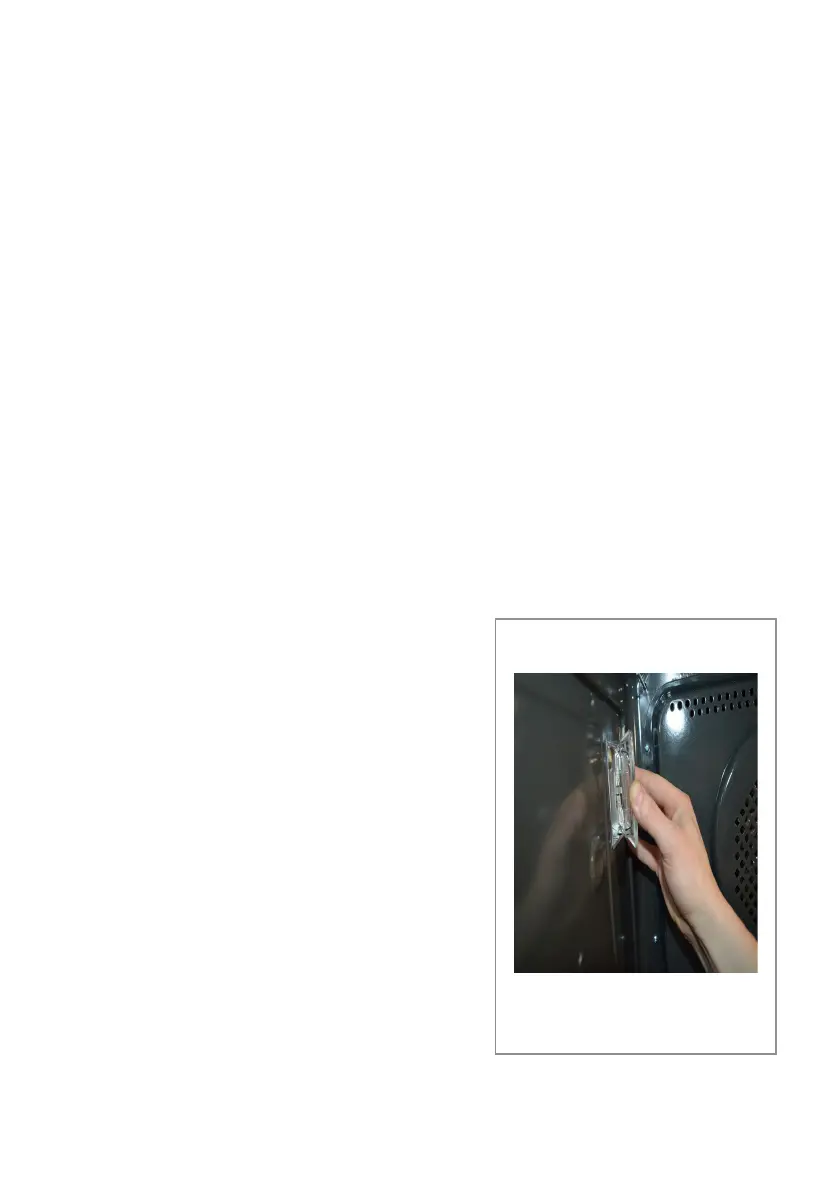
Changing the bulb (Fig. 11)
• Remove all the pans, telescopic runners and shelf supports as
shown on pages 27 and 28
• Carefully detach the glass cover by
applying pressure with your thumb to
one side whilst holding the other side
with your fingers.
• Carefully remove the old bulb and
insert a new bulb suitable for high
temperatures (300°C) of the following
specification; 230-240V~, 50Hz, 25W,
G9 fitting
• Refit the glass cover cover
Please note:
The bulb replacement is not covered by
your guarantee.
Fig. 11
Changing the oven light bulbs


 To Next Page