ENGLISH
36
- Turbo-High
- Normal-Medium
- Eco-Low
7) Mopping
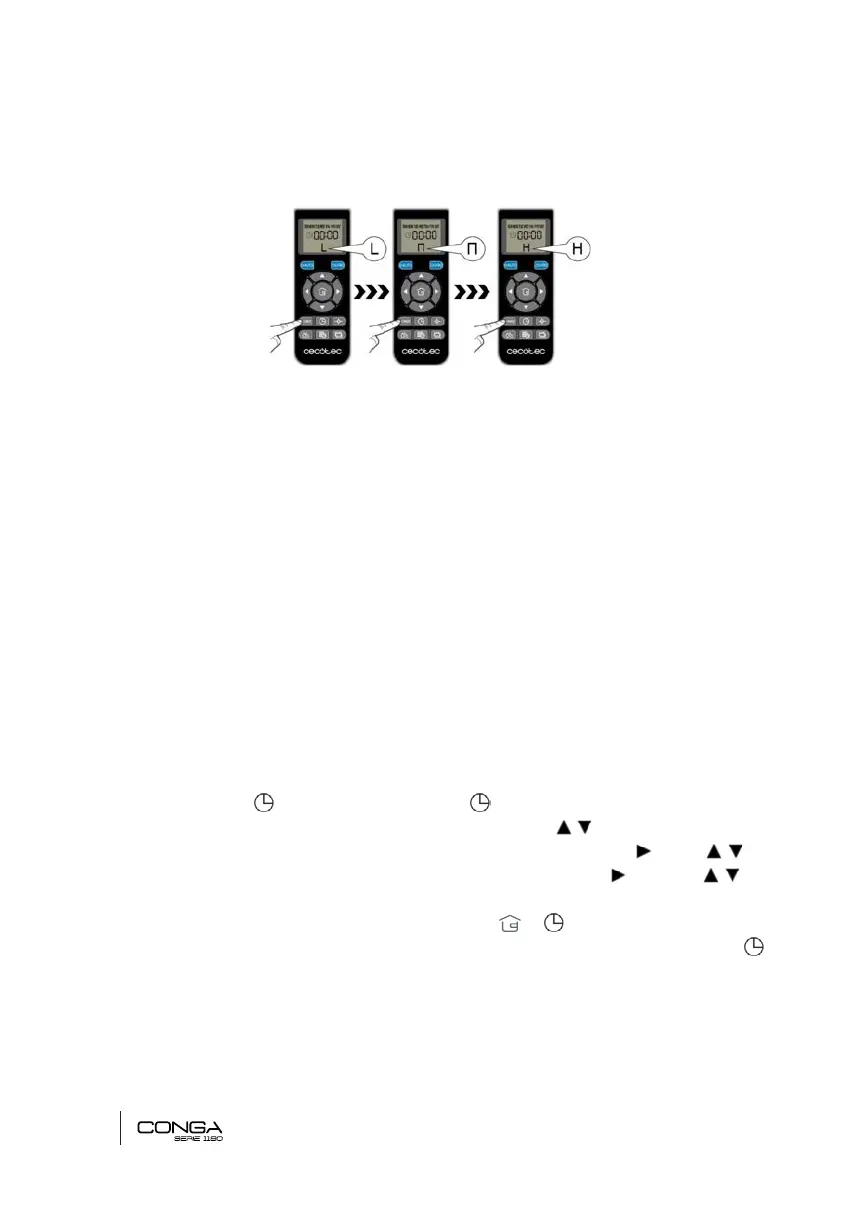
The water intensity can also be adjusted through the remote control. Press the WATER DROP
button in order to switch between the 3 different levels of water-drop speed:
- High-H
- Normal-M
- Low-L
CLEANING SCHEDULING
For an easier cleaning, the robot can be scheduled from the remote control. In accordance with
the conguration, the robot will automatically start cleaning the selected days at the desired
time.
* The time options in the remote control are: 12:00 a. m. – 11:59 p.m. y 12:00 p.m. – 11:59 p.m.
* Before setting the time and the robot conguration, make the robot’s power switch is set on
“I” and that the the AUTO button on the control panel is lit up in is lit up in blue or red. If it is not
turned on, activate the robot from the control panel or from the remote control.
1. Set the current time and day.
• Press the button and the week day and icon will start ashing on the display.
• First, select the day of the week using the direction arrows and select today’s day.
• To change from the day of the week to time, use the direction arrow . Press to
select the desired time. Repeat this action with the minutes: press and then to
select the minutes.
• Once the day of the week and the time is set, press or to safe.
Note: the day of the week will appear on the display. To make sure it has been saved, press
again and ensure it is the correct day.
05133_Conga 1190 Gyro_Manual_PE.indd 36 1/8/18 12:38











 To Next Page