ENGLISH
23
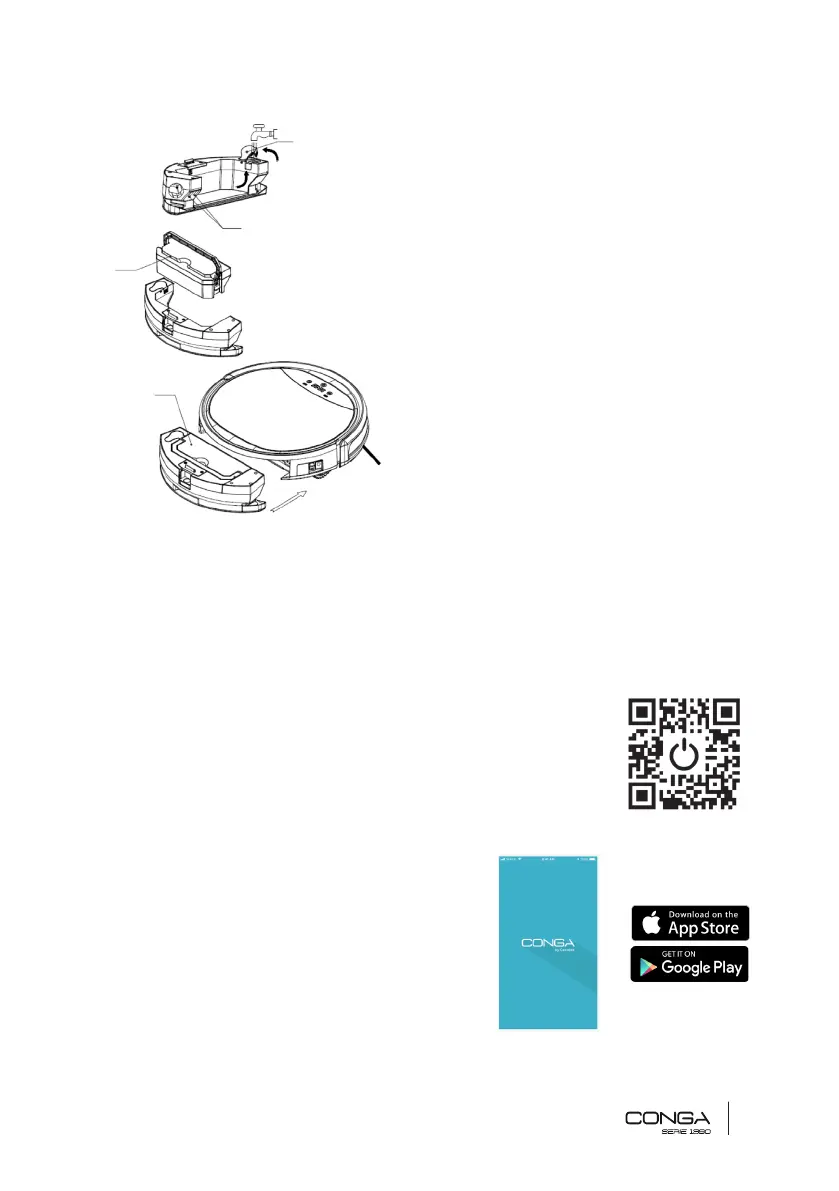
Water and dust tank installation
4. Open the water-lling opening, ll the tank
with water and close it again following the arrows
on the picture.
5. Completely dry the connecting plates.
6. Introduce the dust tank into the
compartment and lower the handle.
7. Introduce the 2-in-1 tank (water and dust)
into the product’s main body.
4. APP DOWNLOAD AND CONNECTION VIA WI-FI
In order to access all the robot’s functions from anywhere, it is suggested to download the
Conga S1390 App. You will be able to control the robot in the most efcient way, enjoying the
excellence of cleaning.
APP ADVANTAGES:
• Control your robot in an easy and intuitive wat.
• Activate the cleaning process from any point.
• Carry out settings and daily scheduling.
• Choose between its different cleaning modes.
• View how the robot creates an interactive map as it is cleaning.
• Check the cleaned surface and the time taken.
• Check the cleaning history.
CONFIGURATION:
• Download the Conga S1390 App from App Store
or Google Play.
• Create an account with your e-mail and a
4
5
6
7











 To Next Page