ENGLISH
24
password.
• Conrm login.
• Add your Conga robot.
• Connect to Wi-Fi
WARNINGS:
• The App does not support 5G networks.
• The Wi-Fi name and password cannot exceed 32 bits.
• If the network conguration fails to connect, follow the below steps:
• Press the start button for 5 seconds, the robot will enter sleeping mode and the Wi-Fi
light indicator will blink fast indicating connection error. Retry connecting the robot again
following the steps in the before section.
• If the connection fails again, check if:
• The robot is too far away from the router.
• The Wi-Fi password is incorrect.
• The Wi-Fi networks is not 2.4G Hz.
5. OPERATION
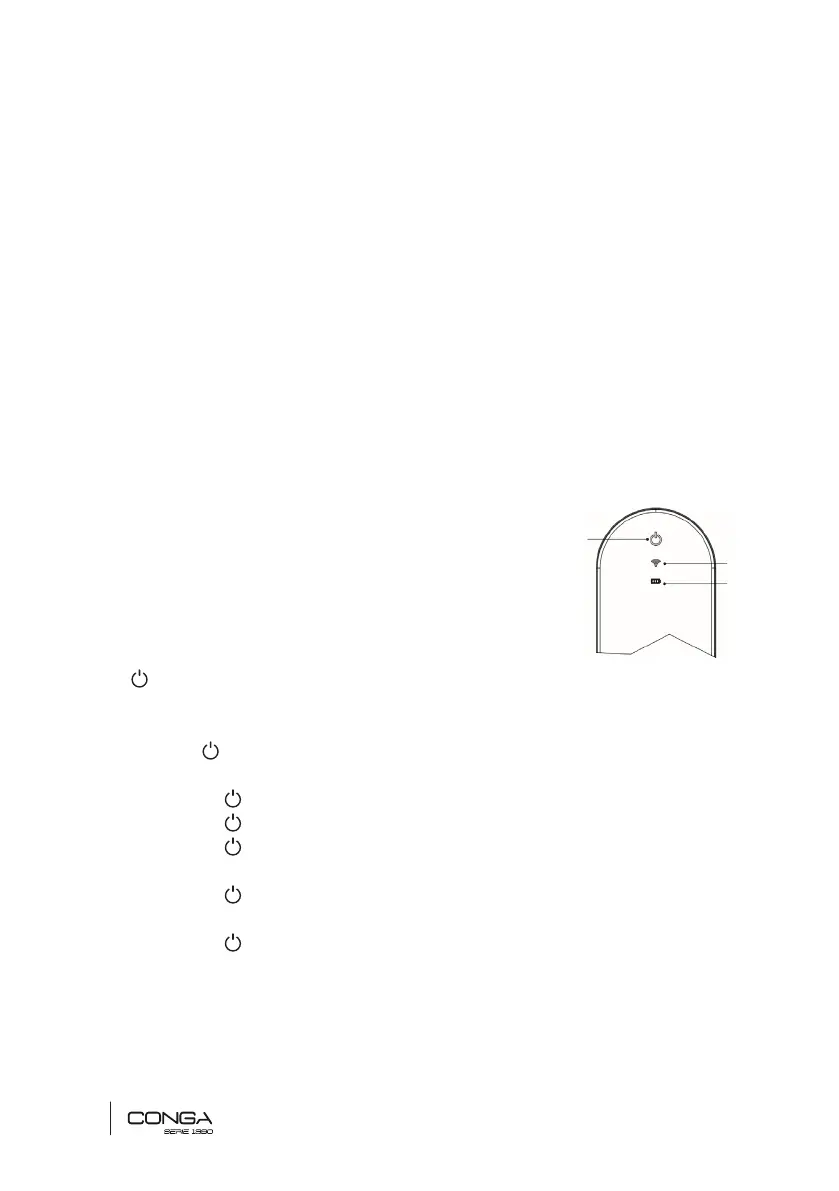
TOUCH DISPLAY
1. Power button
2. Wi-Fi indicator light
3. Battery indicator light
Note: on the robot and on the remote control has the same function.
1. ON/OFF
• Press to start the robot up.
• From the standby mode:
- Press to start auto cleaning mode.
- Press for 3 seconds to enter network conguration.
- Press for 5 seconds to enter sleeping mode.
• During operation:
- Press to stop operation.
• During charging:
- Press to enter auto cleaning mode.
2. Wi-Fi indicator light
• When entering network conguration (see before section), the white light will blink
slowly.
1
3
2











 To Next Page