TOTAL IRON 10100 PRO | 25
ENGLESK
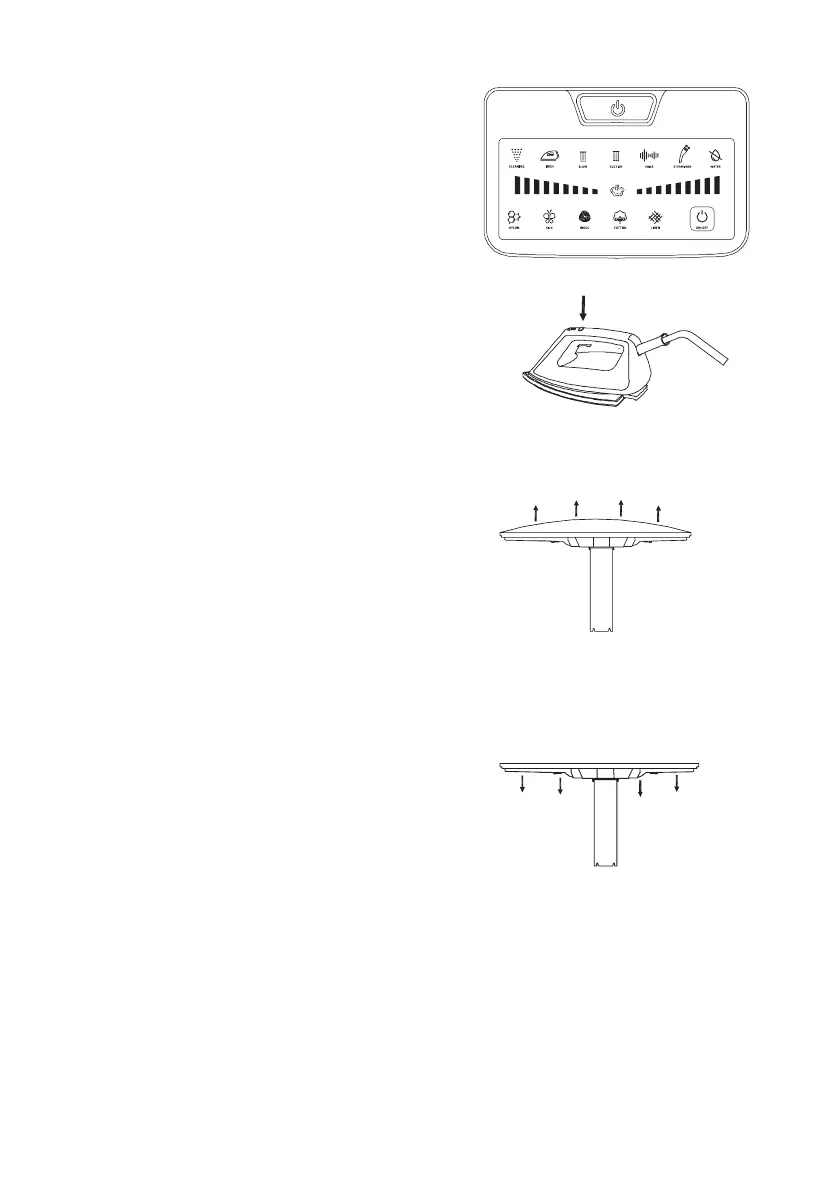
6. a) Press the Power button.
b)PresstheOn/obutton.
c) Select the fabric material to activate the
device.
- The preheating light indicator will
ash.
- After approx. 2 minutes, the prehea-
ting light will stop ashing, indicating
the device is ready for use.
- The heating ready light indicator will
ashthen.
- The iron ready light indicator will turn
on red when heating.
- The same iron ready light indicator will
turn blue indicating it is ready for use.
7. Press the steam trigger to start steam
ironing.
Warning: Do not direct steam at people.
8. To iron in blowing mode on the board,
press the shift button on the top of the
iron or press the blowing button on the
touch panel.
- When this function is activated, the
boardcoverislledwithairforamore
comfortable ironing. It is ideal for iro-
ningthemostdicultpartsofclothes.
- Tap on the blowing indicator on the pa-
nel or press the top shift button on the
iron to stop the blowing mode.
9. To iron in suction mode on the board,
press the shift button on the top of the
iron or press the suction button on the
touch panel.
-The suction mode holds the garment
at and neat ontheboard,andmakes
perfect pleats on trousers.
- Tap on the suction indicator on the pa-
nel or press the top shift button on the
iron to stop the blowing mode.







 To Next Page