7.
MENU / MODES:
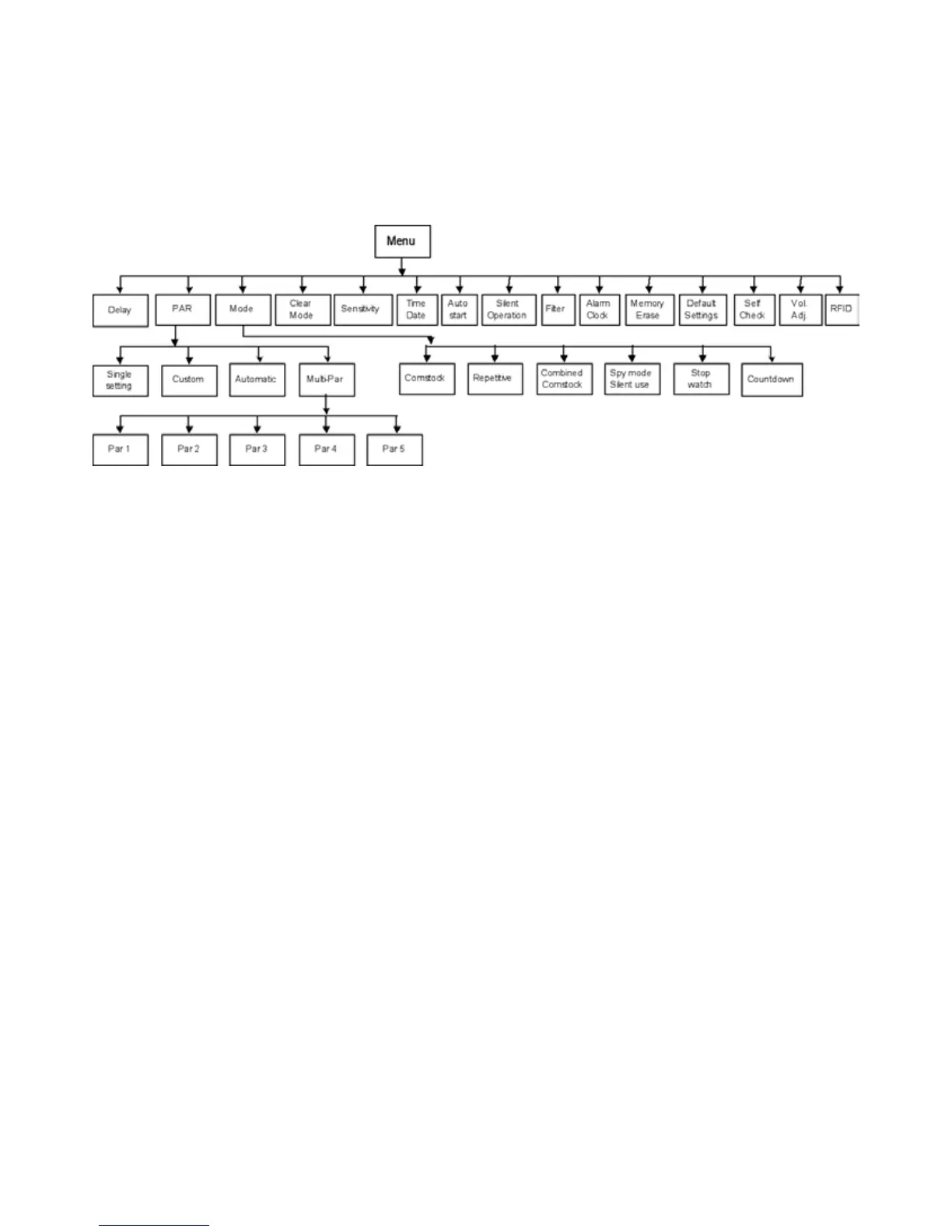
The CED7000 Timer has a complete menu of functions / features many of which offer custom pro-
grams,settings,andcapabilitiesthatnoothertimeronthemarkettodayprovides.Belowisalistof
the Menu options:
PROGRAMMING THE TIMER:
Pressthe“MENU”buttontodisplaythefullrangeofsettings&featuresoftheCED7000Timer.In
the center of the timer there are four directional keys with raised edges that provide directional move-
mentwithintheMenuselection.Inthecenterofthesekeysisthe“ENTER”button,whichismarked
withan“E”.The“UP&DOWN”keysallowtheusertoselectasettingorfunctionfromtheMenu,
bymovingthehighlightupordown.The“LEFT&RIGHT”keysallowtheusertoselectasetting
or value within a given mode, or function. Each directional key moves the highlighted selector in the
directionofthekeypressed.Whenavaluehasbeenselected(highlighted),presstheENTERbutton
tostore(conrm)it.Example:PressMENU,presstheDOWNkeyonetimetohighlightPAR,press
ENTER.ThedisplaywillshowhighlightedPAR.PressENTERtoconrmthis.Thedisplaywillthen
highlightthe“0”intheleftmostcolumn.Toset5.3secondsPAR,continuepressingtheRIGHTkey
onetimetillithighlightsthe“seconds”column.PresstheUPkeyvetimestodisplaythenumber“5”
.Then,presstheRIGHTkeyagaintohighlightthe0.10columnandtheUPkeytillthenumber“3”is
displayed.Onceyouhavethecorrecttimeselected,pressENTERtostoretheselectedPAR.
PressENTERtosavedata
PressCLEARtoexitwithoutsavingdata
ToclearanexistingParsetting,selecttheMenu,andthenscrolldowntoCLEARMODEandpress
ENTER.ThiswillclearanyPARsettings,functions,ormodeincurrentuseandreturnthetimerto
Comstock ready mode.
DAY/DATE/TIME SETTING:
SelectfromtheMenu“Time&Date”,pressENTERandthenselectfromthefollowingoptions.“Set
Time”, “Set Date”, or “Display Mode”. Within “Display Mode”, select one of the following time
formats:Date&Time,DateOnly,TimeOnly,orHideAll.If“HideAll”isselected,thedate&time
functions will not be displayed on the timer screen until the user returns to the function and selects one
oftheotheroptions,suchas“Time&Date”.



 To Next Page