12.
MULTI- PAR TIME SELECTION: (Continued….)
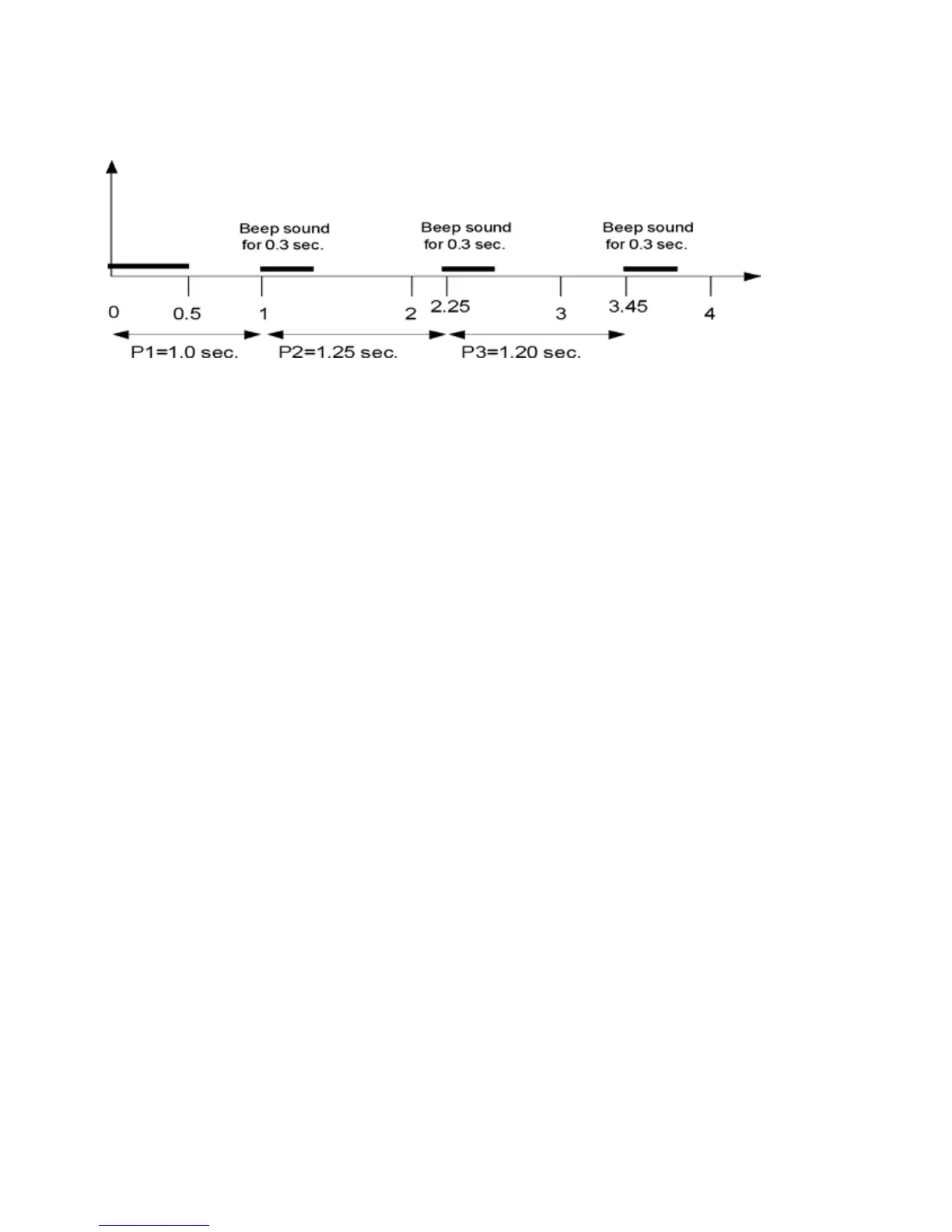
(The above example shows three Par times being activated by a single start beep. A total of four beeps
willbeemittedfromthetimer.OneSTARTbeepandthreePARbeepsattheintervalsselected.Each
PARtimeenteredwillbebasedfromthepreviousone.Thereforeintheaboveexample,fromthetimer
activation (start beep), the next beep will begin at 1.0 second, followed by another beep starting at 2.25
seconds,withthenalbeepstartingat3.45seconds.)
Toactivatethetimerandtheselected“Partimes”,simplypresstheSTARTbutton.Asecond“stop”
beep will occur at EACH of the selected “Par times”. The timer will continue to record shots through-
out the entire process, even after the selected Par times have elapsed. This allows accurate review of
allshotsandtheirexacttimesred.Thisselectedprogrammingwillremainactiveuntilcleared.This
allows the user to practice a given selected drill over and over again.
PLEASE NOTE: When using Multi-Par, the timer display will indicate the multiple Par 1 value as
thePAR time on the display and show the mode (MULTI-PAR1)inthelowerdisplaymatrixarea.
Once the timer is activated and as each Multi-Par setting progress, the current value will appear on the
display in an ongoing progression.
(When in a PAR time function, ALL (Par) beeps will sound at the exact pre-set time for a 0.30 sec-
ond duration! Note, that when in Multi-Par, a maximum Par time of 99.99 seconds is allowed)
ToclearanexistingParsetting,selecttheMenu,andthenscrolldowntoCLEARMODEandpress
ENTER.ThiswillclearanyPARsettings,functions,ormodeincurrentuseandreturnthetimerto
Comstock ready mode
R.O. (RANGE OFFICER) MODE:
DesignedforRangeOfcerswhowanttouseatimerformatchorinstructorpurposesanddesireonly
basic operation without additional features. When selected, the timer Menu only shows the follow-
ingbasicfunctions.DELAY,SINGLEPAR,&SENSITIVITY.Theusercanselectthedelayoption
desiredandadjustsensitivityandsetasinglePartime.ThetimerwillthenallowSTART&REVIEW
functionsandthedisplaycontinuesto show all information as normal. ALLOTHERFEATURES
ANDFUNCTIONSOFTHISTIIMERAREHIDDENANDINACTIVEWHENINROMODE.To
activate:SelectMenu,andscrolldowntohighlightROMode–pressENTER–HighlighteitherON
orOFFandpressENTER.



 To Next Page