6
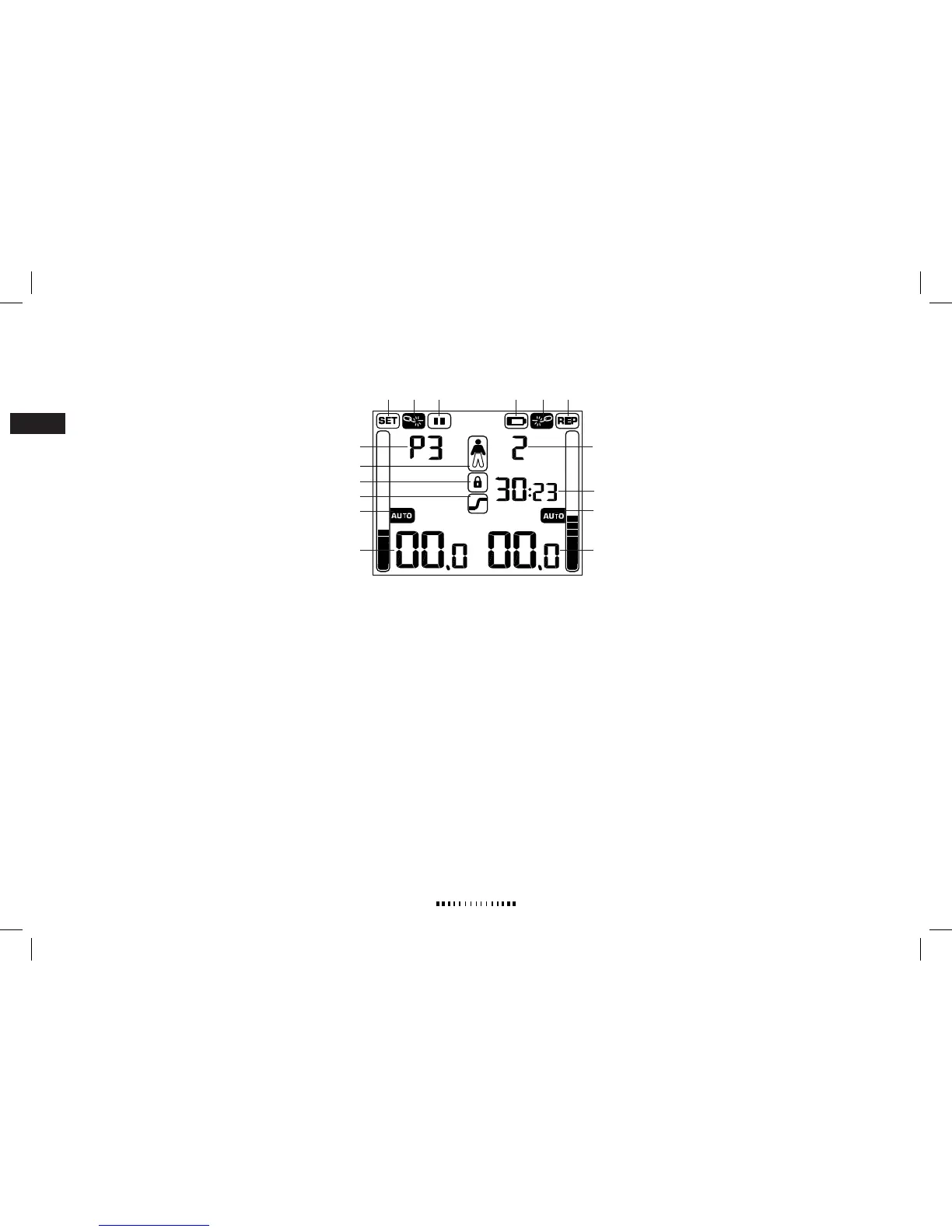
1. SETS
Total or remaining number of sets in selected
program. If SET is not displayed the bargraf illustrates
stimulation amplitude for left channel.
2. REPS
Total or remaining number of repetitions in each set.
If REP is not displayed, the bargraph illustrates
stimulation amplitude for right channel.
3. BROKEN CIRCUIT
Indicates if the circuit (connection between
stimulator and electrode) is broken.
For further information, see
Trouble Shooting.
4. PAUSE
The stimulation program is paused.
5. BATTERY STATUS
Empty batteries. This symbol is shown when the batter-
ies are almost empty.
6. PROGRAM NUMBER
Selected program number. See
Program Description
for
further information.
7. LEVEL NUMBER
Intensity level. See
Program Description
for further
information.
8. REMAINING TIME
Remaining program time in minutes and seconds.
Time is flashing during timer setting, also counts down
the time for break between sets.
9. BODY PART
Selected body part for stimulating, indicated by the
filled body part.
10. KEY LOCK
Key lock is activated.
11. WORK/REST
Upper part flashes during work, lower part during rest
periods.
12. AUTO STIMULATION MODE
Activated automatic amplitude setting. “AUTO” is flash-
ing during test mode and steady during stimulation.
13. AMPLITUDE LEVEL
Selected amplitude in mA (not shown in Auto stimula-
tion mode).
For information about the symbols on the stimulator’s back,
see section
Key to the Stimulator Symbols.
OVERVIEW – GET TO KNOW YOUR STIMULATOR
DISPLAY SYMBOLS



 To Next Page