16
EN
NewTom GO 2D/3D - TECHNICAL MANUAL
EN
PC CONFIGURATION
3.7 PLEORA DRIVER INSTALLATION AND INTEL PRO 1000 NETWORK CARD CONFIGURATION
IMPORTANT: disconnect the device from power supply, wait for 10-15 seconds and reconnect to power
supply.
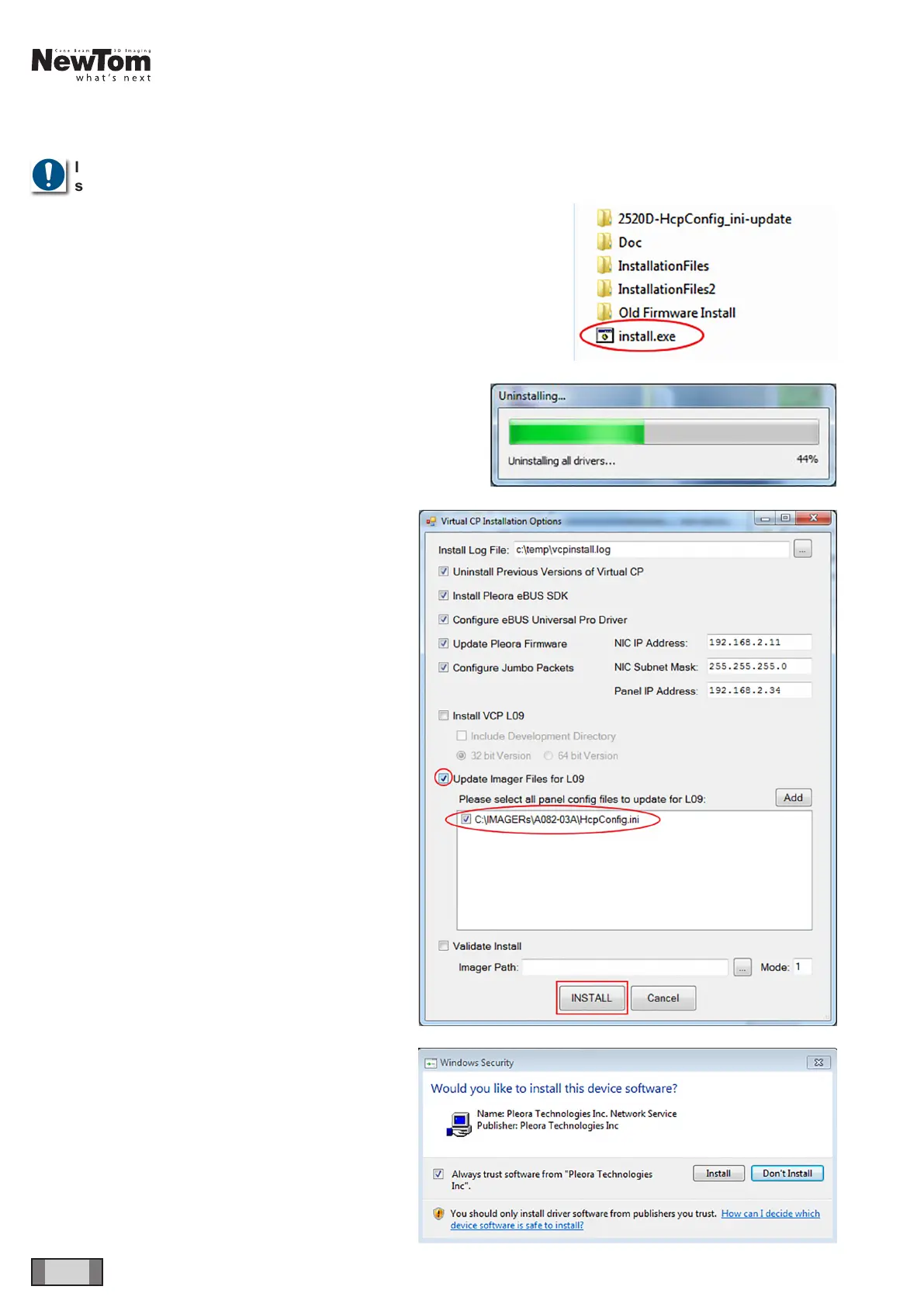
In NNT installation folder, open “Varian” folder and run
the “Install.exe” le.
The installer will check whether previous versions of
Pleora Driver are already present and will uninstall
them if necessary.
WARNING: this procedure may take a long time, do not
interrupt the process. At the end the PC will restart and
resume installation. If this does not occur automatically,
manually relaunch “install.exe”.
The screen on the side will be displayed: tick off “Update
Imager Files for L09” and select the “HcpCong.ini” le.
Click on “INSTALL”.
WARNING: During this procedure do not disconnect or
switch off the device. Failure of panel rmware update
may compromise its functionality. If dialogs appear,
follow the instructions.



 To Next Page