Home
CEFLA
Dental equipment
NewTom GO 2D
Page 30
CEFLA NewTom GO 2D - Page 30
52 pages
Manual
Save Page as PDF
To Next Page
To Next Page
To Previous Page
To Previous Page
Loading...
28
EN
NewT
om GO 2D/3D
- TECHNICAL
MANUAL
EN
PC CONFIGURA
TION
W
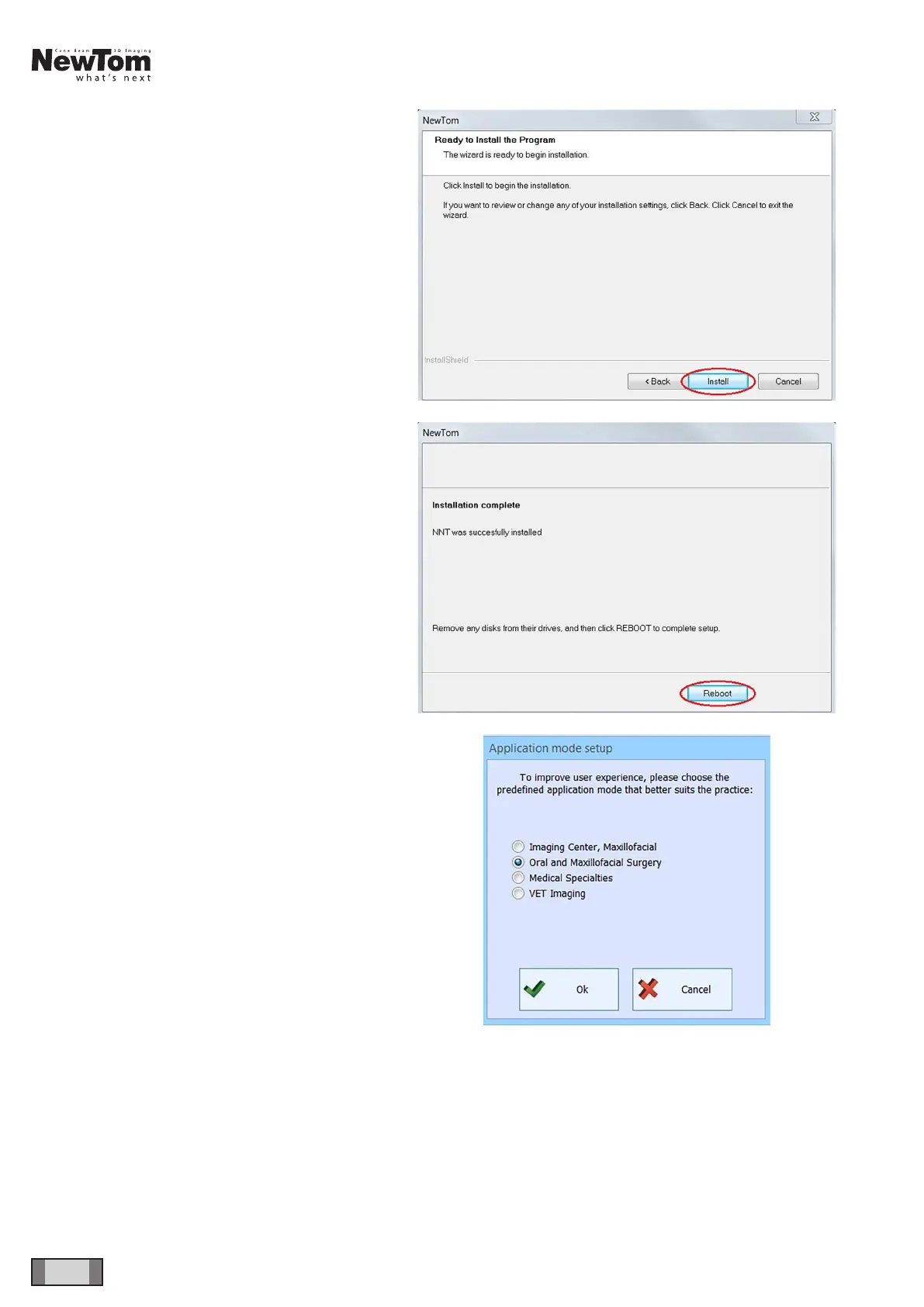
ait and click on “Install”.
At the end, restart the computer
.
Upon
rst
NNT
launch, the display mode has to be
selected (“Oral and Maxillofacial Surgery” is the
standard mode)
29
31
Table of Contents
Main Page
Table of Contents
3
Device Installation
5
Required Instruments
5
Internal Connections
5
External Connections
6
Cover, Handles, Mirror Removal
7
Monobloc Cover
7
Panel Cover
7
Mirror
8
Handles
8
Mirror Frame Cover
9
Side Covers
9
Arch Cover
9
Pc Configuration
10
System Requirements
10
Preliminary Operations
10
Operating System Settings
11
Disabling Windows Firewall
13
Pc-Device Connection
14
Cbct Panel Installation
17
Pleora Driver Installation and Intel Pro 1000 Network Card Configuration
18
Acquisition Server Software Installation
21
Intel Pro 1000 Driver Update
23
Acquisition Server Configuration
25
Nnt Software Installation and Configuration
29
CALIBRATION See Corresponding "3D CALIBRATION MANUAL - OPT Entry Level" Code 97071221
34
Control Boards Description
35
Unit Block Diagram
35
Power Board 97661407
36
Connectors List
38
Fuses and Dip Switches List
38
Leds List
38
Logic Board 97661408
42
Connectors List
42
Dip Switches List
42
Leds List
42
Sensor Interface Board 97661485
44
Connectors List
46
Leds List
46
Monobloc Area
47
Keyboard Board 97661484
48
Connectors List
48
Logo Board 97661539
48
Troubleshooting
49
Craniostat Adjustment
49
Installation Check List (for Usa Only)
50
Related product manuals
CEFLA NewTom GO
76 pages
CEFLA RX DC
67 pages
CEFLA VENUS PLUS
24 pages



 To Next Page