English - 12 -
7KH79VRUWVDOOVWRUHGVWDWLRQVLQWKH&KDQQHO/LVW
<RX FDQ HGLW WKLV FKDQQHO OLVW VHW IDYRXULWHV RU VHW
DFWLYHVWDWLRQVWREHOLVWHGE\XVLQJWKH&KDQQHO/LVW
options.
&RQ¿JXULQJ3DUHQWDO6HWWLQJV
To prohibit viewing of certain pro grammes, channels and
menus can be locked by using the parental control system.
7RGL V SO D \ SD U H QW D O OR F N PHQ X RSW L RQ V WKH 3 , 1Q X P EH U
should be entered. The factory default PIN number is
0000$IWHUFRGLQJWKHFRUUHFW3,1QXPEHUSDUHQWDO
settings menu will be displayed.
Menu Lock: Menu lock setting enables or disables
the menu access.
Maturity Lock:KHQVHWWKLVRSWLRQJHWVWKHPDWXULW\
information from the broadcast and if this maturity
OHYHOLVGLVDEOHGGLVDEOHVDFFHVVWRWKHEURDGFDVW
Child Lock:KHQ&KLOG/RFNLVVHWWKH79FDQRQO\
be controlled by the remote control. In this case the
buttons on the TV will not work.
Set PIN'H¿QHVDQHZ3,1QXPEHU
Note: If the Country option is set to France, you can use 4725
as the default code.
Electronic Programme Guide (EPG)
6RPHEXWQRWDOOFKDQQHOVVHQGLQIRUPDWLRQDERXWWKH
current and next programmes. Press the button
to view the EPG menu.
Up/Down/Left/Right: Navigate EPG.
OK: Displays programme options.
INFO:'LVSOD\VLQGHWDLOHGLQIRUPDWLRQRQWKH
programme selected.
GREEN:6ZLWFKHVWR/LVW6FKHGXOH(3*
YELLOW: Switches to Timeline Schedule EPG.
BLUE:'LVSOD\V¿OWHULQJRSWLRQV
(RECORD): The TV will start to record the selected
SURJDPPH<RXFDQSUHVVDJDLQWRVWRSWKHUHFRUGLQJ
IMPORTANT: Connect a USB disk to your TV while the TV
is switched off. You should then switch on the TV to enable
the recording feature.
Note: Switching to a different broadcast or source is not
available during a recording.
Programme Options
In EPGPHQXSUHVVWKHOK button to enter the
Event Options menu.
Select Channel
In EPGPHQXXVLQJWKLVRSWLRQ\RXFDQVZLWFK
to the selected channel.
General TV Operation
Using the Channel List
Record / Delete Record Timer
After you have selected a programme in the
EPGPHQXSUHVVWKHOK button. Select the
Record option and press the OK button. After
WKLVRSHUDWLRQDUHFRUGLQJZLOOEHVFKHGXOHGIRU
the selected programme.
7R FDQ F HO DQ D O UHD G \ VHW U H F RU G L QJ K L JKO L J KW W K D W
programme and press the OK button and select
the option Delete Rec. Timer. The recording will be
cancelled.
Set Timer / Delete Timer
After you have selected a programme in the EPG
PHQXSUHVVWKHOK button. Select the Set Timer
on Event option and press the OKEXWWRQ<RX
can set a timer for future programmes. To cancel
DQDOUHDG\VHWWLPHUKLJKOLJKWWKDWSURJUDPPHDQG
press the OK button. Then select “Delete Timer”
option. The timer will be cancelled.
Note: It is not possible to record two channels at the
same time.
Connectivity Functions
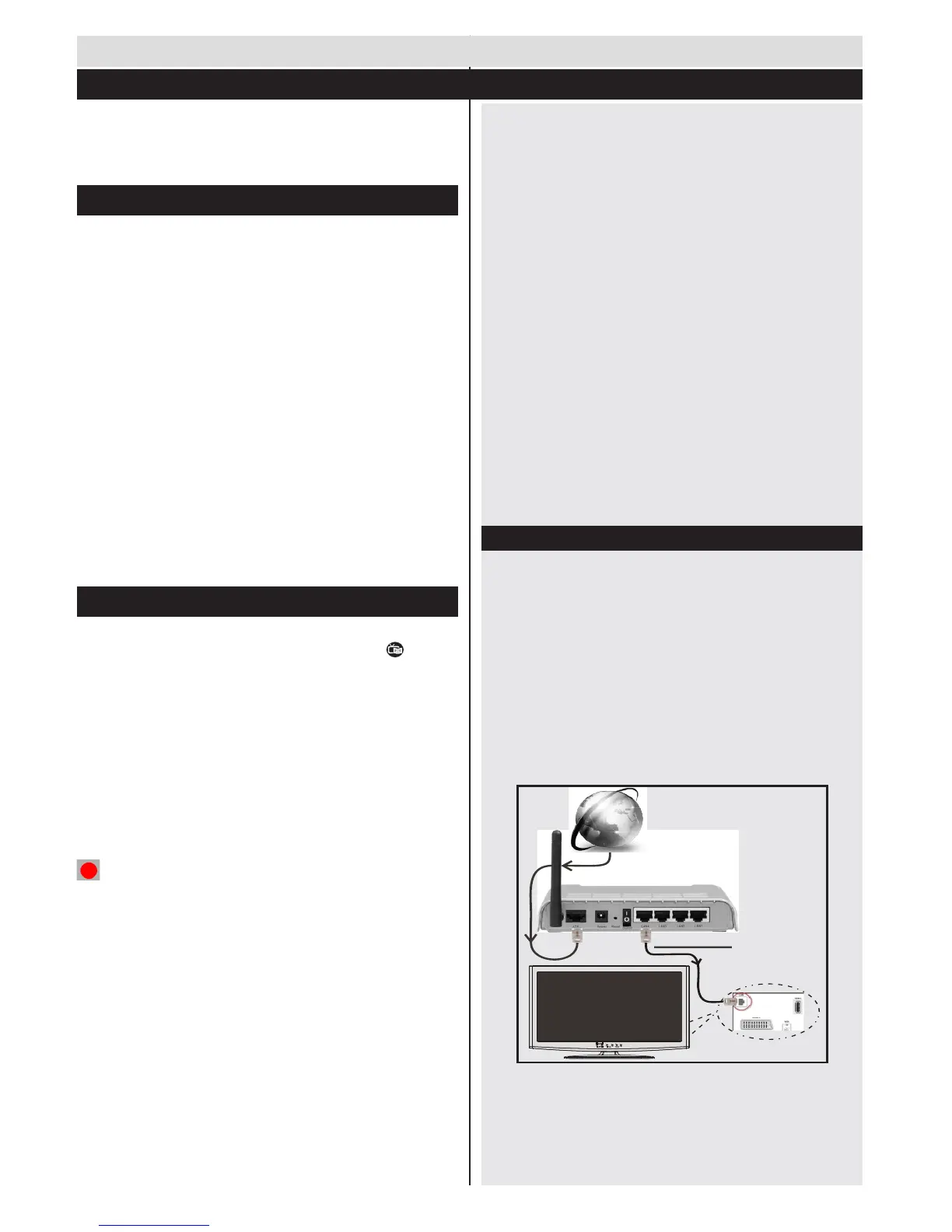
Connecting to a Wired Network
Connect to your broadband ISP connection by
connecting an ethernet cable to the ETHERNET
,1387RI\RXUPRGHP
Ensure that Nero Media Home software is installed
WR\RXU3&IRU'/1$IXQFWLRQ6HH$SSHQGL[$
&RQQHFW\RXU 3& WRWKH RQH RI \RXUPRGHP¶V/$1
FRQQHFWRUVHJ/$1E\XVLQJDSURSHU/$1FDEOH
8VHDQRWKHU/$1RXWSXWRI\RXUPRGHPHJ/$1
2) to enable the connection to your TV.



 To Next Page