English - 3 -
Environmental Information
This television is designed to consume less energy
to help save the environment. To reduce energy
FRQVXPSWLRQ\RXVKRXOGWDNHWKHIROORZLQJVWHSV
,I\RXVHWWKH3RZHU6DYH0RGHDV(FRWKH79ZLOO
switch to energy-saving mode. The Power Save Mode
settings can be found in the ‘Picture’ section of the
Main Menu. Note that some picture settings will be
unavailable to be changed.
,I3LFWXUH2IILVVHOHFWHGWKHIROORZLQJPHVVDJHZLOOEH
displayed on screen: “Screen will be off in 3 seconds.”
6HOHFW 352&((' DQG SUHVV 2. WR FRQWLQXH 7KH
screen will switch off immediately.
:KHQ WKH 79 LV QRW LQ XVH SOHDVH VZLWFK RII RU
disconnect the TV from the mains plug. This will also
reduce energy consumption.
6WDQGE\1RWL¿FDWLRQV
1) If the TV does not receive any input signal (e.g.
IURPDQDHULDORU+'0,VRXUFHIRUPLQXWHVWKH79
ZLOO JR LQWR VWDQGE\ :KHQ \RX QH[W VZLWFKRQ WKH
following message will be displayed: “Standby Cause
1R6LJQDO´3UHVV2.WRFRQWLQXH
2) If the TV has been left on and not been operated
IRUDZKLOHWKH79ZLOOJRLQWRVWDQGE\:KHQ\RXQH[W
VZLWFKRQWKHIROORZLQJPHVVDJHZLOOEHGLVSOD\HG
³6WDQGE\&DXVH1R2SHUDWLRQ´3UHVV2.WRFRQWLQXH
Features
Remote controlled colour TV.
)XOO\LQWHJUDWHGGLJLWDOFDEOH79'9%7&
HDMI inputs.
86%LQSXW
Programme recording.
Programme timeshifting.
OSD menu system.
Scart socket for external devices (such as DVD
3OD\HUV395YLGHRJDPHVHWF
Stereo sound system.
Teletext.
Headphone connection.
Automatic programming system.
Manual tuning.
Automatic power down after up to six hours.
Sleep timer.
Child lock.
Automatic sound mute when no transmission.
NTSC playback.
$9/$XWRPDWLF9ROXPH/LPLWLQJ
3//)UHTXHQF\6HDUFK
PC input.
3OXJ3OD\ IRU :LQGRZV 0( ;3 9LVWD
Windows 7.
Game Mode (Optional).
(WKHUQHW/$1IRU,QWHUQHWFRQQHFWLYLW\DQGVHUYLFH
Q:,),6XSSRUW2SWLRQDO
'/1$
Accessories Included
Remote Control
Batteries: 2 x AAA
Instruction Book
Quick Start Guide
Nero Media Home CD
Side AV Connection Cable
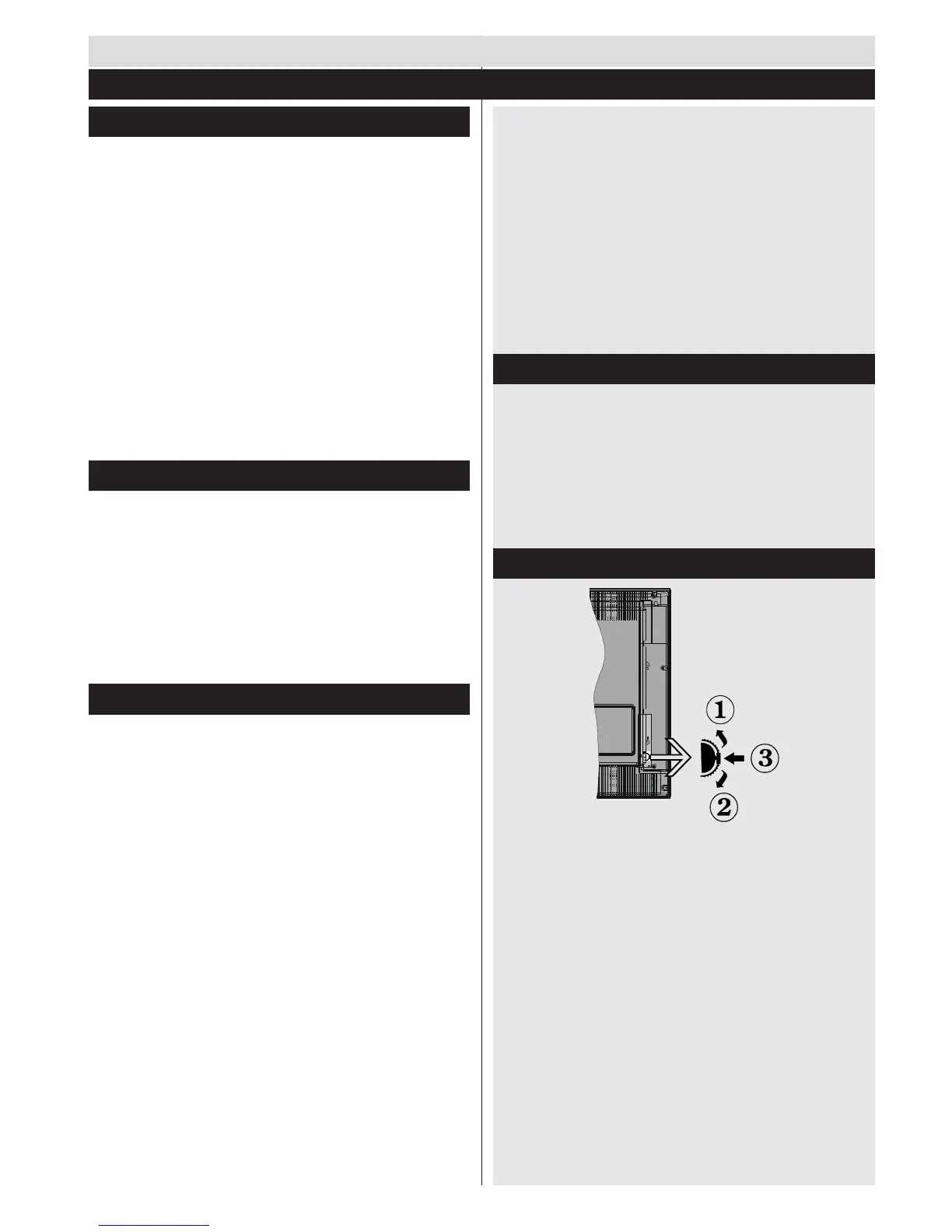
TV Control Switch & Operation
8SGLUHFWLRQ
2. Down direction
3. Programme/Volume / AV / Standby-On selection
switch
The Control button allows you to control the Volume/
Programme/ Source and Standby-On functions of
the TV.
To change volume: Increase the volume by pushing
the button up. Decrease the volume by pushing the
button down.
7RFKDQJHFKDQQHO3UHVVWKHPLGGOHRIWKHEXWWRQ
the channel information banner will appear on screen.
Scroll through the stored channels by pushing the
button up or down
To cha n ge so u rce : P r es s t h e mi d d le of t h e but t o n
WZLFHWKHVRXUFHOLVWZLOO DSSHDU RQ VFUHHQ 6FUROO
Getting Started
1RWL¿FDWLRQV)HDWXUHV$FFHVVRULHV



 To Next Page