English - 20 -
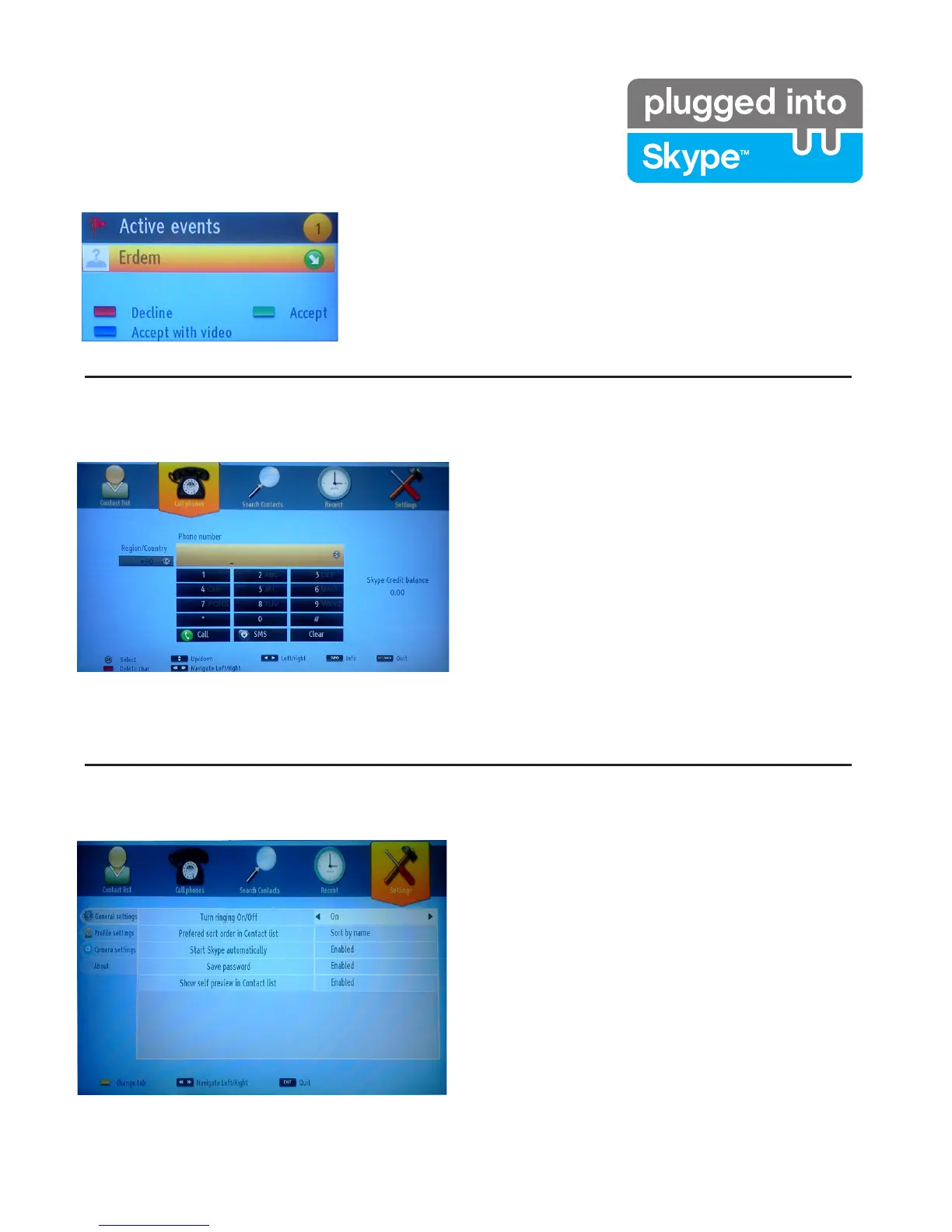
Dialing Phones
The option to call phones is available if you have
6N\SH&UHGLW 3OHDVH EX\FUHGLW¿UVW$IWHUZDUGV
select a country then enter a phone number which
you want to call.
3UHVVWKH<HOORZEXWWRQWRVDYHDQHQWHUHG
telephone number. Press the Green button to start
a conversation.
The incoming call dialog is shown when you are logged into Skype
and when other users initiate a Skype call.
A small dialog box will appear in the lower right corner of the TV
screen whether the user watches TV or is browsing through Skype.
8VHWKHUHPRWHFRQWUROEXWWRQDQGFKRRVH\RXUDFWLRQ
Incoming call
Settings
All your Skype settings can be changed by using
the Settings menu. Please use P+ and P- buttons
on the remote control to move up or down. Select
DQRSWLRQWKHQFKDQJHWKHVHOHFWHGRSWLRQE\XVLQJ
WKHQDYLJDWLRQEXWWRQV,QWKHDERXWVHFWLRQSOHDVH
¿QGWKH6N\SHWHUPVDQGFRQGLWLRQV
Please read this notice carefully.



 To Next Page