English - 13 -
use the Media Browser screen to access and play
VKDUHGQHWZRUN¿OHV
PC/HDD/Media Player or any other devices that are
'/1$ FRPSDWLEOH VKRXOG EH XVHG ZLWK ZLUHG
connection for higher playback quality.
7R FRQ¿JXUH ZLUHG VHWWLQJV SOHDVH UHIHU WR WKH
Network Settings section in the Settings menu.
<RXPLJKWEHDEOHWRFRQQHFW\RXU79WR\RXU/$1
QHWZRUNGHSHQGLQJRQ\RXUQHWZRUN¶VFRQ¿JXUDWLRQ
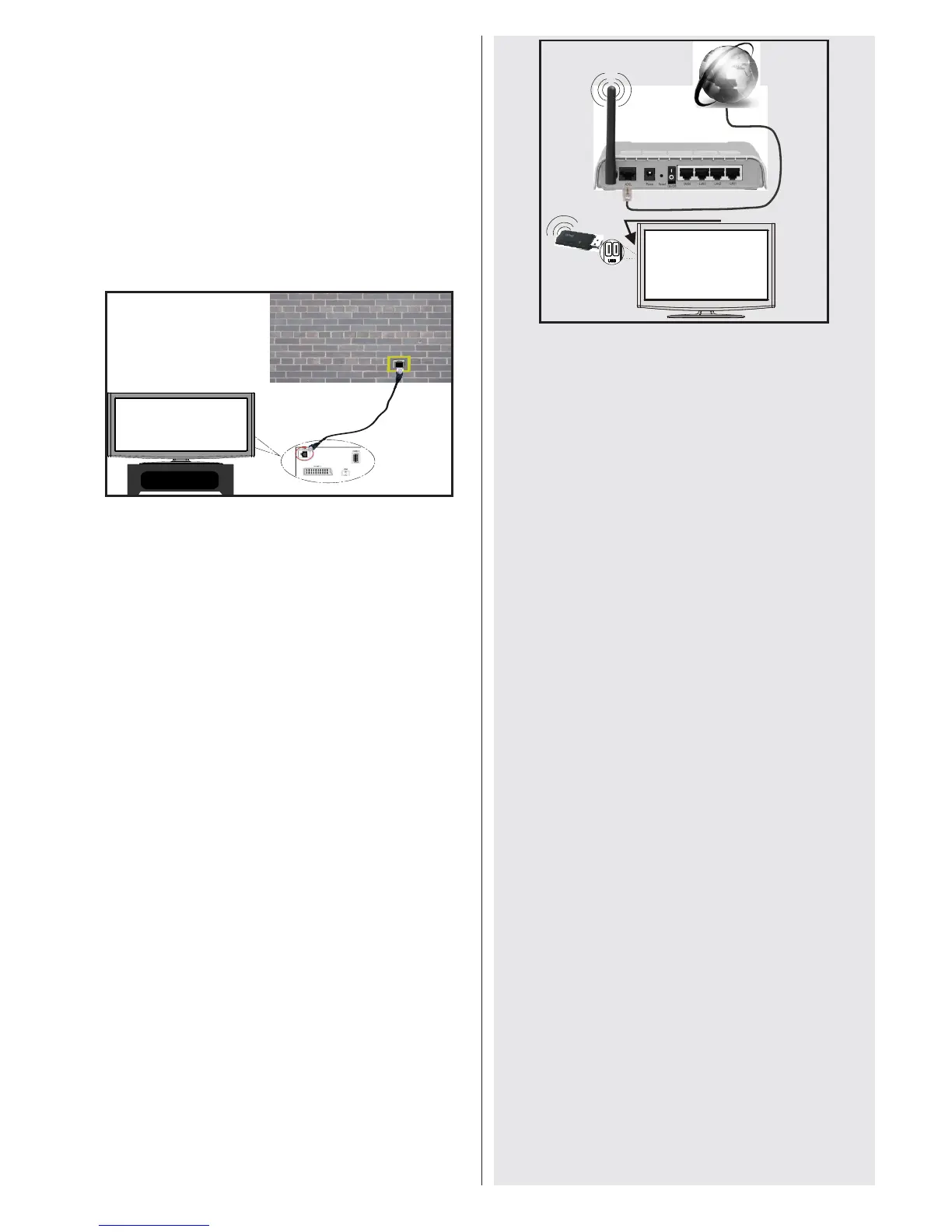
,QVXFKDFDVHXVHDQHWKHUQHWFDEOHWRFRQQHFW
your TV directly to the network wall outlet.
Connecting to a Wireless Network
IMPORTANT$³9HH]\´86%GRQJOHLVUHTXLUHG
to use wireless network features.
7R PDNH \RXU PRGHP¶V 66,' YLVLEOH \RX VKRXOG
change your SSID settings via the modem’s
software. The TV cannot connect to networks with
a hidden SSID.
For connecting to a wireless LAN network, you
should perform the following steps:
1. Connect to your broadband ISP connection by
connecting an ethernet cable to the ETHERNET
,1387RI\RXUPRGHP
2. Ensure that Nero Media Home software is
LQVWDOOHGWR\RXU3&IRU'/1$IXQFWLRQ
3. $IWHUZDUGV\RXVKRXOGFRQQHFWWKHZLUHOHVV
DGDSWRUWRRQHRIWKH86%LQSXWVRIWKH79
4. 7RF R Q¿J X UH Z L UH O H VV V HWW L QJV S OH D V H U H IH U WR W KH
Network Settings section in the Settings menu.
Wireless Lan
Adaptor
USB Inputs (Side of the TV)
Broadband ISP
Connection
A Wireless-N router (IEEE 802.11a/b/g/n) with
VLPXOWDQHRXV DQG *+] EDQGV GHVLJQHG WR
LQFUHDVH EDQGZLGWK 2SWLPL]HG IRU VPRRWKHU DQG
IDVWHU +' YLGHR VWUHDPLQJ ILOH WUDQVIHUV DQG
wireless gaming.
8VH D /$1 FRQQHFWLRQ IRU TXLFNHU ILOH VKDULQJ
between other devices like computers.
The frequency and channel differ depending on the area.
The transmission speed differs depending on the
distance and number of obstructions between the
WUDQVPLVVLRQ SURGXFWV WKH FRQ¿JXUDWLRQ RI WKHVH
SURGXFWVWKHUDGLRZDYHFRQGLWLRQVWKHOLQHWUDI¿F
and the products that you use. The transmission
may also be cut off or get disconnected depending
RQWKHUDGLRZDYHFRQGLWLRQV'(&7SKRQHVRUDQ\
RWKHU:L)LEDSSOLDQFHV7KHVWDQGDUGYDOXHVRI
the transmission speed are the theoretical maximum
values for the wireless standards. They are not the
actual speeds of data transmission.
The location where the transmission is most effective
differs depending on the usage environment.
7KH:LUHOHVV/$1DGDSWRUVKRXOGEHFRQQHFWHGGLUHFWO\
WRWKH79¶V86%SRUW86%KXEVDUHQRWVXSSRUWHG
7KH:LUHOHVV /$1DGDSWRU VXSSRUWV DEJ
n type modems. It is highly recommended that you
should use IEEE 802.11n communication protocol in
order to avoid any possible problems while watching
videos.
8VHWKHRWKHUXVELQSXWLI\RXH[SHULHQFHSUREOHPV
with audio/video performance.
<RX PXVW FKDQJH \RXU PRGHP¶V 66,' ZKHQ WKHUH
are any other modems around with the same SSID.
&RQ¿JXULQJ1HWZRUN6HWWLQJV
Your TV’s Network Settings include Wired and Wireless
Connection options. However, if your TV does not have
a USB Wi-Fi dongle, you should use a Wired Connection.
If you try to connect Wireless Connection when your TV
does not have a USB Wi-Fi dongle, a warning screen
will appear and the TV will not get an IP address. Try
connecting the LAN cable after this and then the TV will
be able to get an IP address.


 To Next Page