ENGLISH 9
+
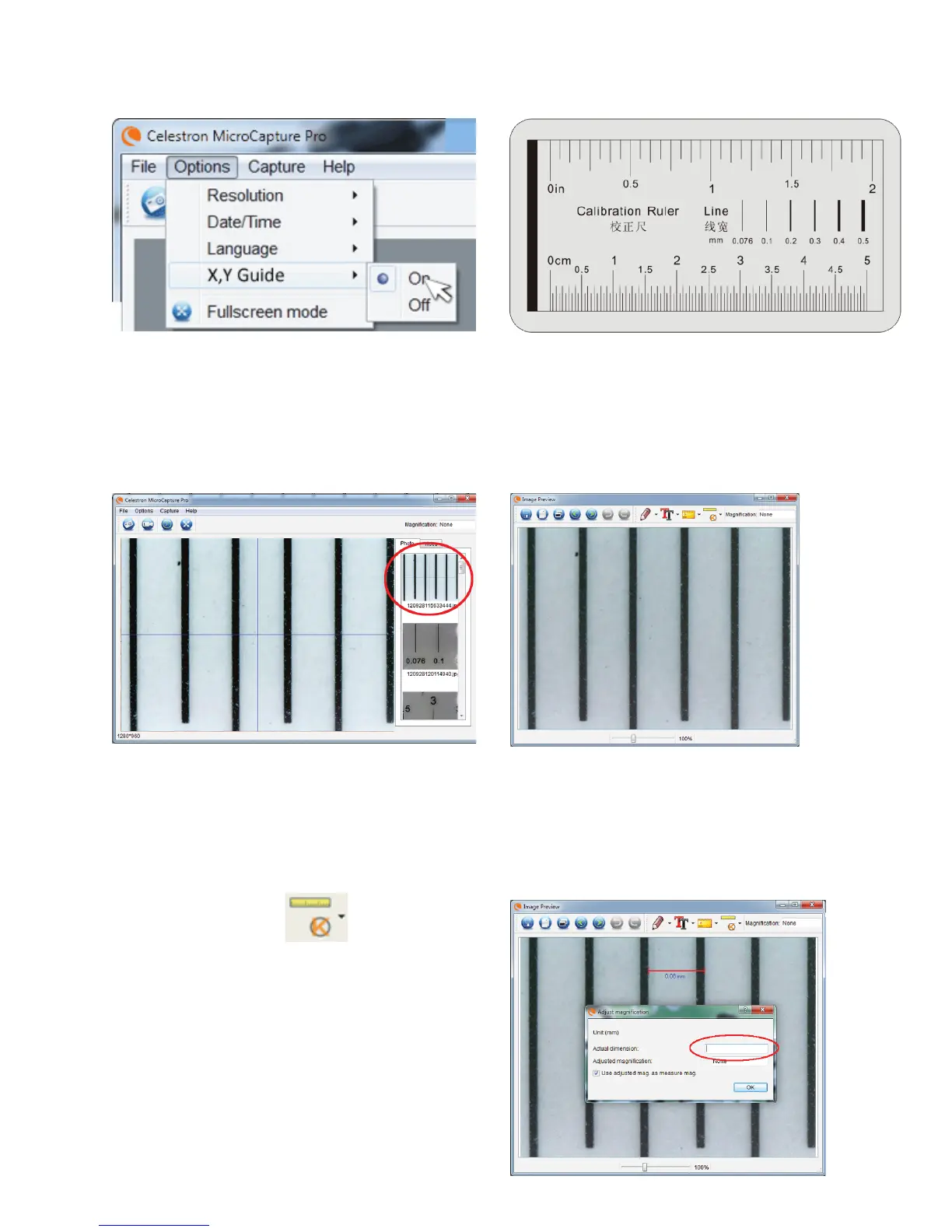
The Celestron Micro CapturePro software includes a
measurement feature. To use this feature, you must first
perform a measurement calibration.
+
Make sure the X,Y Guide is set to “On” by selecting it in
the Options Menu.
+
Double click the saved image to open it in the Image
Preview screen.
+
Take a still image. The image will be displayed in the
column on the right side of the screen.
+
Click on the Calibration icon
+
Click and drag a line across a “known value” on the ruler image.
Try to keep the line as perpendicular to the lines on the ruler as
possible.
+
The “Adjust magnification” window will pop up as shown here.
+
In the box “Actual Dimension”, enter the “known value” from the
calibration ruler
+
Set the height of the microscope and focus on your
specimen. Then, replace your specimen with the
calibration ruler.
+
Re-adjust the focus and align the calibration ruler so that
the lines on the ruler are parallel with the vertical line on
the X,Y Guide.
C. CaliBration and MeasureMent















 To Next Page