7
MOUNTING ON THE WALL OR ON A FURNITURE BACK PANEL
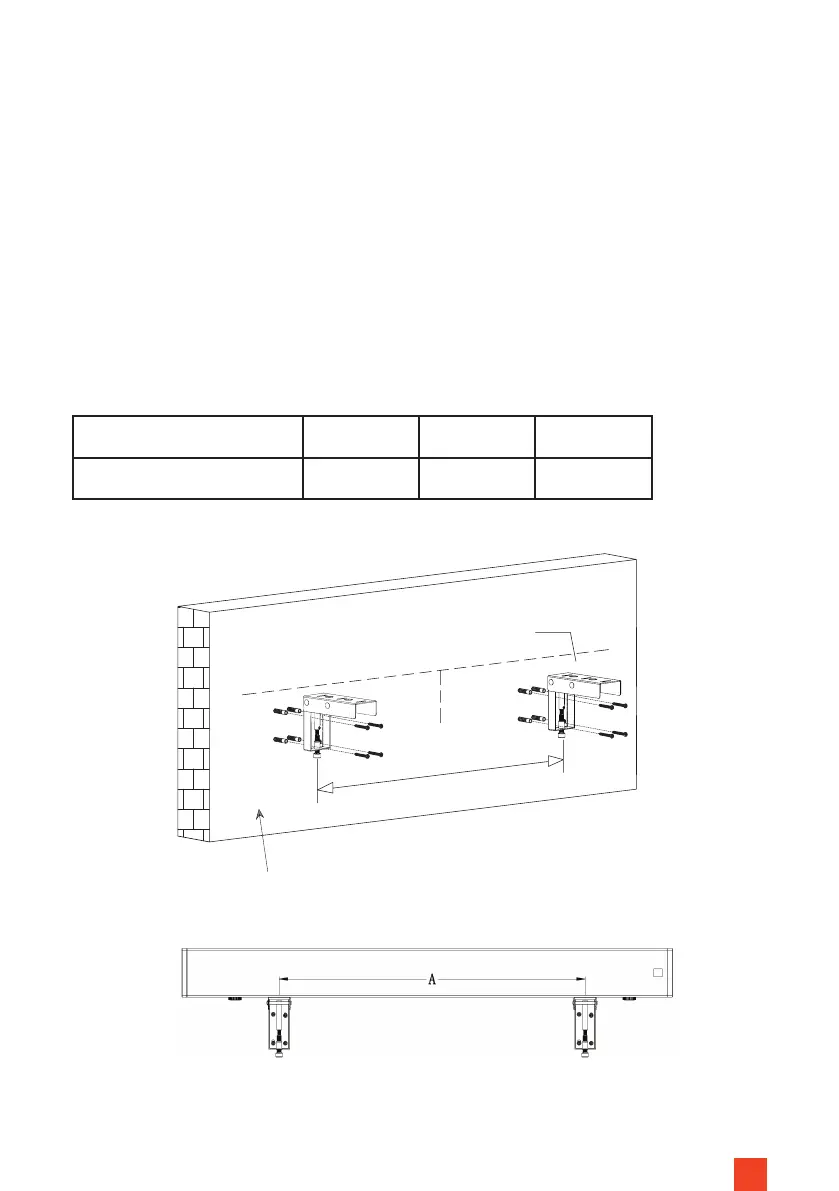
Mark an „installation line“ at the height at which the screen is to be positioned
later.
The „installation line“ corresponds to the lower edge of the screen housing or
the upper edge of the brackets.
Mark the centre of the screen on the installation line (Fig. 1). The distance bet-
ween the two mounting brackets (centre-centre of the brackets!) must be the
distance A (see table). Accordingly, the two brackets are located to the left
and right of the centre mark on the screen. Mark this exactly the same on the
installation line.
Wall or furniture back panel
Contact surface
Installation line
(=bottom edge of housing)
Fig. 1
Centre
Distance A
Size (diagonal) 100” (16:9) 110” (16:9) 120” (16:9)
Distance A (mm) 1.920 2.020 2.240
Fig. 2


 To Next Page