16
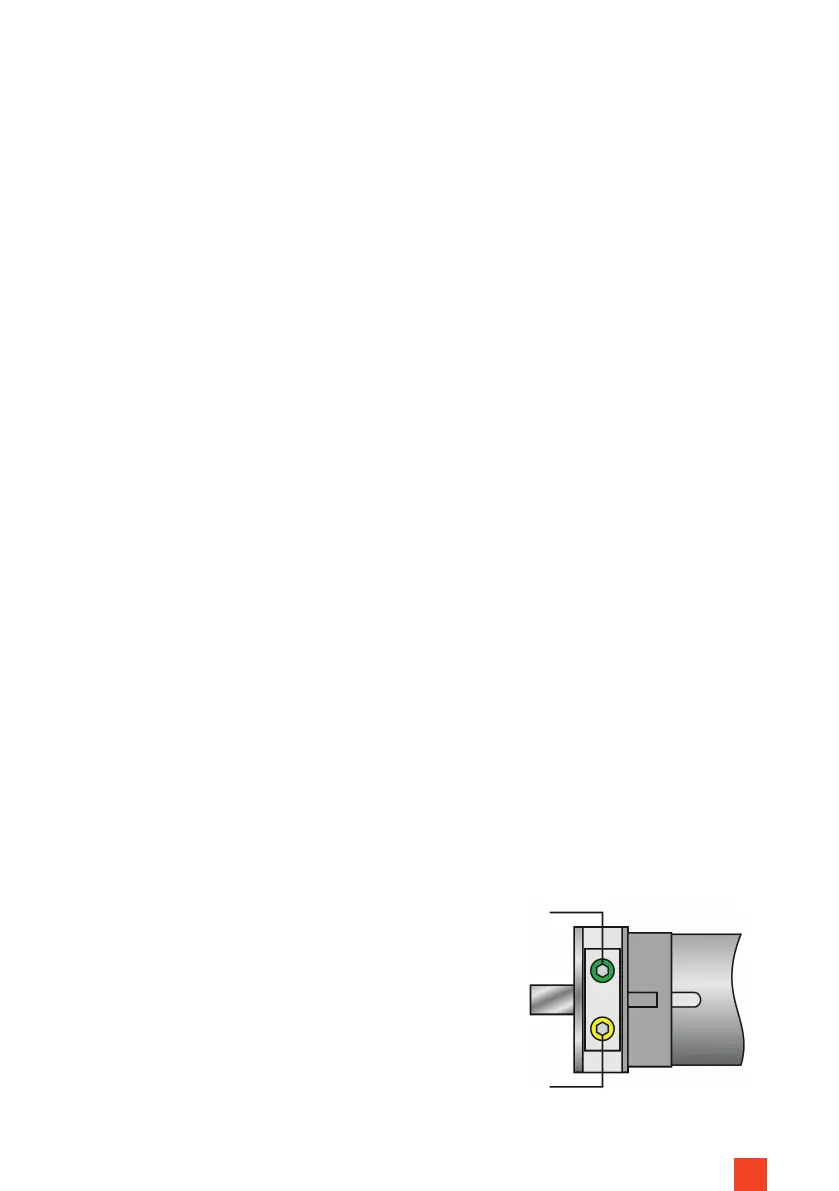
Setting upper end position:
• Allow the screen to rise completely until it stops on its own.
• Use the yellow screw on the motor head to adjust the upper end position.
Check the result after each adjustment of the adjusting screw, by retrac-
ting and extending the screen approx. 1/3.
A. Upper stop position further down: To do this, turn the yellow screw
anti-clockwise.
B. Upper stop position further up: To do this, turn the yellow screw clock-
wise.
Lower end position setting:
• Stop the screen approx. 10 cm out from the housing.
• Use the green screw on the motor head to adjust the lower end position.
Check the result after each change to the adjusting screw by retracting
the screen. Immediately press the manual control button on the screen
housing if the screen retracts too far into the housing, otherwise it may
cause irreparable damage.
A. Lower stop position further down: To do this, turn the green screw
anti-clockwise.
B. Lower stop position further up: To do this, turn the green screw clock-
wise.
• The adjustment is complete and the screen will now stop exactly at the set
position.
• The standard advance is set at approx. 350 mm and must NOT be outside
300 - 400 mm in order not to negatively inuence the atness.
• Contact celexon if you have any questions about this setting, before chan-
ging the factory default setting.
Motor
Fig. 13


 To Next Page