BR'
'
STARTING THE INKREDIBLE IN STAND-ALONE MODE
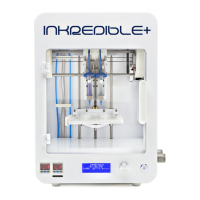
-Turn on the INKREDIBLE +, followed by the Air Compressor.
-Lock the air tube onto the sample cartridge.
-Clip the cartridges onto Printhead 1 (Ph 1) and Printhead (Ph 2)
-Follow the procedure to “Home Axes” and “Calibrate Z” in the INKREDIBLE
-Clip the 24 well plate or petri dish onto the printbed
- Adjust the pressure using the two separate pressure regulators located on the right side of the
INKREDIBLE 3D Bioprinter. Note: the regulator closest to the user is for Printhead 1 and the
one further away is for Printhead 2.
-In the LCD menu, select “Bioprint from SD” and then select the file
-The bioprinting process is now running! The pressure can be adjusted during bioprinting in
order to have a continuous flow, simply turn on the pressure regulators.
-At the end of the bioprinting, the printbed will lower.
-Take out the well plate or petri dish.
-To Crosslink with the UV System, enter the “Utilities Menu” on the control panel by pressing the
Control Knob Wheel [5].
-Select “Utilities” and press the Control Knob [5]
-Scroll until you select “Turn On LED” and press the Control Knob button. To turn off the UV
LED curing, press the “Turn Off LED” button.
You can try bioprinting any of your bioinks or hydrogels. Simply, load it in the cartridges and
configure your bioprinting parameters (Printing pressure and printing speed). Configurations,
pressure adjustments, and any development of printable biomaterial is upon the customer`s
responsibility. CELLINK is not responsible for any clogging or damages caused by any user
dependent biomaterials bioprinted with the INKREDIBLE.
'


 To Next Page