Home
Cello Electronics
LED TV
Traveller
Page 31
Cello Electronics Traveller - Page 31
60 pages
Manual
Save Page as PDF
To Next Page
To Next Page
To Previous Page
To Previous Page
Loading...
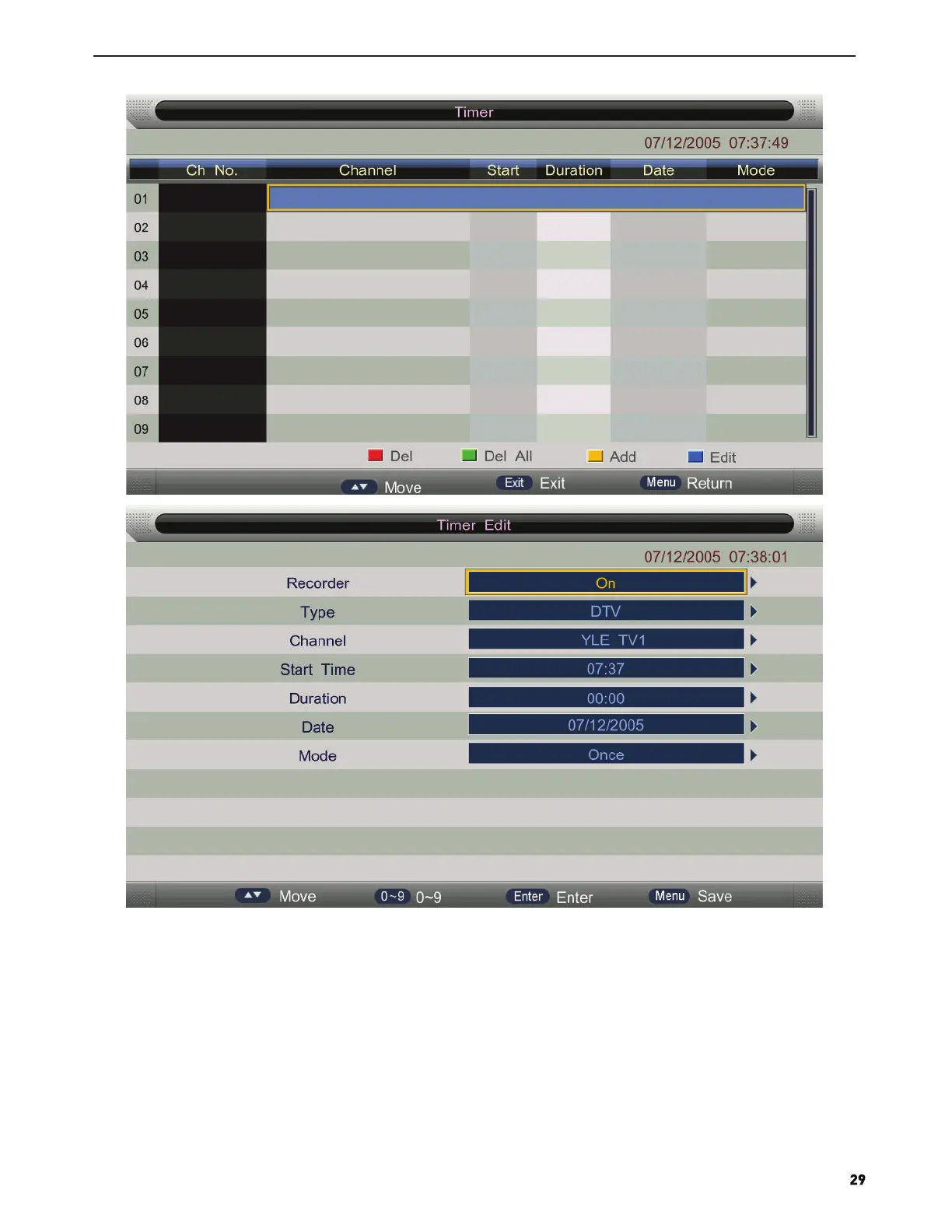
Press number keys and direction keys, user can set the channel, date, start time, mode, type and record length
information on this menu.
When approaching the preset time, the screen will be appear a countdown to remind the user menu.
30
32
Table of Contents
Main Page
Table of Contents
3
Safety Information
5
Headphone Warning
6
Where to Install
6
LED Screen
6
Unit and Accessories
7
Unit and Started
7
Front View
7
Remote Control
9
Remote Control Instructions
9
Remote Control Instructions
10
Installaing Batteries in the Remote Control
11
Using the Remote Control
11
Aerial Connection
11
Connecting the TV Antenna
11
Connecting External Devices
11
HDMI Lead
11
VGA Cable
11
Connections
13
PC Connection
13
VGA,HDMI PC Connection
13
Satellite Connection
13
Connecting Video Camera and Video Recorder
14
Connecting a Digital Audio Receiver
14
Connecting an Audio System
14
Connecting a DVD Player
15
HDMI Connection
15
USB Conntion
15
AV Connection
16
Ypbpr Connection
16
Tv Operation and System Setup
17
Picture Menu
19
SOUND Menu
21
Channel
22
Feature
26
Setup
34
How to User Record
39
How to User Time Shift
43
Hotel Mode
44
Media Operation
46
Photo
47
Music
48
Movie
49
E-Book
49


 To Next Page