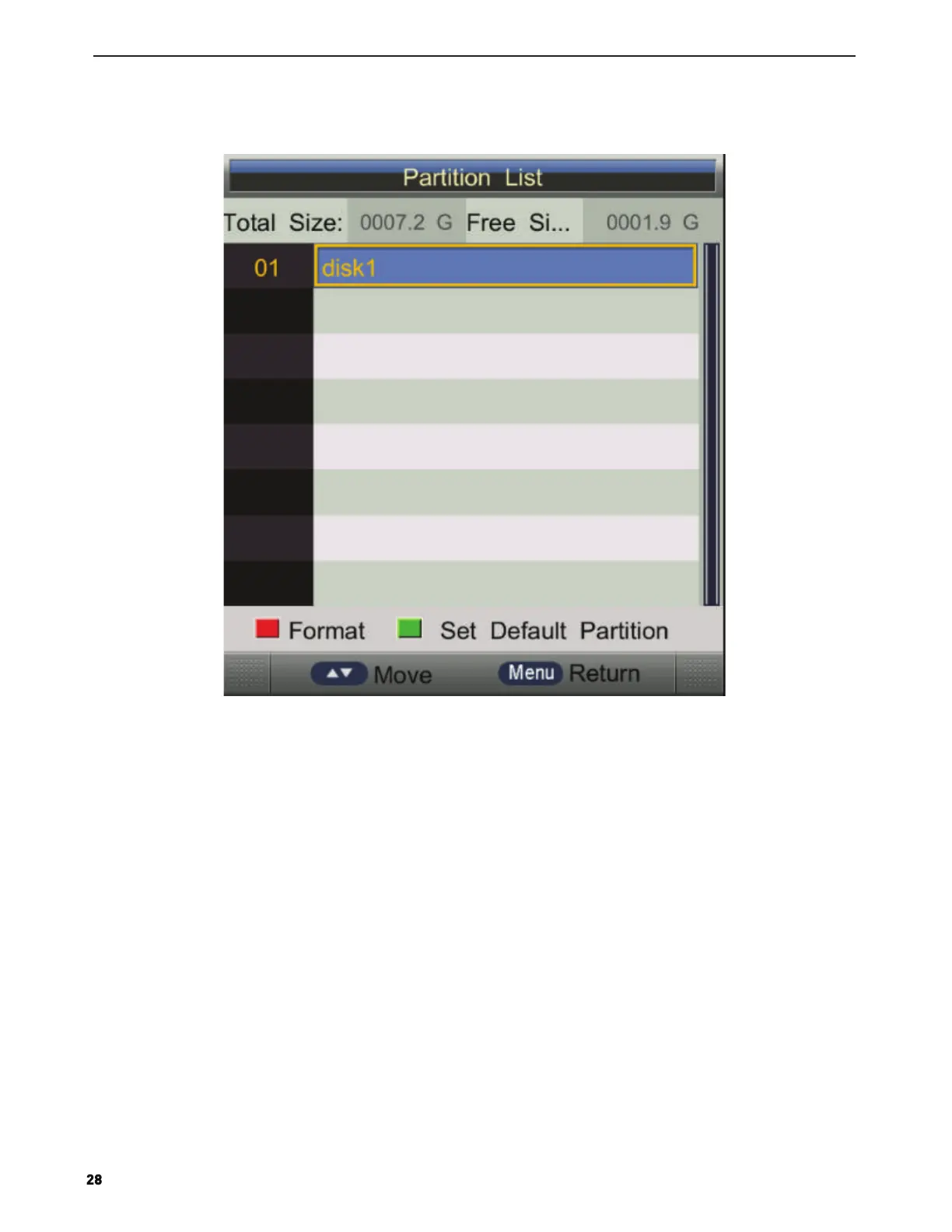
Partition Select
Press ▲/▼ button to select Partition Select, then press ENTER button to open the sub-menu. As follows:
Auto TimeShift
Press ▲/▼ button to select Auto TimeShift,Press Enter or ► button to open the sub-menu hen Press ▲/▼ to
select on/off.
TimeShift Buffer
Press ▲/▼ button to select TimeShift Buffer,Press Enter or ► button to open the
sub-menu hen Press ▲/▼ to select Auto,30 Mins,1hr,2hr.
Timer
Press ▲/▼ button to select Timer,Press Enter or ► button to open the sub-menu.
Note: you can also open Timer menu by key REC.TASK
Press ▲/▼ button to select Timer, and then press ENTER button to display the sub menu,
and then press YELLOW button to set an appointment record. As follower:
Press ▲/▼ button to select different disk on in Partition Select menu.
Press RED button to format the disk you selected.
Press GREEN button to set the disk you selected to default partition.


 To Next Page