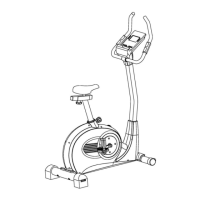
4. Install the Saddle Post
a. Push the saddle (7) with saddle bracket into the saddle slide (31) and tight it up in
desired position.
b. Place the saddle slide (31) into the holder of saddle post (6), set it at the desired
horizontally position and screw it onto the saddle post (6) by flat washer (19) and plum
nut (20).
c. Push the saddle post (6) into the matching locator in the main frame (1), set it at the
desired position and lock it by inserting the knob bolt (28) with the quick release in place
and doing it up tight.
Attention: Ensure before every exercising that the saddle is tightened firmly.
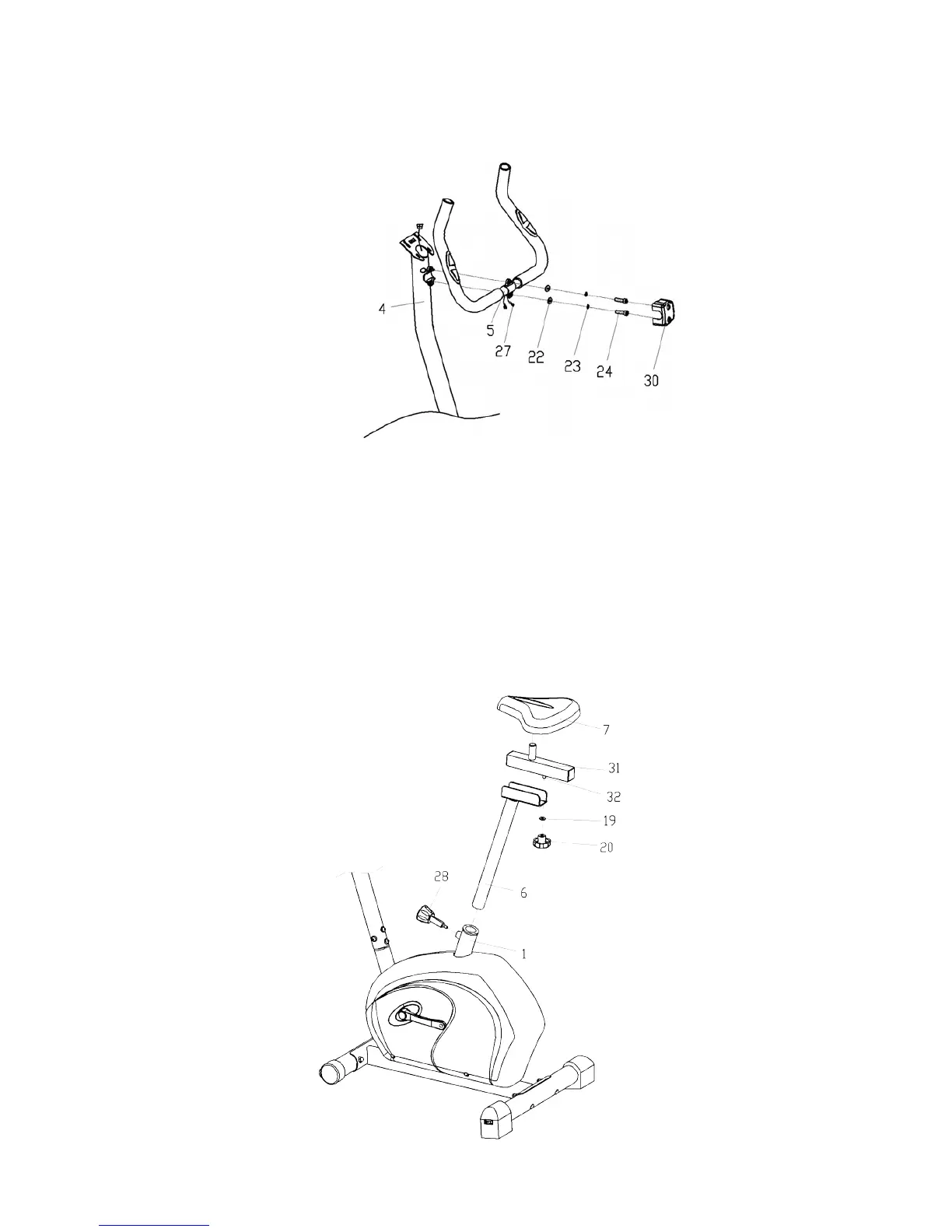
3. Install the Handlebar
Put the pulse sensor wires (27) through the hole of the handlebar post (4) then pull the pulse
sensor wires (27) out from the top of handlebar post (4).Fix the handlebar (5) on the handle-
bar post (4) with the hex bolt (24) the spring washer (23) and flat washer (22), then put the
handlebar chuck cover (30) on it.
6


 To Next Page