- 7 -
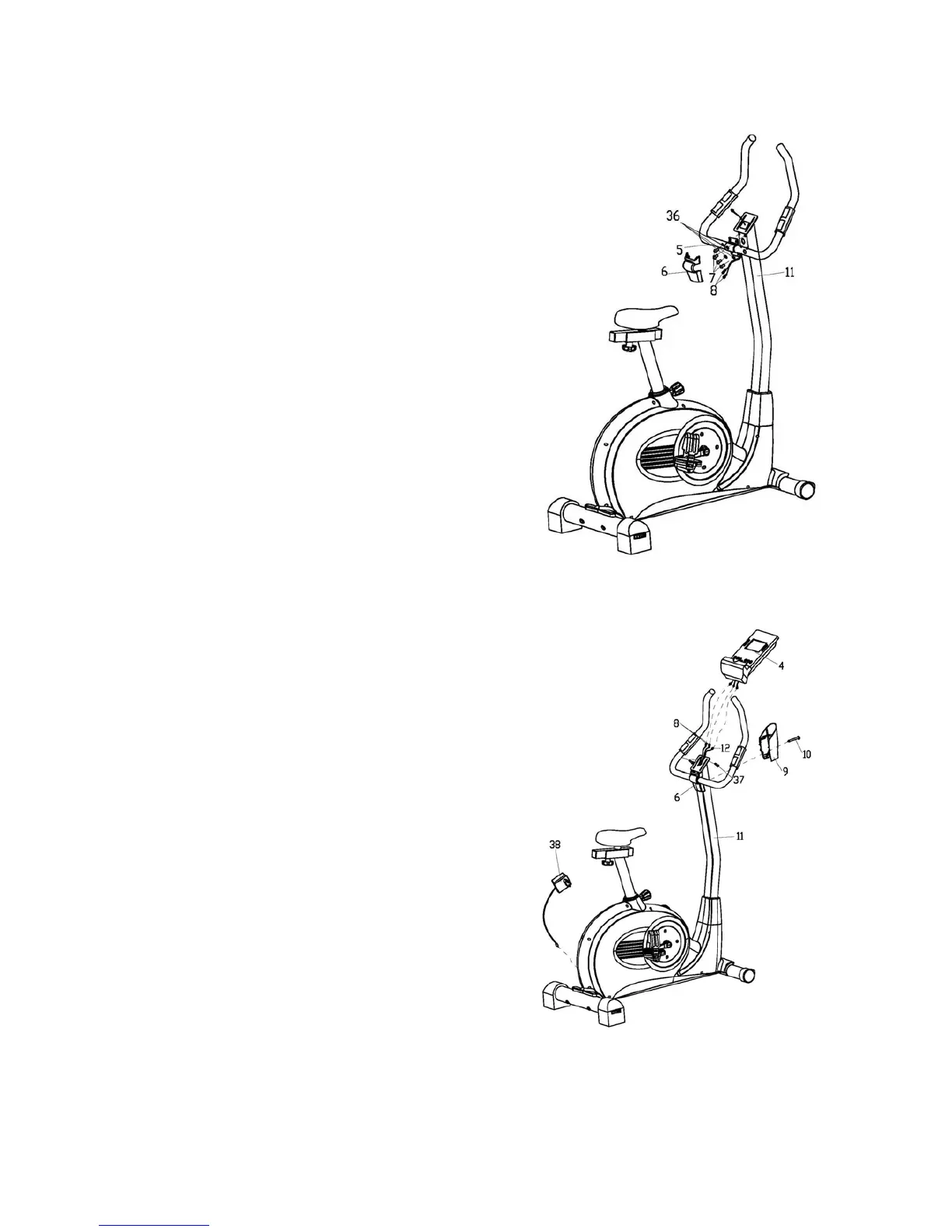
STEP 5
A: Feed the Pulse sensor wires (8) out of the Handlebar
post (11) through the computer bracket on the top.
Attach the Handlebar (5) to the Handlebar post (11),
secured with the Allen bolts (7) and Spring washers (36)
as shown.
B: Attach the front Handlebar cover (6) to the Handlebar.
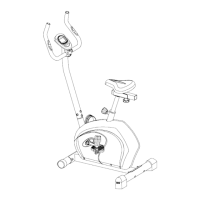
STEP 6
A: Connect all the Wires (8 & 12) to the wires and
socket of the Computer (4), and then install the
Computer
onto the computer bracket on the top of the Handlebar
post (11), secured it with the Cross screws (37) as
shown.
B: Attach the rear Handlebar cover (9) to the Handlebar
post (11), fit the front and rear covers (6 & 9) properly,
and then secure them together with the Cross screw
(10) as shown.
Note: This Bike need power supply via Adaptor (38).


 To Next Page